Geekzone: technology news, blogs, forums
Guest
Welcome Guest.
You haven't logged in yet. If you don't have an account you can register now.


406 posts

Ultimate Geek


Topic # 113784 28-Jan-2013 12:03 Send private message

(Posting on behalf off, not sure if I have all the information)

A friend contacted me last week, needed some assistance with installing Office 2010 they purchased.
Installed and imported email from old system in with no major issues. While I was there, she asked if I had any experience with Domainz. They had purchased a domain name, and hosted exchange email for the domain and were getting the run around.

I gave her the information I could, but based on the information her and her business partner had received from Domainz they needed more in order to setup Outlook to connect to the hosted email.

On Sunday I was called over to her business partners house to assist with multiple error messages on Outlook. Since I had last been in contact it seems they had received more information as they could connect to the exchange emails on iPhones/iPads but not using Outlook - Outlook was unable to connect to the exchange server

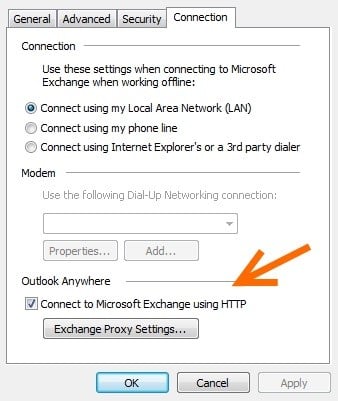
I did some digging and it seems that I may need to have even more information - specifically information to add into to Outlook Anywhere -> Connect to Microsoft Exchange using HTTP

Am I digging in the right area or have I dug too deep and need to back out.
Cheers

Create new topic
2370 posts

Uber Geek

Trusted
Subscriber

  Reply # 751936 28-Jan-2013 12:33 Send private message

Yes you would need to use RPC over HTTP to access Exchange remotely. This is sometimes referred to as Outlook anywhere.


BDFL
43710 posts

Uber Geek

Administrator
Trusted
Geekzone
Subscriber

  Reply # 751958 28-Jan-2013 13:04 Send private message

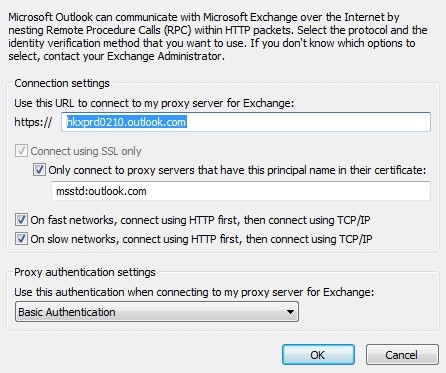
You need their exchange server endpoint address. Usually Outlook configures itself with no problem but if you need to manually configure it then you'd need to set the RPC over HTTP as you've been told.

This is what I have here with an account on Microsoft Office 365. Obviously their server configuration will be different. They have to supply this information.


4247 posts

Uber Geek


  Reply # 751959 28-Jan-2013 13:07 Send private message

Surely they should have been provided with all that information when they signed up? Maybe they could looks at another provider if they have been having problems

624 posts

Ultimate Geek

Trusted

  Reply # 751961 28-Jan-2013 13:10 Send private message

freitasm: 


You can sometimes get away with just entering the server name in the first field. This is probably the same server name that you've used in the iPhone/iPad settings. Try using that and see how you get on.


Stuart Maxwell
Choice Mobile (2degrees Authorised Dealer)
Choice Technology (Managed IT Services)


4735 posts

Uber Geek

Trusted
Subscriber

  Reply # 751968 28-Jan-2013 13:17 Send private message


The information you are looking for you should be in your domainz portal, or available via the 24/7 support (Phonre and email) your friend is entitled to with the product they purchased.

From the email I got:

To contact the team during normal business hours, please call NZ
freephone number 0800 438 432 or 0800 366 2469


406 posts

Ultimate Geek


  Reply # 751969 28-Jan-2013 13:18 Send private message

Excellent, thanks for the replies all.
Haven't been provided with the Outlook Anywhere information by the provider or my friend so it looks as though they need to again contact them to get this sorted out. From what they have told me, it has been a nightmare trying to get support from the support team at the company which is why they have turned to me for help.

Sadly Outlook is not able to configure itself with just the username/password and falls over when trying to configure using manual settings.


4735 posts

Uber Geek

Trusted
Subscriber

  Reply # 751970 28-Jan-2013 13:20 Send private message

nzkiwiman: Excellent, thanks for the replies all.
Haven't been provided with the Outlook Anywhere information by the provider or my friend so it looks as though they need to again contact them to get this sorted out. From what they have told me, it has been a nightmare trying to get support from the support team at the company which is why they have turned to me for help.

Sadly Outlook is not able to configure itself with just the username/password and falls over when trying to configure using manual settings.


We setup a half dozen sites with domainz, now we resell another product which is much better support wise as well called myhostedexchange.co.nz


4247 posts

Uber Geek


  Reply # 751972 28-Jan-2013 13:21 Send private message

nzkiwiman: Excellent, thanks for the replies all.
Haven't been provided with the Outlook Anywhere information by the provider or my friend so it looks as though they need to again contact them to get this sorted out. From what they have told me, it has been a nightmare trying to get support from the support team at the company which is why they have turned to me for help.

Sadly Outlook is not able to configure itself with just the username/password and falls over when trying to configure using manual settings.


Suggest moving to  a provider that has support they are happy with the quality of. 

BDFL
43710 posts

Uber Geek

Administrator
Trusted
Geekzone
Subscriber

  Reply # 751974 28-Jan-2013 13:22 Send private message

amanzi: You can sometimes get away with just entering the server name in the first field. This is probably the same server name that you've used in the iPhone/iPad settings. Try using that and see how you get on.


Correct. If you have ALL the servers names, better.


1789 posts

Uber Geek


  Reply # 752002 28-Jan-2013 14:15 Send private message

If DNS was correctly setup for the email domain then all you would need to put into Outlook would be the name, email address and password and it would pick up all the setting automatically using autodiscover.


406 posts

Ultimate Geek


  Reply # 752035 28-Jan-2013 14:58 Send private message

I suggested when they told me of the issue that they perhaps should have gone with Office365 (recommend to me by this forum) and it would have saved them $120 a year AND given 25x more space for emails. However they have told me they are locked in.

Pretty sure I shall be making a house call tonight to access the account management section of the Domainz website to grab the Outlook Anywhere settings and then configuring Outlook from there.


406 posts

Ultimate Geek


  Reply # 752471 29-Jan-2013 10:53 Send private message

Was able to access 'Mission Control' and watch a video on how to get the RPC information.
This lead to even more questions and having to hunt around a very poor FAQ section which had to be searched specifically for RPC to get very out of date information (XP and Office 2003).

I would hate to be a standard home user and having to confront this FAQ to get the information - it confused me and I have been in the IT industry for 6 years.

Think I have sorted it out, now I just need to access Outlook and plug in the information

BDFL
43710 posts

Uber Geek

Administrator
Trusted
Geekzone
Subscriber

  Reply # 752473 29-Jan-2013 10:55 Send private message

Friends make sure friends stay away from Domainz.


Create new topic


Twitter »
Follow us to receive Twitter updates when new discussions are posted in our forums:


Follow us to receive Twitter updates when news items and blogs are posted in our frontpage:


Follow us to receive Twitter updates when new jobs are posted to our jobs board:


Follow us to receive Twitter updates when tech item prices are listed in our price comparison site:


News »

Trending now »
Hot discussions in our forums right now:

How do you fall out of a moving car ???
Created by Mark, last reply by surfisup1000 on 21-May-2013 22:40 (19 replies)
Pages... 2


A new project coming to Geekzone
Created by freitasm, last reply by xpd on 21-May-2013 21:19 (239 replies)
Pages... 14 15 16


Changeover issue: dial up
Created by Zigg, last reply by robjg63 on 21-May-2013 22:02 (17 replies)
Pages... 2


HTC One (2013) owners' discussion
Created by Dingbatt, last reply by Technofreak on 21-May-2013 22:11 (1508 replies)
Pages... 99 100 101


$200 Smart Phone!? Ideas..
Created by antaeusa, last reply by antaeusa on 21-May-2013 21:55 (32 replies)
Pages... 2 3


Orcon, Is this for real or a scam??
Created by old3eyes, last reply by mattwnz on 21-May-2013 13:20 (15 replies)

Vodafone Naked Broadband Speeds (Auckland CBD)
Created by wscalioni, last reply by grkiwi on 20-May-2013 21:13 (14 replies)

Ubiquiti Rocket M2 bridged - Does distance/performance drop markedly if units are mounted inside?
Created by clinty, last reply by clinty on 21-May-2013 23:02 (13 replies)


Geekzone Jobs »
Most recent NZ jobs in technology:

Application Support Analyst
Posted 21-May-2013 22:27

SAP Performance Test Lead
Posted 21-May-2013 22:27

Senior MI Analyst
Posted 21-May-2013 19:27

Software Engineer
Posted 21-May-2013 18:27

Senior C#.Net Developer ? 6 Months Fixed Term
Posted 21-May-2013 18:27

Senior Java Developer
Posted 21-May-2013 18:27

Intermediate Technical Analyst
Posted 21-May-2013 18:27


Geekzone Live »
Try automatic live updates from Geekzone directly in your browser, without refreshing the page, with Geekzone Live now.

Are you subscribed to our RSS feed? You can download the latest headlines and summaries from our stories directly to your computer or smartphone by using a feed reader.

Alternatively, you can receive a daily email with Geekzone updates.