Geekzone: technology news, blogs, forums
Guest
Welcome Guest.
You haven't logged in yet. If you don't have an account you can register now.


527 posts

Ultimate Geek

Subscriber

Topic # 83151 11-May-2011 16:43 Send private message

Anyone else have issues with the Xtra SPAM filter? They seem to blacklist our domain as standard. We run our own Exchange server with a static IP. It's really frustrating trying to tell/teach someone how to log into their Xtra account online to check that SPAM folder, not the one they have in Outlook etc. Total WOFTAM. They need to relax the aggressiveness of detection I feel.


Create new topic
52 posts

Master Geek


  Reply # 468023 11-May-2011 18:59 Send private message

Have u set up the RDNS record for that static ip? If not, most email servers may regard the mails from that server ip as spam.

6894 posts

Uber Geek

Trusted
Subscriber

  Reply # 468221 12-May-2011 11:22 Send private message

Setting up a mail server best practices to be recognized as legitimate
http://serverfault.com/questions/72559/setting-up-a-mail-server-best-practices-to-be-recognized-as-l...


527 posts

Ultimate Geek

Subscriber

  Reply # 468225 12-May-2011 11:27 Send private message

My server is set up correctly but thanks for the info.

6894 posts

Uber Geek

Trusted
Subscriber

  Reply # 468228 12-May-2011 11:38 Send private message

Do you mind saying what your domain name is or the mail server domain is?

Anyway, if you're sure everything is right at your end.. you can an email to security@xtra.co.nz or abuse@xtra.co.nz

Try include details like any smtp logs from the server specific to the problem.  Emailing those addresses does seem to end up as a job logged for Telecom Complex Faults to look at (eventually).

I got a response within 48 hrs last time I reported a problem.

In our case it was some infected xtra ADSL user attempting to send thousands of messages to our mail server, they sorted it out and notified the user that they had a problem.


527 posts

Ultimate Geek

Subscriber

  Reply # 468230 12-May-2011 11:40 Send private message

I found this article does it still stand?

http://www.geekzone.co.nz/forums.asp?forumid=39&topicid=26341

hyspecs.co.nz

6894 posts

Uber Geek

Trusted
Subscriber

  Reply # 468231 12-May-2011 11:42 Send private message

Yes it does but if you have reverse DNS / PTR, SPF, DKIM etc setup properly you shouldn't be having a problem.

Edit:

Ok two problems...

#1

mail.hyspecs.co.nz (203.97.146.22) doesn't have a PTR record.

Appears you do not have a reverse dns setup for your mail server domain name / ip address.  Contact you account manager at your provider to get this setup (looks like Telstraclear).

#2

The MX records show that you receive mail via a trendmico gateway (anti spam service I presume) which probably forwards to your server, your exchange server mail.hyspecs.co.nz is the backup (pref 15).

It's likely that when you send mail, it's direct from exchange so from mail.hyspecs.co.nz (203.97.146.22).

Now mail.hyspecs.co.nz does not respond to smtp or telnet on port 25 so it;s effectively useless as a backup MX record for receiving mail.

Also external receiving mail servers eg: xtra/yahoo that check your server's smtp header as an anti spam technique will just get a timeout from your server.

Basically a few config issues to sort out.


527 posts

Ultimate Geek

Subscriber

  Reply # 471033 19-May-2011 12:09 Send private message

Thanks for the info. I have changed the MX record since you ran that diag test to remote.hyspecs.co.nz. This should work for point 2?


527 posts

Ultimate Geek

Subscriber

  Reply # 471043 19-May-2011 12:18 Send private message

Sorry of course just remembered on your point 2. As we only receive email from the Trend servers I have only made the remote.hyspecs.co.nz server respond to those IP addresses. So you are right the MX record for remote.hyspecs.co.nz wont work, unless I change the firewall rule. I guess I just left during the change over phase to using Trend. It doens't hurt to have it there as an MX record now does it?


Edit: So what you're saying is that by blocking all other connections to our mail server on 25 apart from the Trend ones, may have an effect on our email being sent to Xtra/Yahoo because it wont be responding on port 25 anymore?  

6894 posts

Uber Geek

Trusted
Subscriber

  Reply # 471114 19-May-2011 14:17 Send private message

Hmm first question regarding how your outgoing email being sent, is it direct from exchange or is it configured to sent through Trend Micro?

The MX records specify the receiving servers for a domain, specifying a server that doesn't actually receive is pointless.

Most anti spam systems use a number of factors to classify whether a message is spam or not, the trick is to hit as many of the best practices as possible to give your sent messages enough trust so that they pass Xtra's anti spam system.


527 posts

Ultimate Geek

Subscriber

  Reply # 471115 19-May-2011 14:19 Send private message

Yes I send all outgoing mail direct from the exchange server, not via Trend.

I've made your suggested changes and Telstra are doing the reverse DNS setup for me.

6894 posts

Uber Geek

Trusted
Subscriber

  Reply # 471131 19-May-2011 14:52 Send private message

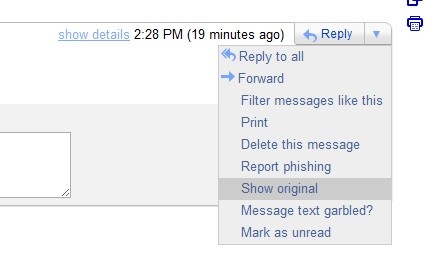
One thing I suggest you do is create a test gmail account, then send an email from your email/domain to the test gmail account.

In gmail when viewing an email next to the top reply to button is a arrow, click that and go to show original.


This will show you a lots of interesting email headers, namely: 

Received: from
Received-SPF:
Authentication-Results:

1309 posts

Uber Geek

Trusted

  Reply # 471137 19-May-2011 14:56 Send private message

A SPF Record in your domain also really helps.  I haven't had a dropped e-mail since I added in a SPF record for my mail server.b


Check out my Mobile Cell Site Google Maps KML Files in my blog.
Now using Google Fusion Tables or Address Lookup or GPS using Smartphone
I update it on a monthly basis automatically from RSM.


527 posts

Ultimate Geek

Subscriber

  Reply # 471441 20-May-2011 09:24 Send private message

Thanks for your help guys have now got SPF records and PTR record is almost sorted.

Create new topic


Twitter »
Follow us to receive Twitter updates when new discussions are posted in our forums:


Follow us to receive Twitter updates when news items and blogs are posted in our frontpage:


Follow us to receive Twitter updates when new jobs are posted to our jobs board:


Follow us to receive Twitter updates when tech item prices are listed in our price comparison site:


News »

Trending now »
Hot discussions in our forums right now:

Fecked up religious people strike again :-(
Created by Mark, last reply by TheUngeek on 23-May-2013 14:28 (38 replies)
Pages... 2 3


Cannabis is illegal yet we have really strong 'legal highs' ?
Created by qwerty7, last reply by Klipspringer on 23-May-2013 14:56 (70 replies)
Pages... 3 4 5


Xbox One
Created by DjShadow, last reply by networkn on 23-May-2013 14:45 (38 replies)
Pages... 2 3


A new project coming to Geekzone
Created by freitasm, last reply by ZollyMonsta on 23-May-2013 15:09 (268 replies)
Pages... 16 17 18


Truenet Article - VoIP in New Zealand ----- Based on what Mr Butt ???
Created by maverick, last reply by maverick on 23-May-2013 14:28 (17 replies)
Pages... 2


HTC One (2013) owners' discussion
Created by Dingbatt, last reply by Deanzo on 23-May-2013 15:13 (1541 replies)
Pages... 101 102 103


"igov" online passport renewals
Created by Linuxluver, last reply by profrink on 22-May-2013 22:22 (29 replies)
Pages... 2


Orcon, Is this for real or a scam??
Created by old3eyes, last reply by DarthKermit on 22-May-2013 19:12 (29 replies)
Pages... 2


Geekzone Jobs »
Most recent NZ jobs in technology:

Senior Java Developer
Posted 23-May-2013 14:28

Project Coordinator
Posted 23-May-2013 14:28

Intermediate .Net Developer
Posted 23-May-2013 14:28

Data Analyst
Posted 23-May-2013 14:28

Front-end Developer
Posted 23-May-2013 14:28

Business Analyst | ERP | Intermediate
Posted 23-May-2013 14:28

UX/Interaction Designer
Posted 23-May-2013 13:28


Geekzone Live »
Try automatic live updates from Geekzone directly in your browser, without refreshing the page, with Geekzone Live now.

Are you subscribed to our RSS feed? You can download the latest headlines and summaries from our stories directly to your computer or smartphone by using a feed reader.

Alternatively, you can receive a daily email with Geekzone updates.