Geekzone: technology news, blogs, forums
Guest
Welcome Guest.
You haven't logged in yet. If you don't have an account you can register now.


274 posts

Ultimate Geek


Topic # 60080 18-Apr-2010 19:33 Send private message

There is a file on my desktop called 'videoplayback.mp4.'  I think its from using a youtube downloader.

I cannot delete it, its 0kb, and everytime i try and trash it, it keeps having this error: 

Error

I have tried replacing the file by using notepad and just coping the exact file name and extention, but it seems to re-apppear after a refresh?


View this topic in a long page with up to 500 replies per page Create new topic
 1 | 2 | 3Next
3809 posts

Uber Geek

Moderator
Trusted
Subscriber

  Reply # 320002 18-Apr-2010 19:47 Send private message

Have you tried doing it in safe mode?


274 posts

Ultimate Geek


  Reply # 320019 18-Apr-2010 20:15 Send private message

Hi, I just tried that now, but still the same error.


BDFL
43798 posts

Uber Geek

Administrator
Trusted
Geekzone
Subscriber

  Reply # 320026 18-Apr-2010 20:24 Send private message

Open File Explorer. Go to User and Settings | Username | Desktop and see if the file is there...


274 posts

Ultimate Geek


  Reply # 320028 18-Apr-2010 20:28 Send private message

yep its still there.


1393 posts

Uber Geek

Trusted
Subscriber

  Reply # 321459 21-Apr-2010 21:01 Send private message

Ty opening a DOS window with Administrator privileges and navigate to the relevant folder.  If you can see the file using a dir command, type: attrib -s -h -r {filename} then press enter.

Follow this up with: del {filename}.

Go back to Windows Explorer and see if the file is still there.  If it is, hit F5 to do a screen refresh.  Hopefully this will take care of the problem.

My understanding is this problem can occur if an application (or applications) is taking up all (or a significant quantity of) RAM when the original file delete command is initiated.


Chuck Norris has abolished the periodic table of elements. The only element he recognises is the element of surprise!


274 posts

Ultimate Geek


  Reply # 321490 21-Apr-2010 22:40 Send private message

Dratsab: Ty opening a DOS window with Administrator privileges and navigate to the relevant folder.  If you can see the file using a dir command, type: attrib -s -h -r {filename} then press enter.

Follow this up with: del {filename}.

Go back to Windows Explorer and see if the file is still there.  If it is, hit F5 to do a screen refresh.  Hopefully this will take care of the problem.

My understanding is this problem can occur if an application (or applications) is taking up all (or a significant quantity of) RAM when the original file delete command is initiated.


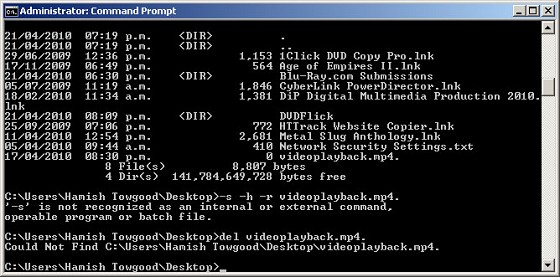
Hi, thanks, I have just tried that now with this result;


Still didn't work :( 


FPR

76 posts

Master Geek


  Reply # 321501 21-Apr-2010 23:50 Send private message

Hi, try this program called Unlocker http://ccollomb.free.fr/unlocker/
worked for me when I had a similar problem trying to delete files.

IT Professional
1218 posts

Uber Geek

Subscriber

  Reply # 321504 22-Apr-2010 00:07 Send private message

hamisht:
Dratsab: Ty opening a DOS window with Administrator privileges and navigate to the relevant folder.  If you can see the file using a dir command, type: attrib -s -h -r {filename} then press enter.

Follow this up with: del {filename}.

Go back to Windows Explorer and see if the file is still there.  If it is, hit F5 to do a screen refresh.  Hopefully this will take care of the problem.

My understanding is this problem can occur if an application (or applications) is taking up all (or a significant quantity of) RAM when the original file delete command is initiated.


Hi, thanks, I have just tried that now with this result;


Still didn't work :( 


As per Dratsab message, the command is:

attrib -s -h -r {filename


You missed the critical command - the attrib. Try that and see how you get on.


274 posts

Ultimate Geek


  Reply # 321536 22-Apr-2010 07:40 Send private message

Still just says 'file not found'


keewee01:
hamisht:
Dratsab: Ty opening a DOS window with Administrator privileges and navigate to the relevant folder.  If you can see the file using a dir command, type: attrib -s -h -r {filename} then press enter.

Follow this up with: del {filename}.

Go back to Windows Explorer and see if the file is still there.  If it is, hit F5 to do a screen refresh.  Hopefully this will take care of the problem.

My understanding is this problem can occur if an application (or applications) is taking up all (or a significant quantity of) RAM when the original file delete command is initiated.


Hi, thanks, I have just tried that now with this result;


Still didn't work :( 


As per Dratsab message, the command is:

attrib -s -h -r {filename


You missed the critical command - the attrib. Try that and see how you get on.


274 posts

Ultimate Geek


  Reply # 321538 22-Apr-2010 07:42 Send private message

FPR: Hi, try this program called Unlocker http://ccollomb.free.fr/unlocker/
worked for me when I had a similar problem trying to delete files.


No luck with this one either :( 


IT Professional
1218 posts

Uber Geek

Subscriber

  Reply # 321551 22-Apr-2010 08:11 Send private message

Is there any other weird stuff happening with the computer? You've not opened any suspicious emails lately that could have infected you?


274 posts

Ultimate Geek


  Reply # 321554 22-Apr-2010 08:21 Send private message

Nah nothing at all. I think it started when i used www.okyoutube.com to try and save a youtube video. I've used okyoutube in the past with success, but since youtube updated their site, okyoutube doesn't seem to work. so when i cancelled a saving, i was left with that file. No virus, no spyware.


IT Professional
1218 posts

Uber Geek

Subscriber

  Reply # 321572 22-Apr-2010 09:33 Send private message

Are you able to rename the file from the desktop? (as opposed to in a DOS session)


274 posts

Ultimate Geek


  Reply # 321626 22-Apr-2010 11:59 Send private message

No i cant rename either, still says "file is no longer located at ..."


139 posts

Master Geek


  Reply # 321627 22-Apr-2010 12:04 Send private message

Try Delete Doctor - Has worked for me many a time.

http://rapidshare.com/files/378623217/deletedr.exe.html

 1 | 2 | 3Next
View this topic in a long page with up to 500 replies per page Create new topic
Twitter »
Follow us to receive Twitter updates when new discussions are posted in our forums:


Follow us to receive Twitter updates when news items and blogs are posted in our frontpage:


Follow us to receive Twitter updates when new jobs are posted to our jobs board:


Follow us to receive Twitter updates when tech item prices are listed in our price comparison site:


News »

Trending now »
Hot discussions in our forums right now:

Fecked up religious people strike again :-(
Created by Mark, last reply by freitasm on 25-May-2013 08:44 (85 replies)
Pages... 4 5 6


Cannabis is illegal yet we have really strong 'legal highs' ?
Created by qwerty7, last reply by freitasm on 23-May-2013 23:20 (74 replies)
Pages... 3 4 5


A new project coming to Geekzone
Created by freitasm, last reply by l43a2 on 24-May-2013 23:02 (342 replies)
Pages... 21 22 23


HTC One (2013) owners' discussion
Created by Dingbatt, last reply by mrgsm021 on 25-May-2013 14:30 (1567 replies)
Pages... 103 104 105


Xbox One
Created by DjShadow, last reply by Hobchild on 26-May-2013 04:26 (76 replies)
Pages... 4 5 6


Monolithic Cement Sheet cladding mid 80s house - "leaky home" or not?
Created by joker97, last reply by mattwnz on 24-May-2013 23:46 (15 replies)

Orcon, Is this for real or a scam??
Created by old3eyes, last reply by DarthKermit on 22-May-2013 19:12 (29 replies)
Pages... 2


Entire house HTPC concept
Created by InfiniteLoop, last reply by darthmeow on 24-May-2013 12:19 (26 replies)
Pages... 2


Geekzone Jobs »
Most recent NZ jobs in technology:

Developer of interactive experiences
Posted 25-May-2013 21:28

Ambitious Project Coordinator
Posted 25-May-2013 19:28

Ambitious Project Coordinator
Posted 25-May-2013 19:28

Exceptional Senior Project Manager
Posted 25-May-2013 19:28

Multitalented Business Analyst
Posted 25-May-2013 18:28

Communicative Test Manager
Posted 25-May-2013 17:28

Flexible Test Manager
Posted 25-May-2013 17:28


Geekzone Live »
Try automatic live updates from Geekzone directly in your browser, without refreshing the page, with Geekzone Live now.

Are you subscribed to our RSS feed? You can download the latest headlines and summaries from our stories directly to your computer or smartphone by using a feed reader.

Alternatively, you can receive a daily email with Geekzone updates.