Geekzone: technology news, blogs, forums
Guest
Welcome Guest.
You haven't logged in yet. If you don't have an account you can register now.


View this topic in a long page with up to 500 replies per page Create new topic
1 | 2 | 3 | 4 | 5 | 6 | 7 | 8
graciem

32 posts

Geek

Trusted

  #508691 18-Aug-2011 18:47
Send private message

After removing personal shield pro, I'm still having this virus of hijacking google search urls.  I tried full scan of malwarebytes again in the windows safe mode option, nothing's detected.  I searched google in this safe mode, the URLs are still hijacked.  Looks like this malware runs in safe mode too.

Any suggestions?


BarTender
3630 posts

Uber Geek
+1 received by user: 2572

ID Verified
Trusted
Lifetime subscriber

  #508708 18-Aug-2011 19:07
Send private message

graciem: After removing personal shield pro, I'm still having this virus of hijacking google search urls.  I tried full scan of malwarebytes again in the windows safe mode option, nothing's detected.  I searched google in this safe mode, the URLs are still hijacked.  Looks like this malware runs in safe mode too.

Any suggestions?


You may also have TDSS, Try TDSSKiller from Kaspersky to see if you have it.

http://support.kaspersky.com/viruses/solutions?qid=208280684


graciem

32 posts

Geek

Trusted

  #508712 18-Aug-2011 19:16
Send private message

BarTender:

You may also have TDSS, Try TDSSKiller from Kaspersky to see if you have it.

http://support.kaspersky.com/viruses/solutions?qid=208280684


nothing's found :(


graciem

32 posts

Geek

Trusted

#508725 18-Aug-2011 20:13
Send private message

fixed... i think :)

downloaded the trial version of the 2012 Kaspersky (http://www.kaspersky.com/internet-security-2012?icid=bnnr_mhp_kis_area) in safe mode.  when i tried to install it, it's trying to stop me from installing saying something about admin setting is not allowing this, which is what I've been getting from installing other anti virus software.  thought that was it, then there was the popup from Kaspersky saying there may be virus that's stopping me from installing and I need to install a special virus removal software.  I Ok'd that and it started downloading the next program.  when trying to run it, I get the popup asking me to block it.  I just keep unblocking to let the program to install.  After it's done trying to scan, looks like nothing's happening and a small popup from Kaspersky saying you need to run full windows.  I did that but couldn't find where to run it.  Went back to safe mode and tried again, ignore the warning and just waited a bit longer.  it detected 1 file.  and now seems working fine, yipee!

ps. above is for removing the google url hijacking virus.

antoniosk
2387 posts

Uber Geek
+1 received by user: 752

ID Verified
Trusted
Lifetime subscriber

  #508726 18-Aug-2011 20:14
Send private message

Hmmm.... with Mr Mauricio's article on maliciousness, I thought I'd give Malwarebytes a go.

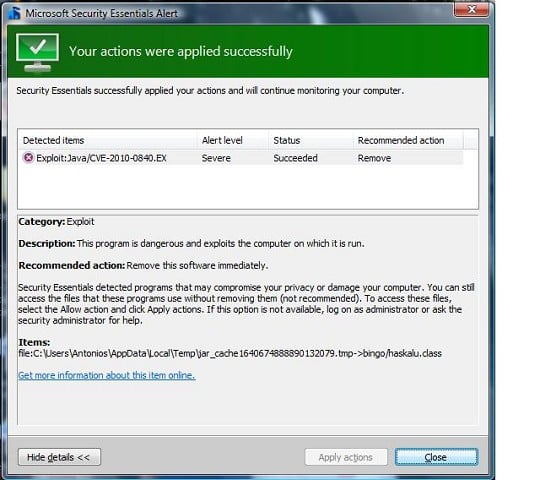
But I also have Microsoft Security Essentials running on the machine. Malware is going through first scan - and just look at what cropped up and got stomped on:

Exploit

Now I'm worried....


________


Antoniosk


TangoNZ
117 posts

Master Geek
+1 received by user: 4


  #508917 19-Aug-2011 11:34
Send private message

I work at a PC repair shop so seeing lots of these infections, had about a dozen customer's turn up with the problem yesterday. A couple of them have been Vista machines, so its not limited to XP. No Windows 7 machines yet. It looks like the malware was stopping the Vista PC getting into safe mode, it would just shut it down after Windows booted, but normal mode was working fine (apart fro being infected with the malware). The PC had Avast installed, and after an update and a reboot it was able to take care of it.


Stream your favourite shows now on Apple TV (affiliate link).

29k

29k
8 posts

Wannabe Geek


  #508945 19-Aug-2011 12:27
Send private message

TangoNZ: I work at a PC repair shop so seeing lots of these infections, had about a dozen customer's turn up with the problem yesterday. A couple of them have been Vista machines, so its not limited to XP. No Windows 7 machines yet. It looks like the malware was stopping the Vista PC getting into safe mode, it would just shut it down after Windows booted, but normal mode was working fine (apart fro being infected with the malware). The PC had Avast installed, and after an update and a reboot it was able to take care of it.


It was stopping Vista going in Safe Mode? I'm glad you said that, because I got it on a Vista machine and couldn't get into Safe Mode and blamed it on my machine being old/dodgy/dying. One less thing I have to worry about.

TangoNZ
117 posts

Master Geek
+1 received by user: 4


  #508962 19-Aug-2011 12:59
Send private message

Actually its still not getting into safe mode after removal of that malware, so can't confirm if that was the cause or not.

Ironically one of the first things that popped up after booting for the first time with a clean system was the Java update window. Its such a stupid process that its no wonder so many people don't have the updates and have been infected. You have to click the update window, and then accept a UAC prompt, and THEN you need to click the Java update popup again to install the update...no average user is going to do that, leaving them vulnerable. Best solution as Mauricio says is just to get rid of Java...

freitasm
BDFL - Memuneh
80953 posts

Uber Geek
+1 received by user: 41729

Administrator
ID Verified
Trusted
Geekzone
Lifetime subscriber

  #509016 19-Aug-2011 14:28
Send private message

For those interested to know how it was accomplished, this seems to be a good read: http://joeloughton.com/blog/security/metservice-hacked-how-it-happened/


Referral links: Quic Broadband (free setup code: R587125ERQ6VE) | Samsung | AliExpress | Wise | Sharesies 


Support Geekzone by subscribing (browse ads-free), or making a one-off or recurring donation through PressPatron.



antoniosk
2387 posts

Uber Geek
+1 received by user: 752

ID Verified
Trusted
Lifetime subscriber

  #509033 19-Aug-2011 14:55
Send private message

TangoNZ: I work at a PC repair shop so seeing lots of these infections, had about a dozen customer's turn up with the problem yesterday. A couple of them have been Vista machines, so its not limited to XP. No Windows 7 machines yet. It looks like the malware was stopping the Vista PC getting into safe mode, it would just shut it down after Windows booted, but normal mode was working fine (apart fro being infected with the malware). The PC had Avast installed, and after an update and a reboot it was able to take care of it.


Hmmm, hope it's gone then and isn't tricking the security software.


________


Antoniosk


TangoNZ
117 posts

Master Geek
+1 received by user: 4


  #509040 19-Aug-2011 15:11
Send private message

Nope, its gone, I wouldn't just rely on Avast :-)


Shop now on AliExpress (affiliate link).
kyhwana2
2572 posts

Uber Geek
+1 received by user: 233


  #509043 19-Aug-2011 15:13
Send private message

After cleaning this off, make sure you install Secunia PSI and have your users run the updates!
http://secunia.com/vulnerability_scanning/personal/

Ragnor
8287 posts

Uber Geek
+1 received by user: 591

Trusted

  #509046 19-Aug-2011 15:16
Send private message

One thing I noticed is that by default if java is installed then IE and Firefox will run the java. Chrome seems to have a more sensible default prompting you to allow java on this site etc.

deltadelta
21 posts

Geek
+1 received by user: 7


  #509048 19-Aug-2011 15:18
Send private message

kyhwana2: After cleaning this off, make sure you install Secunia PSI and have your users run the updates!
http://secunia.com/vulnerability_scanning/personal/

This is fantastic advice. It's especially good for bringing a neglected machine up to speed. It checks your Flash/Shockwave/Java, and almost every application you can think of - Acrobat, Firefox...I think mine even detected an update for Notepad++

dale77
298 posts

Ultimate Geek


  #509610 21-Aug-2011 14:39
Send private message

we got this on our windows xp desktop. From firefox, with a few old java plugins installed. I think java was latest version.

Also got the google redirect malware, nothing detected it, combofix from bleepingcomputer finally removed it.


HTPC: Antec Fusion 430, Intel i3, Gigabyte 1050, Corsair 4x1Gb,   Hauppauge WinTv, Logitech z-5500, Logitech Harmony 525, Yamaha Rx-v6a, Samsung KS8000 4k, Windows 10, Mediaportal 1.30, BLU-RAY: Panasonic UB820


1 | 2 | 3 | 4 | 5 | 6 | 7 | 8
View this topic in a long page with up to 500 replies per page Create new topic


Geekzone Live »

Try automatic live updates from Geekzone directly in your browser, without refreshing the page, with Geekzone Live now.


Are you subscribed to our RSS feed? You can download the latest headlines and summaries from our stories directly to your computer or smartphone by using a feed reader.