Geekzone: technology news, blogs, forums
Guest
Welcome Guest.
You haven't logged in yet. If you don't have an account you can register now.


View this topic in a long page with up to 500 replies per page Create new topic
Prev1 | 2 | 3 | 4 | 5 | 6 | 7 | 8 | 9 | 10Next
1874 posts

Uber Geek


  Reply # 162648 6-Sep-2008 15:32 Send private message

Whats the clear cable running down to the top of your TV for?


FM antenna cable.
The cables under the matt are for the rear 5.1 speakers
I just setup so need to move the matt closer to the entertainment unit to hide the cables =)


HTPC - Intel i3-2100 / 12GB / 13TB Storage / HD4670 / HVR2200 / Win 7 x64 + MediaPortal 1.3 Final
PC - Intel e8600 / 8GB / HD5830 / Win7 x64

84 posts

Master Geek


  Reply # 162737 7-Sep-2008 11:14 Send private message

Do you have the FM aerial running into your HVR2200 or is it going into an external reciever? I've split my UHF feed so not only is it providing DVB-T, its also the source for my FM radio reception. It works well, and means I dont have to worry about a seperate unsightly FM antenna.


21 posts

Geek


  Reply # 163754 11-Sep-2008 12:27 Send private message

Getting a Bravia which will replace my AV switcher and Dell 24" (post #1 in this thread).  The HTPC has also now officially been named "Steview" as my wife is convinced I'm stealing Freeview Wink

Also, I saw the thread asking which codec to use for DVB-T: Answer is CoreAVC, it may not be hardware accelerated, but is the best quality and idiot simple to use [on Windows].

1874 posts

Uber Geek


  Reply # 167625 28-Sep-2008 21:37 Send private message


took out the middle shelf, yay =) might move the mouse to under the table too.  finally finished =)


HTPC - Intel i3-2100 / 12GB / 13TB Storage / HD4670 / HVR2200 / Win 7 x64 + MediaPortal 1.3 Final
PC - Intel e8600 / 8GB / HD5830 / Win7 x64

27 posts

Geek

Subscriber

  Reply # 172100 19-Oct-2008 17:33 Send private message

Hi all,

Having read through the majority of all the HTPC related posts here I finsally made the decision to get my own HTPC. I also decided, if i'm going to do it, do it well, so I went a little OTT, but its turned out well.


ZeeBOB HTPC 1

ZeeBOB HTPC 2

ZeeBOB HTPC 3

HTPC:
Case:
Zalman HD160XT Plus
Motherboard: Gigabyte GA-MA790FX-DS5 AM2+
CPU: AMD Phenom 9950 Quad-Core Black Edition
Memory: 4GB - Corsair TWIN2X4096-6400C5DHX 2 X 2GB DDR
Graphics: Saphire ATI Raedon HD4850 512MB HDCP HDMI PCI-E
HDD: 2x Seagate 750GB SATAII 7200RPM
PSU: Seasonic M12 700W
TV Tuner: Hauppauge WinTV HVR4000 Quad Mode TV Reciever
Sound Card: Asus Xonar Ultra Fidelity PCI Sound Card
Keyboard: Logitech DiNovo Edge Ultra Slim Keyboard
Mouse: Logitech MX Revolution Cordless Laser Mouse

Audio/Video:
TV:
Panasonic Viera 42" Plasma
AV Reciever: Onkyo TX-SR705
Speakers: Wharfdale 5.1 Surrond Sound Speakers

Software:
OS:
Microsoft Windows Vista Ultimate (x64) with Service Pack 1
Media Center: MediaPoral 1.0.0.0 RC3
Daemon Tools
WinAMP
VLC Media Player

Codecs:
MPEG-2 Video:
CyberLink Video/SP Decoder (PCM45) - Bundled with TV Card
H.264 Video: CyberLink H.264/AVC Decoder (PDVD8)
Audio Codec: CyberLink Audio Decoder (PCM45) - Bundled with TV Card


The 7" LCD Touchscreen on the case is connected via DVI-VGA and the TV via DVI-HDMI. All sound is decoded and processed on the Asus Xonar card and output via SPDIF to the AV Reciever. MediaPortal can do pretty much everything now just a few little problems and extra tweaks to do:

Outstanding:
1. Get xmlTVNZ installed and working
2. Get my Logitech Harmony 525 to control the PC and MediaPortal


21 posts

Geek


  Reply # 172109 19-Oct-2008 18:18 Send private message

Yum, but should post some new pics as I've got a Bravia and a decent cabinet now.
Love that TFT screen, but have you thought about a Logitech Harmony remote.  It took me a while to come around, but now I have it working right (took 3 days) I can't imagine life without it.  I used to have 5 remotes, now we have one and my wife can just push 'Watch TV' and it switches everything on, jumps to live TV, adusts the sound field.... you get the idea.  It takes a little bit of patience, but is SO worth it.
Awesome setup.  Thanks for posting it :)

1441 posts

Uber Geek

Subscriber

  Reply # 172121 19-Oct-2008 19:10 Send private message

ZeeBOB:............


Outstanding:
1. Get xmlTVNZ installed and working
2. Get my Logitech Harmony 525 to control the PC and MediaPortal


I note you are in an apartment so this may not be possible...
If you have access to a satellite dish pointing at Optus D1 then your HVR4000 will be able to download the 7-day EPG via freeview.  It is what I use because my HTPC is not connected to the 'net.

Awesome setup tho'.


Areas of Geek interest: Home Theatre, HTPC, Android Tablets & Phones, iProducts.


21 posts

Geek


  Reply # 172122 19-Oct-2008 19:23 Send private message

I second that, I too run an HVR-4000, well 3 of them.
I have one pointing at the Optus D1 which gets my EPG, the other two point at DVB-T.
Has anyone had any good results getting their EPG over DVB-T?  I hate EPG's via internet!

27 posts

Geek

Subscriber

  Reply # 172147 19-Oct-2008 21:25 Send private message

Dingbatt:
I note you are in an apartment so this may not be possible...
If you have access to a satellite dish pointing at Optus D1 then your HVR4000 will be able to download the 7-day EPG via freeview.  It is what I use because my HTPC is not connected to the 'net.

Awesome setup tho'.

I like this idea! I know the last tenants in our apartment had SKY but there is no seperate cable feed so i'm guessing the Sat and UHF signals are coming down the same cable...

Can anyone advise the settings I need in MediaPortal for a DVB-S signal or is it just as simple as picking the Sat from the list and run a detect?

27 posts

Geek

Subscriber

  Reply # 173227 24-Oct-2008 00:20 Send private message

So I posted the build of my HTPC up on youtube including the 98% completed system, feel free to check it out!

http://nz.youtube.com/user/ZeeBOBNZ

692 posts

Ultimate Geek


  Reply # 175089 1-Nov-2008 15:51 Send private message

Well I've commented quite a few times in the freeview and HTPC threads so I thought I'd better snap a few shots of my very humble setup. I opted for hiding the computer rather than putting it on display in an HTPC case.

The "TV" is small; 19" but its ok for TV, I have a projector for movies .

The case contains a custom made fibreglass cpu/video card duct and is very quiet.

The lamp and sub can be turned on an doff using the parallel port power control plug-in I wrote for MediaPortal


166 posts

Master Geek


  Reply # 178324 17-Nov-2008 10:17 Send private message

Hey all - thought I would be cheeky & re-post as I've made a few tweaks here & there
It's all on http://www.jenkin.net/HTPC.htm
Major changes since last post are addition of a USB DAC, namely Citipulse 2.03E which I've now had for about 6 months, oh and the hand-built sub, which really does get things moving. I'm still a stereo freak, not yet taken to the dark side of HT.
The tweaks to the HTPC setup itself amount to the addittion of a few new tuners (HVR2200, & 2XUSB Nova-T, total 4 digital & 2 analogue tuners) and I had to swap out the ATI video card for an Nvidia 9600GT Passive. I took the Preamp out and am using the Citypulse as the pre. I've also pulled the twin 500GB drives, replaced the system disk with a solid state drive, and media disk with a 1.5TB HDD. I also replaced my TV cabinet and the wine rack I was using for my audio/HTPC rack with a custom built TV unit from a guy who sells on trademe. The whole affair is now as good as I could ever wish it to be, and the family love it.

HTPC setup

10 posts

Wannabe Geek


  Reply # 179646 23-Nov-2008 16:19 Send private message

Here is my setup.
Running An Asus M2h with a AMD Athlon 64x2 5200, ATI HD2600Pro, 2gb Ram, Hauppauge Nova-T 500, Seagate 500gb SATA, WD 320gb IDE, WD 200gb.
Mediaportal RC3 with Aeon Skin, Moving Pictures, TV Series, Music Video DB, etc. etc.
Two x Logitech Cordless PS3 controllers (which work on PC) to run the emulators
Connected to a 42" k7 Pana Plasma
Marantz 5.1 Amp, powering Acoustic Reseach HC6 5.1 Speakers
Plus the PS2.My HTPCMy HTPC

68 posts

Master Geek


  Reply # 189000 12-Jan-2009 15:39 Send private message

Current

CASE:
Silverstone LC16-M & iMon Remote,
PWRSUP: Corsair VX520W,
MOTHERBOARD: Gigabyte GA-P35-DS3R,
VIDEO: Gigabyte 8600GT Silent,
SOUND: Onboard 8 Channels ALC889A Audio controller ,
CPU: Intel Core2 Duo E8400,3.00GHz,
RAM:Corsair DDR2-800, 2GB,
HDD: SAMSUNG 500 & 750GB HDD,
TUNER: Hauppauge PVR150MCE PCI TV Tuner + Sky Star SAT Tuner for Freeview & EPG,
DISPLAY: Panasonic 50" PZ850 HD Plasma with HD Freeview Tuner.
SOFTWARE: Vista, Mediaportal 1.0.
RECEIVER: Sony 940 5.1 surround sound, it also has an optical link which I connected directly to the computer.
SPEAKERS: Front: PSB, Not shown but I also have the following that I haven't setup yet Centrer Paradigm, Rear: Paradigm Mini Monitor, Subwoofer: Paradigm PS1200

Things to do

HD Tuner, possibly HVR 2200
Blueray player, once prices come down
more storage in a RAID setup so I don't loose it all, possibly 3 x 750GB HDD
Harmony Remote

Here's some photos, and yes I know the cables look messy, but who cares you never see them. You will also note that I removed some of the rear paneling so overheating isn't a problem.

Comments welcome.

htpc

124 posts

Master Geek


  Reply # 191772 24-Jan-2009 11:07 Send private message

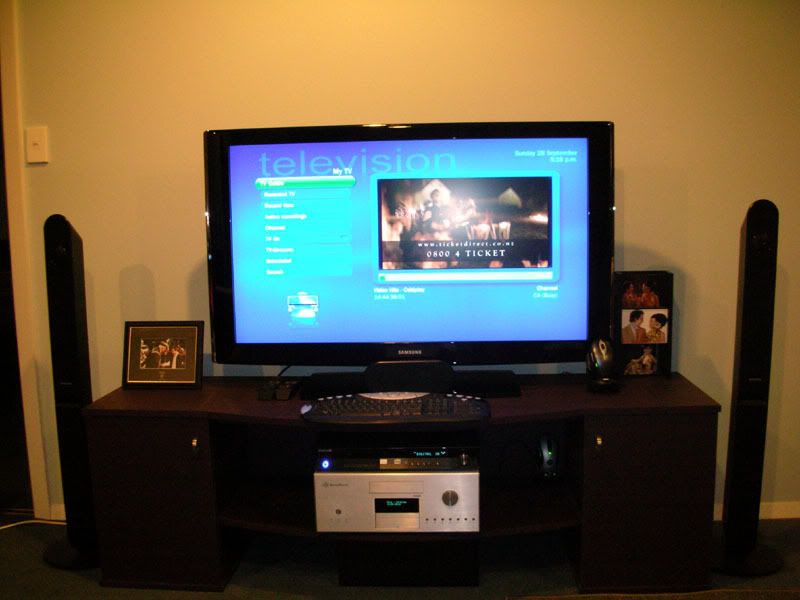
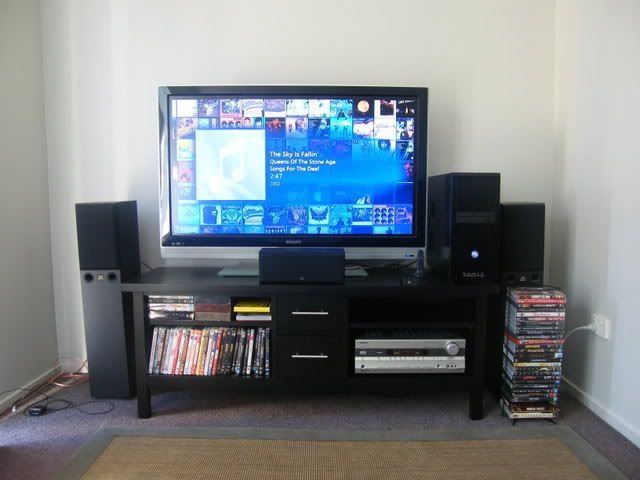
Right, it's not actually finished, but it's far along enough that I feel like putting something up here : )

http://img.photobucket.com/albums/v333/skeletoro/DSCF2715.jpg

Here she is in all her glory. You're looking at:

[b]receiver[/b]: Onkyo TX-SR575s. Got for $498. Doesn't process HDMI signals, so I just use a 5.1 spdif coaxial connection from the pc.

[b]speakers[/b]: Monitor Audio Bronze 3 front speakers, plus Monitor Baby Center and 2x Monitor 2 surround speakers (not shown). No subwoofer yet - I'd probably die an early death due to neighbour hate. Bought 5 years ago when they were being phased out by a newer range for about $1k - just under 50% RRP from Soundline Audio.

[b]Screen[/b]: Philips 47PFL7422 47" 1080p LCD. Connected directly to PC via HDMI.

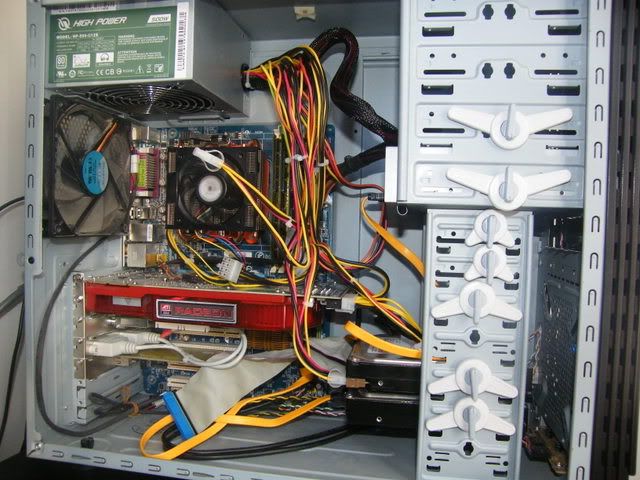
[b]PC[/b]: WARNING: MESSY

http://img.photobucket.com/albums/v333/skeletoro/DSCF2717.jpg

Specs are in my sig. As you can see, I'm trying to get this rig working as a hybrid HTPC/Gaming machine. I've had some success with this - its playing games and dvds without a hitch at the moment. Regarding freeview, I'm getting some problems with the hardware decoding of channels 4 and up, and I still don't have a guide working in windows 7. :( But I'm hoping that driver updates or updates to windows 7 will sort that. I still have yet to buy a blu-ray drive.

Its messy and noisy right now. My corsair modular PSU died earlier this year, and the replacement is a POS. It will eventually need replacing, for reasons of noise. I'm also thinking about moving this computer into a better case, although I am not sure which cases will fit my video card - and it needs to have decent cooling! I'd also probably buy a better CPU cooler - I imagine that the stock cooler with my phenom is contributing to the noise issue too.

For some reason the Windows 7 version of the catalyst drivers isn't actually installing the control center, even though it claimed that it does. Once I've got that up and running, I'll probably look at using the profiles system to underclock the video card and turn down the fan when I'm not gaming.

[b]Outstanding[/b]:

Reduce noise coming from PC case (replace PSU, CPU fan,set up software tweaks)
Fix some software issues
     video artifacts on resume from sleep
     Freeview 576i channels not displaying correctly
Put PC in a decent HTPC case that will fit it, and move into the left cabinet cavity so that I can properly center TV.
Get a subwoofer if and when we move somewhere more suitable
Get a blu-ray drive

Prev1 | 2 | 3 | 4 | 5 | 6 | 7 | 8 | 9 | 10Next
View this topic in a long page with up to 500 replies per page Create new topic


Twitter »
Follow us to receive Twitter updates when new discussions are posted in our forums:


Follow us to receive Twitter updates when news items and blogs are posted in our frontpage:


Follow us to receive Twitter updates when new jobs are posted to our jobs board:


Follow us to receive Twitter updates when tech item prices are listed in our price comparison site:


News »

Trending now »
Hot discussions in our forums right now:

Fecked up religious people strike again :-(
Created by Mark, last reply by freitasm on 25-May-2013 08:44 (85 replies)
Pages... 4 5 6


Cannabis is illegal yet we have really strong 'legal highs' ?
Created by qwerty7, last reply by freitasm on 23-May-2013 23:20 (74 replies)
Pages... 3 4 5


A new project coming to Geekzone
Created by freitasm, last reply by l43a2 on 24-May-2013 23:02 (342 replies)
Pages... 21 22 23


HTC One (2013) owners' discussion
Created by Dingbatt, last reply by mrgsm021 on 25-May-2013 14:30 (1567 replies)
Pages... 103 104 105


Xbox One
Created by DjShadow, last reply by Hobchild on 26-May-2013 04:26 (76 replies)
Pages... 4 5 6


Monolithic Cement Sheet cladding mid 80s house - "leaky home" or not?
Created by joker97, last reply by mattwnz on 24-May-2013 23:46 (15 replies)

Orcon, Is this for real or a scam??
Created by old3eyes, last reply by DarthKermit on 22-May-2013 19:12 (29 replies)
Pages... 2


Entire house HTPC concept
Created by InfiniteLoop, last reply by darthmeow on 24-May-2013 12:19 (26 replies)
Pages... 2


Geekzone Jobs »
Most recent NZ jobs in technology:

Developer of interactive experiences
Posted 25-May-2013 21:28

Ambitious Project Coordinator
Posted 25-May-2013 19:28

Ambitious Project Coordinator
Posted 25-May-2013 19:28

Exceptional Senior Project Manager
Posted 25-May-2013 19:28

Multitalented Business Analyst
Posted 25-May-2013 18:28

Communicative Test Manager
Posted 25-May-2013 17:28

Flexible Test Manager
Posted 25-May-2013 17:28


Geekzone Live »
Try automatic live updates from Geekzone directly in your browser, without refreshing the page, with Geekzone Live now.

Are you subscribed to our RSS feed? You can download the latest headlines and summaries from our stories directly to your computer or smartphone by using a feed reader.

Alternatively, you can receive a daily email with Geekzone updates.