Could someone help me out here. I recently got a Fritz!Box 7390 (bought it myself), and I have been running ADSL2+ through it while I've been waiting to transfer over onto VDSL2 (which happened today ! :D ).
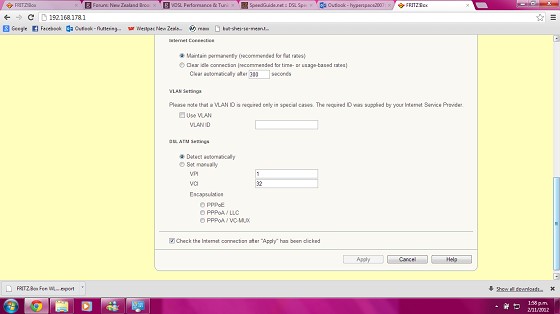
My issue is the Fritz!Box is still Syncing up to the DSLAM using ADSL2+ and the Fritz!Box 7390, absolutely will not let me change the VPI and VCI settings to the correct value or the encapsulation to PPPoE (will not enable me to press the apply button). Anyone had this issue and have a work around?
Try a factory reset then the settings you want - I seem to remember having some issues along these lines, and I think others have going from ADSL -> VDSL where a fritzbox has first been used for ADSL.
"I was born not knowing and have had only a little time to change that here and there." | Octopus Energy | Sharesies - Richard Feynman
Alrighty, So even after a factory reset, it still will not let me manually input any information. This is getting rather frustrating. I'm now going to try rolling back the firmware version and see if that changes anything.
Firmware version is 84.05.22 This is rather annoying me to be honest. Does anyone have a settings files that I could steal off them and load into my router?
EDIT: I also can't roll back to a earlier version as AVM dont have it on their website?
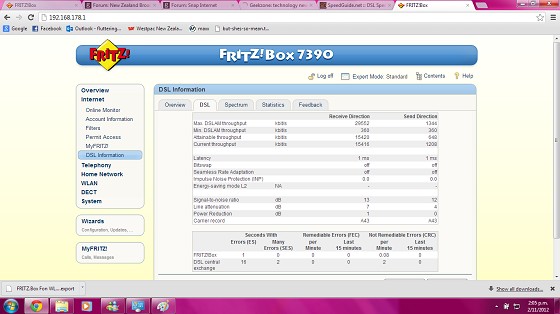
varix: One thing to note was that before this mornings resync when it was likely on DLM-4 I noticed bitswap was on. After resync bitswap is off. Bitswap is not related to DLM though is it? Does bitswap affect sync speeds or latency?
My experience is that bitswap is often set to off immediately after a resync but will turn on sometime later. What bitswap does is it allows the reallocation of bits from one frequency to another. The second graph on the Spectrum tab shows the bit allocation to each frequency. With bitswap on the connection can adapt to noise on a particular frequency by moving some bits from the affected frequency to another frequency (theoretically you could see the change on that graph, though the graph may not have high enough horizontal resolution in practice). Since the total number of bits is unchanged it doesn't affect sync speed. Latency is determined by the degree of interleave and error correction (i.e. the INP value) so this will not be affected either. What bitswap should do is reduce your error rate. A week after I last went to DLM 1 I noticed my error rate was about half what it had been and I believe that was because bitswap had been turned on at some point.
Dairusire: I have been running ADSL2+ through it while I've been waiting to transfer over onto VDSL2 (which happened today ! :D ).
My issue is the Fritz!Box is still Syncing up to the DSLAM using ADSL2+ and the Fritz!Box 7390, absolutely will not let me change the VPI and VCI settings to the correct value or the encapsulation to PPPoE (will not enable me to press the apply button).
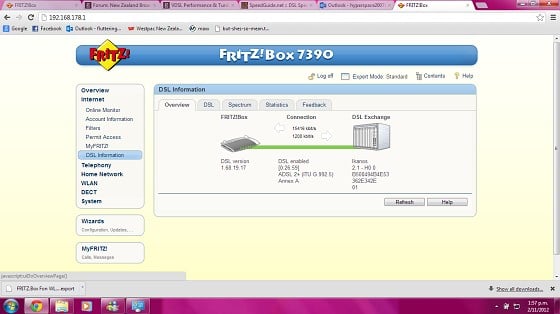
I don't think the Fritz can connect using ADSL if the DSLAM is set to VDSL - there is actually no setting on the Fritz!Box to control this (the account settings page is about PPP/ATM configuration, not the underlying DSL connection). What does the DSL Information / Overview tab have on it?
Can you post a screenshot of you Account Information / Internet Connection tab?
I don't think the Fritz can connect using ADSL if the DSLAM is set to VDSL - there is actually no setting on the Fritz!Box to control this (the account settings page is about PPP/ATM configuration, not the underlying DSL connection). What does the DSL Information / Overview tab have on it?
Can you post a screenshot of you Account Information / Internet Connection tab?
Yeah not a problem, give me some time as I'm working off my Phone connection and the signal isnt very good >.<
Your connection hasn't been switched over yet. It should say "VDSL2". As I said there is no setting controlling this - the modem will detect the DSL variety automatically.
When I was using my Fritz!Box 7340 on ADSL I had weirdness with the Account Information / Internet Connection page as well. The only way I could get it to work was to leave it on "Detect Automatically". It would allow me to change the parameters if I set it to "Set Manually" (I guess you've tried selecting that?), but it wouldn't establish a PPP session even with the correct parameters. I think this was mentioned once or twice in other threads here.
When you do get switched over to VDSL2 the correct settings are: "Use VLAN" selected "VLAN ID" 10 "Set manually" selected "VPI" 0 "VCI" 110 "Encapsulation" PPPoE
If that is the case, then the guy from Chorus who rang me up telling me he had switched me over into the VDSL2 port is wrong? This was around 11-12 this morning.
EDIT: Also it will not let me change anything even when I have selected 'set manually'.
Also I do apologize if I seem a tad frustrated, Slingshot disconnected me three days early (WTF), leaving me with no internet connection, meanwhile my server in the states needs monitoring etc. So I need this all sorted and finished as having no internet for over the weekend is a absolute NO.
Alrighty gave them a call and they fobbed me off to my isp. now onto them. hopefully its just some back-end crap which hasnt been updated or something.
Are you subscribed to our RSS feed? You can download the latest headlines and summaries from our stories directly
to your computer or smartphone by using a feed reader.





 Trusted