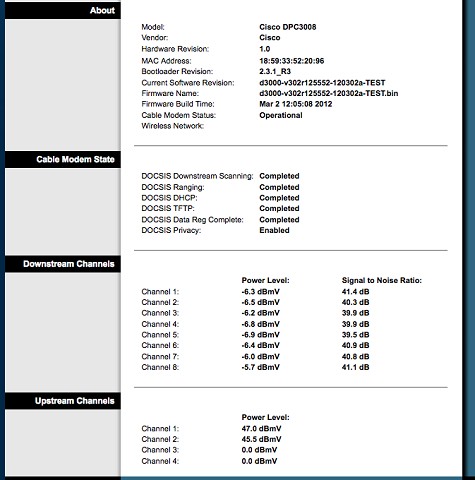
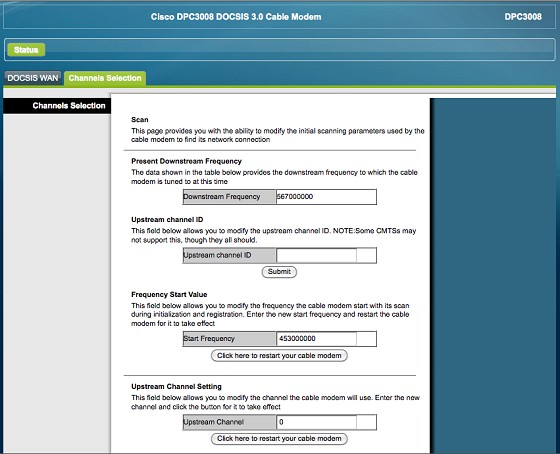
Anyone know how to access one of these Cisco DPC3008 cable modems to see connection stats etc?


 ID Verified
 Trusted Lifetime subscriber
I'm a geek, a gamer, a dad, a Quic user, and an IT Professional. I have a full rack home lab, size 15 feet, an epic beard and Asperger's. I'm a bit of a Cypherpunk, who believes information wants to be free and the Net interprets censorship as damage and routes around it. If you use my Quic signup you can also use the code R570394EKGIZ8 for free setup. Opinions are my own and not the views of my employer.


|
 ID Verified Trusted Subscriber

 Retired Mod Trusted
 Biddle Corp Lifetime subscriber


Speedtest FibreX Max (via 5G WiFi)

 Trusted
ID Verified Trusted Lifetime subscriber
Trusted
ID Verified Trusted Lifetime subscriber
I'm a geek, a gamer, a dad, a Quic user, and an IT Professional. I have a full rack home lab, size 15 feet, an epic beard and Asperger's. I'm a bit of a Cypherpunk, who believes information wants to be free and the Net interprets censorship as damage and routes around it. If you use my Quic signup you can also use the code R570394EKGIZ8 for free setup. Opinions are my own and not the views of my employer.
|
|