Geekzone: technology news, blogs, forums
Guest
Welcome Guest.
You haven't logged in yet. If you don't have an account you can register now.


44 posts

Geek


Topic # 104699 20-Jun-2012 14:27 Send private message

I'm hoping someone can help.

For quite sometime now - for the past 6 months or so - I have been unable to get the XNet webmail service to display on any of the Windows 7 machines in the the house.

One of the machines is a workstation, which is on a wired connection. The other is a laptop on a wireless connection. Both fail to display the login page.  It doesn't matter whether I use IE or Firefox - the result (or lack thereof) is the same.

I have also gone into the browers settings to minimise security features and the like and still no luck. 

I thought it may be the router I have (D-Link DSR-250N), as the issues started around the same time this went in. However, we also have an Android tablet and that does seem to bring up the XNet webmail login page fine. I have to admit, it's been a while since I've tried it, but from memory, it's OK.

I have contacted XNet Support, who were a little baffled. Their only suggestion was to update Java on the effected PC's. I have done that, but still no joy.

Is this happening to anyone else? Any ideas?


Create new topic
296 posts

Ultimate Geek

Trusted
WorldxChange

  Reply # 643824 20-Jun-2012 14:30 Send private message

That does sound extremely odd. 

Have you tried pinging webmail.xnet.co.nz?  Does it resolve to 58.28.4.141. 

PM me your Xnet username and I'll ensure nothing weird is happening on our side. 

Thanks 
Cameron 


2494 posts

Uber Geek

Trusted

  Reply # 643851 20-Jun-2012 15:24 Send private message

No issues at all from work on a very tight network and running Win7 Pro 64 bit. Are you running some interesting web based parental control application (I did for a while) which could be why all Windows PCs are affected?


You can never have enough Volvos!


120 posts

Master Geek


  Reply # 643888 20-Jun-2012 16:38 Send private message

Was your Android phone using the Wi-Fi or the 3g connection when you loaded the webmail page ?
Also, which DNS servers are you using ?
As Cameron mentioned, when pinging webmail.xnet.co.nz does that resolve as 58.28.4.141 ?
And just to make sure, you are using this address to connect to webmail : https://webmail.xnet.co.nz/ ?
If so, can you load any other https websites on your machines ? For example can you login ok for your internet banking ?


44 posts

Geek


  Reply # 644352 21-Jun-2012 16:38 Send private message

To answer some of your questions.

- No, I am not running any CyberNanny type software.

- The Android tablet was connected to the internet via Wi-Fi.

- When pinging 'webmail.xnet.co.nz', it resolves the domain name to 58.28.4.141, but I get no responses. The request times out.

- I have tried just placing the IP address in the browser address bar and it resolves to https://webmail.xnet.co.nz/, however the page never displays.

- I have performed a TRACERT and this is the response I get:
1 <1 ms <1 ms <1 ms ophelia.wxnz.net [58.28.4.141]
2 2 ms 1 ms 1 ms 192.168.1.254
3 28 ms 27 ms 32 ms akl-ip21-xdsl-gw.wxnz.net [182.154.0.21]
4 27 ms 26 ms 26 ms xe-0-2-0-35.akl-ip01.wxnz.net [58.28.160.1]
5 * * * Request timed out.
6 * * * Request timed out.
7 * * * Request timed out.

- Cameron also asked me tp attempt a TELNET session to 'webmail.xnet.co.nz' on port 443 and this, strangely enough, seems to work. A connection seems to be made and I'm left with a blank console screen.


44 posts

Geek


  Reply # 644353 21-Jun-2012 16:41 Send private message

Oh and yes, other HTTPS websites seem to work fine. However, I cleared the SSL Cache and tried agan - still no luck.

16849 posts

Uber Geek

Moderator
Trusted
Biddle Corp
Subscriber

  Reply # 644369 21-Jun-2012 16:59 Send private message

Can you access other SSL sites? Is your MTU set correctly?


*Need help configuring your Linksys ATA or IP Phones for New Zealand? Check my blog post

120 posts

Master Geek


  Reply # 644396 21-Jun-2012 18:11 Send private message

It sounds like you are resolving the IP address correctly, but it's not good that your pings are timing out, you should be getting replies.

Can you get to the webmail page if you take the DLink router out of the loop and plug your laptop directly into your modem ?
Is the MTU on your modem set to 1492?

16849 posts

Uber Geek

Moderator
Trusted
Biddle Corp
Subscriber

  Reply # 644400 21-Jun-2012 18:20 Send private message

Might also pay to post what type of modem you're using and how you have the router connected - are you using bridge mode and a EUBA PPPoE connection or PPPoE to PPoA conversion, or are you just plugging the router in and letting double NATTing occur?


*Need help configuring your Linksys ATA or IP Phones for New Zealand? Check my blog post


44 posts

Geek


  Reply # 644422 21-Jun-2012 19:08 Send private message

My modem/router:
D-Link DSL-526B (http://dlink.co.nz/products/?pid=803)

My Network Router:
D-Link DSR-250N (http://dlink.co.nz/products/?pid=DSR-250N)

Now, I'll need to do some digging around, however I believe the Modem/Router is setup in modem only mode. All PC's on the network, get their IP address. gateway and DNS detail from the Network Router.

I have just tried plugging the laptop direct into the modem and the IP address on the laptop LAN looks like an external IP address and I can't browse the internet.

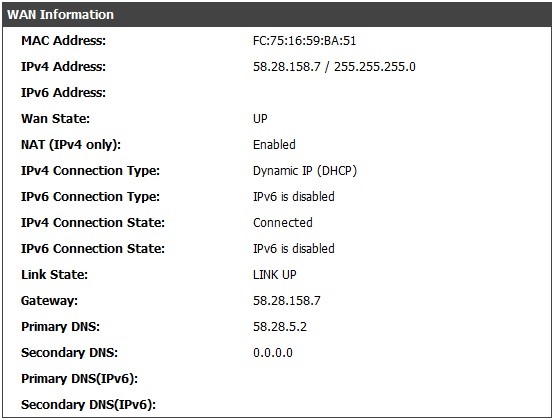
A screenshot from the Network Router is attached. As you can see, this WAN IP address on my Network Router is my external IP address, even though there is another device - the Modem/Rouer - between it and the outside world.  i think this call Bridging Mode:
ftp://files.dlink.com.au/products/DSL-526B/REV_T/SetupGuides/DSL-526B-How_to_configure_Bridge_mode.pdf


44 posts

Geek


  Reply # 644430 21-Jun-2012 19:34 Send private message

I have managed to log into the Modem/Router and can confirm the following:
- Default Gateway (Auto-Assigned): 182.154.0.21
- Primary DNS: 58.28.5.2
- Secondaty DNS: 58.28.6.2
- VPI / VCI: 0 /100 (UBR without PCR)
- Connection Type: PPP Over ATM (VC/MUX)
- Enable NAT: Off
- Enable Firewall: Off

Unable to find any reference to MTU size unfortunately.

Create new topic
Twitter »
Follow us to receive Twitter updates when new discussions are posted in our forums:


Follow us to receive Twitter updates when news items and blogs are posted in our frontpage:


Follow us to receive Twitter updates when new jobs are posted to our jobs board:


Follow us to receive Twitter updates when tech item prices are listed in our price comparison site:


News »

Trending now »
Hot discussions in our forums right now:

Condenser Dryer: anyone has one?
Created by joker97, last reply by graemew on 18-Jun-2013 21:08 (31 replies)
Pages... 2 3


sky outbid for EPL rights
Created by JonnyCam, last reply by Jas777 on 19-Jun-2013 10:27 (59 replies)
Pages... 2 3 4


Slow YouTube Response
Created by SneakerPimps, last reply by mercutio on 18-Jun-2013 21:34 (23 replies)
Pages... 2


S4 Data giveaway - Misleading advertising
Created by TheDistantOne, last reply by Klipspringer on 19-Jun-2013 10:45 (22 replies)
Pages... 2


Calling all mazda 3/Axela owners in NZ
Created by coolcat21, last reply by Kingy on 19-Jun-2013 09:51 (37 replies)
Pages... 2 3


Stationary Vehicle Infringement Notice Has Wrong Details
Created by Wheelbarrow01, last reply by Dratsab on 18-Jun-2013 23:46 (33 replies)
Pages... 2 3


Finding strongest carrier signal in a given location
Created by timmmay, last reply by timmmay on 16-Jun-2013 14:51 (16 replies)
Pages... 2


HTC One (2013) owners' discussion
Created by Dingbatt, last reply by bradstewart on 18-Jun-2013 23:28 (1818 replies)
Pages... 120 121 122


Geekzone Jobs »
Most recent NZ jobs in technology:

Reporting Analyst SSRS/SSIS/C++ - $95k neg - Nort
Posted 19-Jun-2013 10:38

PSG Technical Support Analyst
Posted 19-Jun-2013 10:38

JavaScript Ninja, Christchurch
Posted 19-Jun-2013 10:38

Junior C#.Net/ASP.Net Web Developer, Christchurch
Posted 19-Jun-2013 10:38

C#.Net Software Development Team Leader
Posted 19-Jun-2013 10:38

Senior UX/IA Designer
Posted 19-Jun-2013 09:38

Level 2 Helpdesk
Posted 19-Jun-2013 09:38


Geekzone Live »
Try automatic live updates from Geekzone directly in your browser, without refreshing the page, with Geekzone Live now.

Are you subscribed to our RSS feed? You can download the latest headlines and summaries from our stories directly to your computer or smartphone by using a feed reader.

Alternatively, you can receive a daily email with Geekzone updates.