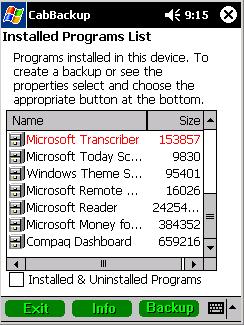
CabBackup allows the user to re-create a CAB file of any Pocket PC program (a CAB file is an installation folder containing all files needed to run a program). This is a great application for full backup of installation files on storage media like SD or MMC cards.
Basically, it recomposes the installation folder of any program, allowing you to backup easily and quickly all your PocketPC programs on an external memory card. Therefore, all unused programs can be stored and safely uninstalled. It can then be resintalled later if needed.
CabBackup does not need any synchronization with a PC and gives the freedom to backup your PocketPC programs anywhere, anytime.
The new version 1.2 adds some functionality:
PocketPC Windows Mobile 2003 compatibility
A CAB file will be re-generated with the current registry settings of the application. In other words, if you've modified the settings of an application, you will find them identically in the newly re-generated CAB
The newly re-generated CAB file will install your application at the same location than the one selected during the first installation. For example, an application installed via activesync into the storage card, will only be reinstall to the same location, after tapping on the newly re-generated CAB file
A display in red shows installed programs which cannot be re-generated because their files could be either moved to a different location or deleted. This feature will help you identify programs for which the installation can be corrected in order to be uninstalled correctly.