
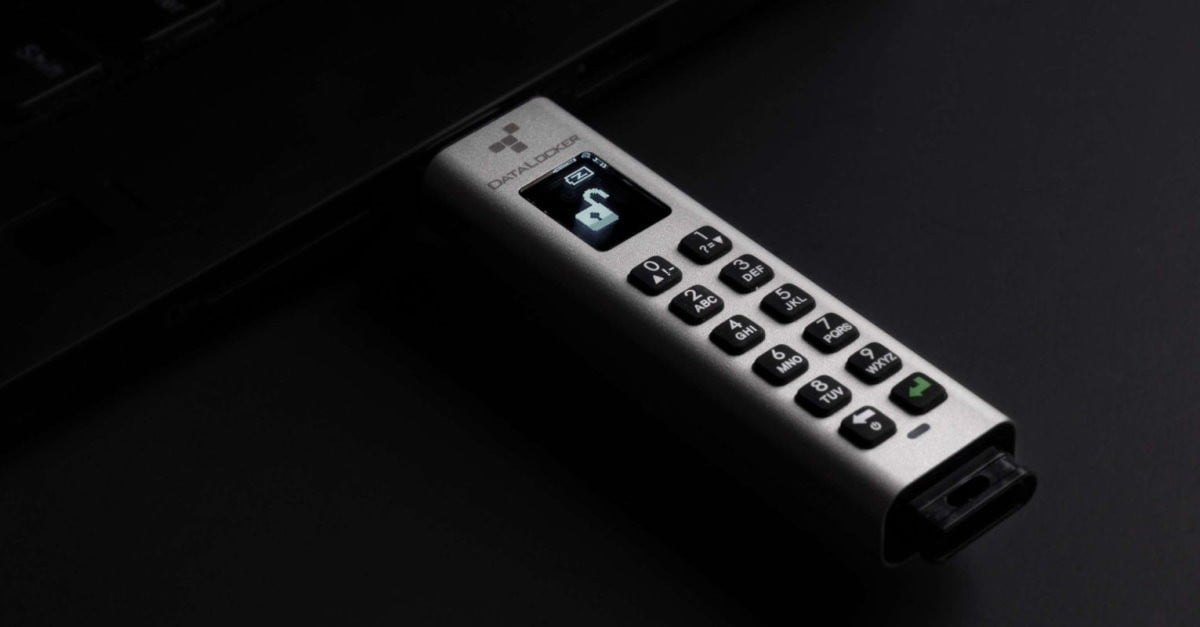
Datalocker is releasing a new USB encrypted storage solution aimed at verticals that require data security during transport or at rest.
The Datalocker K350 is a small form factor encrypted flash drive that is simple to use and comes with remote management features. This security-focused device is FIPS 140-2 Level 3 certified by the NIST, the American government certification authority. It uses multiple FIPS algorithms to encrypt data and requires no additional software or drivers to be installed on the host computer or mobile device.
Its form factor is similar to any standard USB flash drive with two very noticeable differences: a small black and white LCD and a keypad with 12 rubber buttons including numbers 0 to 9 plus an on/off and an Enter key. Very much like phone keypads the numbers 0 to 9 double as alpha keys when repeatedly pressed, while the buttons 0 and 1 also have the up and down functionality to navigate on-screen menus.
In standalone mode the Datalocker K350 can be used out of the box by following a couple of steps to create your admin password. Pushing the power button will start a self-test while showing the device’s internal battery level.
A menu will appear on the LCD and you can then create your admin password by pushing the buttons to enter digits 0 – 9 or alpha characters A – Z. These are briefly shown on the screen, quickly replaced by bullet point-sized dots. You can correct any errors by pushing the power button which also doubles as backspace during data entry.
Once you create a password and confirm it you can plug the device into your computer or enable the user option, which allows you to have separate passwords to manage and to use the USB encrypted storage.
From now when you turn the Datalocker K350 on, select Admin or User mode and enter the corresponding password. Connect it to a computer and you are ready to copy all that important or confidential data you want to keep private and secure.
The admin user can enable and disable the user account, as well as reset the device or create a special PIN for emergency use that will start a self-destruct routine. This self-destruct routine can also be activated if a wrong password is entered more than a set number of attempts and works in two ways: one can simply delete the cryptographic keys created when you enter the password, making all data disappear and the other option being complete destruction of the device, in a way that it can’t be used again.
The Datalocker K3350 is actually very easy to use, thanks to its LCD that provides a user interface with context menus that you can browse using the 0 and 1 buttons to scroll up and down through the options.
I did not test the managed features as it requires a piece of software called SafeConsole. The list of features here includes remote device destruction, on-board anti-malware scan, data geofencing and file activity audit capabilities.
The device has a sealed metal body with epoxy sealed internals, with the design giving it an IP67 rating, which means it can be in water up to one metre deep for 30 minutes and still be functional. Despite all these robust protections, it weighs only 35 grams, making it very easy to move around or ship.
Like previous Datalocker devices I have had the chance to try, the Datalocker K350 has uses in many industries but finance, health, government and research are those that spring to mind when I think data security. Thanks to its ease of use, this USB encrypted storage can also be used by individuals and families to store scans of documents and other important information, which is how I am using it.


