
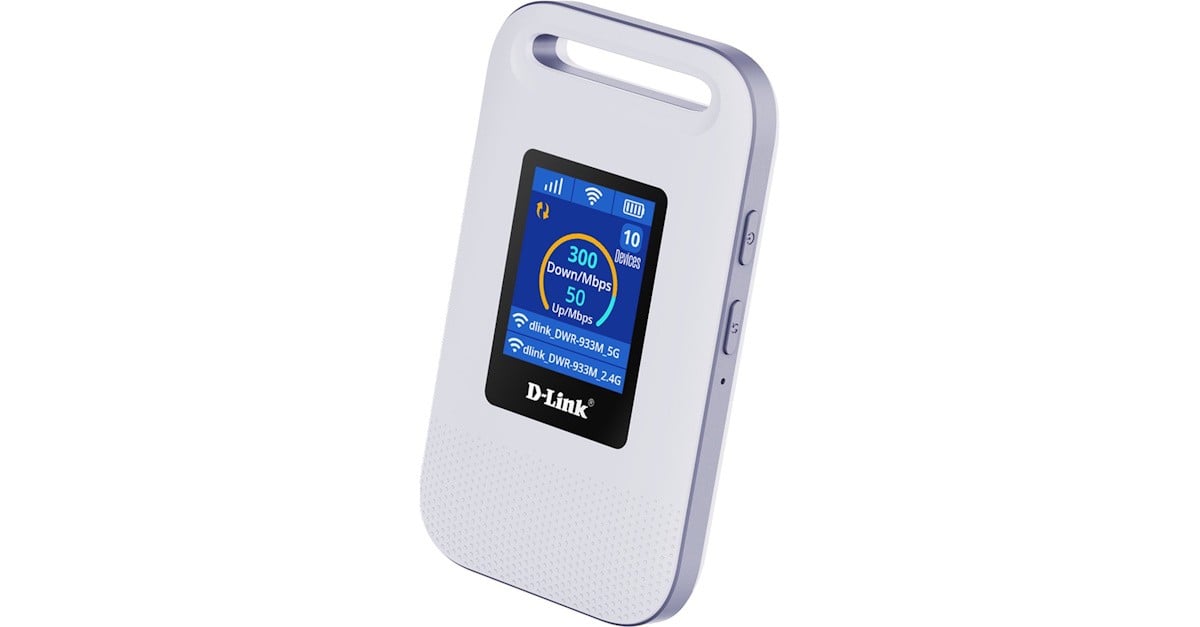
The new D-Link 4G+ Cat6 Wi-Fi 6 Mobile Hotspot is a great tool for users who want to be able to work from anywhere, regardless of having access to a Wi-Fi network, and without wanting to worry about running out of battery power on their phone.
With a small form-factor, measuring only 100 mm x 60 mm x 16 mm it it’s small and convenient to carry on your bag. With a convenient slot on top, it can also be securely attached to a bag or backpack so it can be used at any time without having to worry about forgetting it.
A 1.77-inch display shows its status, including current speed, number of devices attached to its Wi-Fi, mobile signal strength, battery life and Wi-Fi network name (SSID),
Two buttons on the side server to turn the device on/off and to start WPS (Wi-Fi Protected Setup), so you can connect to the device even if you can’t remember the Wi-Fi password.
Once connected your laptop, tablet or phone will work just like in any other Wi-Fi network.
While a mobile app is available for monitoring and configuration, you can also use its built-in browser-based for setup.
The management website is simple and easy to use. You don’t actually ever need to change its configuration, although you might benefit from accessing it to check for any incoming SMS notification from your mobile operator from time to time (like top-up or limits notifications, if these are a thing).
The management website is minimal. There’s no port forwarding or firewall settings. You can change the LAN IP subnet and the DHCP range but nothing else.
The device can reach speeds up to 600 Mbps on 4G (Cat 6). It uses a nano SIM card, and it’s not compatible with eSIM.
The Wi-Fi 6 standard is optimised for congested environments and performs well in both 2.4 GHz and 5 GHz bands, in this case with a maximum 286 Mbps speeds available.
You can configure the bands with separate SSID and password, as well as configure channel and maximum number of users. Wireless security can only be disabled or set to WPA2-PSK, which is good but not the latest standard.
You can also use a USB-C cable to connect the mobile hotspot to your computer, and it will be recognised as an Ethernet connection (RNDIS). This way, wireless interference is reduced and you get the maximum speed possible. I tried it with a Windows laptop, and you don’t even have to worry about installing drivers.
In any case, it’s worth taking a picture of the inside of the mobile hotspot before inserting the battery, because that’s where the admin password is located.
The 3000 mAh battery is charged from the USB-C port. A full battery can last you for hours and while I didn’t use if this long, the specs say it can last up to 12 hours.


