
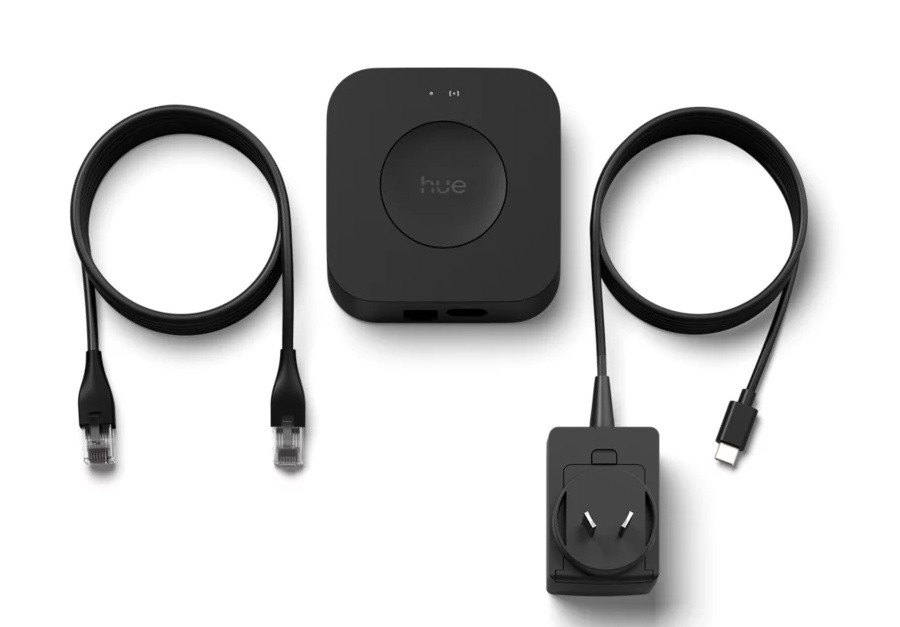
Those of you with an interest in home automation have known the name Philips Hue for years. The brand offers a huge variety of LED-based, remote-controlled lights and accessories, making it possible to create whole-house lighting and security systems with a single vendor, reducing the risk of things not working when put together.
Sure, they aren’t always the cheapest option, but they come to mind with their reliability, easy to use and good integration with other platforms.
Like other systems, your home lighting tends to grow, with more lights being added as you uncover areas where lights can be useful (outdoors), add a nice ambient touch with colours (lounge/TV room) or outright take you into an adventure (when synchronised with a home gaming setup).
The Philips Hue system usually includes the Hue Bridge, a small device that links your lights to a wider network via your home router.
This bridge device is not always needed, as some lights can be controlled via Bluetooth or via other Zigbee devices such as Amazon Echo smart speakers. But if you are serious about your Philips Hue system, or if you want it to integrate with other platforms, the bridge is essential.
The new Philips Hub Bridge Pro is an improvement on the previous version. It adds features and expands the possibilities.
To start, it now supports both Ethernet (for when you have it positioned close to your router or switch), or Wi-Fi 2.4GHz. The addition of Wi-Fi means you can more freely decide on a placement for it.
The way Hue lights and devices work, they just need to be in range of another device to establish a wireless link. Having one or two light bulbs near the bridge, and other light bulbs in range of those, is enough to extend the coverage. So being able to position your Hue Bridge Pro without being limited by Ethernet connections is a plus and allows you more flexibility when installing lights and devices.
Power is now supplied by a small power adapter with a USB-C plug at the end of the cord. This is handy, and as I noticed, you can use any good USB-C adapter with enough power, so if you already have one in the desired location it can be reused.
In terms of performance, a new quad-core CPU/GPU, supported by 1 GB RAM and 8 GB flash memory mean it has enough power and capacity to control up to 150 lights, three times more than the previous model. It also promises five times faster response to commands, and this worked well for me.
The Hue app remains the same and is still easy to use. It allows you to add lights and other devices to your system, split these into rooms and control those lights individually or as part of separate areas in your home.
If you already have a Hue system at home, the app will guide you through migrating your lights from the existing bridge to the new one. All your lights and devices must be on during the process. In my experience, our 15 lights were migrated in under five minutes.
Once the migration is done, you are asked to factory reset the old bridge.
If you have any integration, you will need to setup this again, as the migration does not perform this step. In my case, my Hue system is connected to Alexa. I had to re-authenticate the Hue integration with Alexa, and the lights were automatically discovered again.
I found a problem during migration, where an existing Hue Smart Plug was correctly migrated in the Hue app, but Alexa didn’t recognise it as a power plug. I haven’t managed to fix this yet, but I will look more into it. It’s an important integration for me, as I use the temperature from an Amazon Echo speaker as a trigger for a routine that turns the plug on/off to start and stop heaters in the bedrooms during winter. In this case, I suspect some change in the way Alexa and Hue talk to each other might be causing this.
The Hue Bridge Pro introduces a new feature called Hue MotionAware. With a minimum of three lights in a room, you can setup a virtual area in the shape of a polygon. In case of a person or pet walking into that area will create a disturbance in the radio traffic between lights, which will be recognised as motion.
This works extremely well, and you can create routines to turn lights on when motion is detected. This feature doesn’t replace motion sensors completely, as it requires a minimum number of lights, but it’s very clever and ready to use now.
The Philips Hue Bridge Pro now comes in black, making it easier to blend with some decor, replacing the old white box. It’s a nice upgrade for existing systems and a good start for new users.


