✨
Quic broadband
|
Apple TV
|
Samsung
|
AliExpress
|
Wise
|
Sharesies
Home
Forums
News
Reviews
Live
Search
Contact
Welcome
Guest
.
You haven't
logged in
yet. If you don't have an account you can
register now
.
Rudeo Play & Control for Pocket PC
Posted on 14-Jul-2005 08:32
|
Filed under:
Software
:
Windows Mobile Pocket PC
:
Software
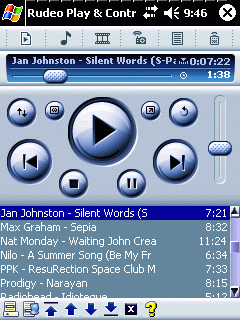
Access and control your home media through UPnP
Browse media stored on UPnP Media Servers (such as Windows Media Connect) on your Pocket PC.
Play Music from your UPnP Media Servers on Pocket PC, carry it with you where you go.
Control UPnP Media Player devices from Pocket PC.
Control a PC with Windows Media Player (requires Rudeo Server component) Play Music on Pocket PC
Works best if device has Windows Media Player 10
A Storage Card is required for Playback on Pocket PC.
A UPnP Media Server is Required. See our Downloads for more information.
Currently only non-protected music can be played. Compatible formats: MP3 and WMA.
Control UPnP Media Players through Rudeo
Media Information is accessed from available UPnP Media Servers
Rudeo Server component is not required, only need Rudeo Pocket PC installation
Discovers UPnP devices automatically
Play controls: Stop, Play, Pause, Next, Previous Volume Control
Progress Bar with real-time update back to Pocket PC
Only Music playback controlling is supported with UPnP Players
Control Windows Media Player through Rudeo
Play controls: Stop, Play, Pause, Next, Previous Volume Control
Progress Bar with real-time update back to Pocket PC
Seek to any spot on the song by dragging progress trackbar.
Stores Media Library locally on Pocket PC for quick start operation
Update Media Library without having to dock Pocket PC into craddle.
Will work with multiple Pocket PCs connected to the same computer.
Reliable operation: Music doesn''t stop if Pocket PC turns off or disconnects from computer.
Tested with UPnP Media Players
D-Link DSM-320
Roku Soundridge (with 2.34 Firmware beta available from Rokulabs)