Have you ever found yourself needing an important document or other file, only to realize its on your PC back at home or the office? FilePoint Exchange lets you access your desktop PC or network, directly from your Pocket PC through an Internet connection.
With FilePoint Exchange, the handheld is able to connect to the home or office computer and browse folders and files on local hard drives and mapped network drives.
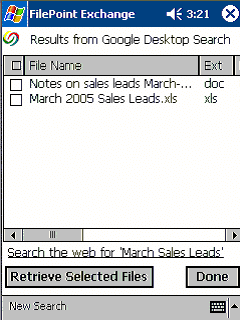
The software offers full integration with Google Desktop Search product, and lets users remotely search for files on a computer from the handheld by using keywords. To search for files on a remote computer, simply enter one or more keywords that you know are related to the file’s content, or the filename, or both. For example if you know you have a spreadsheet somewhere on your computer with your March Sales Leads, just enter "March Sales Leads" in the search box and tap Search. Google Desktop Search will automatically search your remote computer and FilePoint Exchange will deliver a listing of matching files back to you!
Once you've located the files you want using FilePoint's Google Desktop Search or Network Browse, you can download one or more files to your handheld where you can open them with Word, Excel, or your favorite media player.
FilePoint Exchange lets you create connections to as many remote computers as you want. Access your home computer, office desktop, laptops, network servers, and more, all from your wireless handheld!
Browse folders and files on your home or office computer
Search your remote computer for files using our Google Desktop Search feature
Download documents, spreadsheets, music, photos, or other files to your smartphone or handheld
Quickly access frequently needed files with FilePoint Favorites
Create and upload documents and other files from your handheld to your PC
Access multiple computers on different home or office networks