Geekzone: technology news, blogs, forums
Guest
Welcome Guest.
You haven't logged in yet. If you don't have an account you can register now.


Wheelbarrow01

1784 posts

Uber Geek
+1 received by user: 2638

Trusted
Chorus

#290200 27-Oct-2021 11:02
Send private message

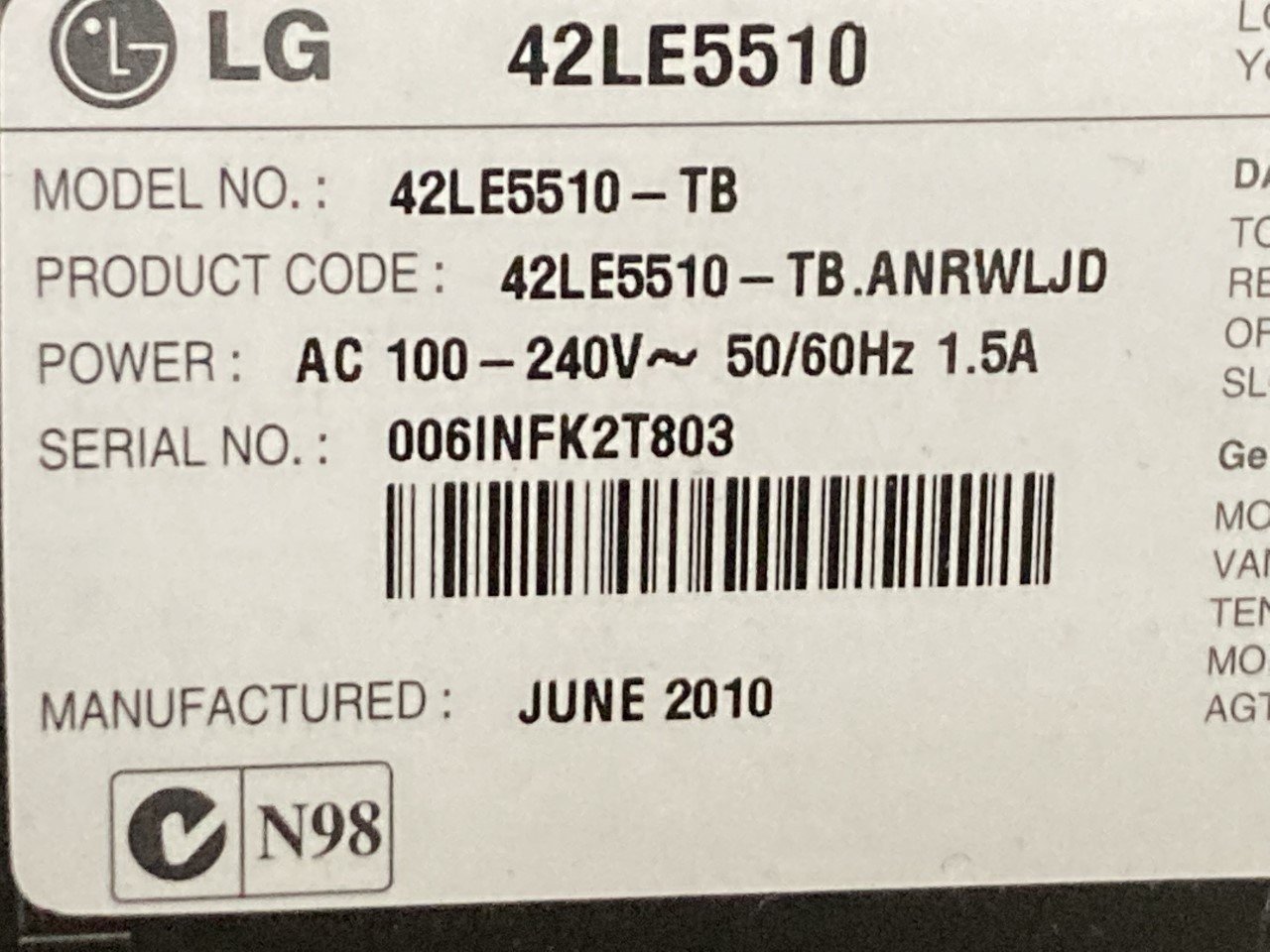
Just after some advice from anyone who knows anything about LED TVs....


My 2010 LG 42" tv was working perfectly well up until Sunday night. I turned it off and went to bed but when I switched it on in the morning, I got this:


[EDIT: the logo onscreen looks normal in real life - my camera has distorted it]


That screen normally flashes up for a few seconds before the tuner starts showing a tv channel, but now it just stays on the screen. Pressing any button on the remote does nothing (but the light on the tv bezel shows it is receiving the signal from the remote ok).


While the TV is 11 years old now, it's spent most of its life at the bach, so the actual total hours of use are comparitively low.


I called a TV repair place and they told me it's "probably" the motherboard which is no longer made, so the advice was to bin it and buy a new one.


Is it actually worth taking it somewhere for them to physically have a look at it & diagnose or am I wasting my time/money?




The views expressed by me are not necessarily those of my employer Chorus NZ Ltd


View this topic in a long page with up to 500 replies per page Create new topic
 1 | 2
surfisup1000
5288 posts

Uber Geek
+1 received by user: 2159


  #2801840 27-Oct-2021 11:07
Send private message

These days, they seem to want to replace the whole motherboard rather than the component that failed. Possibly a blown cap...seems to be something they skimp on to keep costs down. 


wellygary
8828 posts

Uber Geek
+1 received by user: 5310


  #2801893 27-Oct-2021 11:21
Send private message

What's the exact model number??


There may be a factory reset that can be triggered from the physical buttons on the Unit ( as opposed to the remote)- this would rule out any software glitch... 


Wheelbarrow01

1784 posts

Uber Geek
+1 received by user: 2638

Trusted
Chorus

  #2801894 27-Oct-2021 11:23
Send private message

wellygary:


What's the exact model number??


There may be a factory reset that can be triggered from the physical buttons on the Unit ( as opposed to the remote)- this would rule out any software glitch... 


Worth a try:


I just googled it and had a go at holding down the power button for 10 seconds. Because the power button is soft (ie haptic) it only recognised my finger as being on it for a second, so I was unable to "hold it down" as it were, and therefore this method was unsuccessful.


All other methods require you to be able to scroll through the menu - which I can't do while the logo is displayed on the screen.


robjg63
4163 posts

Uber Geek
+1 received by user: 1433

Subscriber

  #2801947 27-Oct-2021 13:03
Send private message

Pull the power plug out.


Press the power button on the TV - Might drain a little residual power trying to start the TV.


Leave unplugged for 30 minutes.


Plug back in and try again?


Nothing is impossible for the man who doesn't have to do it himself - A. H. Weiler


robjg63
4163 posts

Uber Geek
+1 received by user: 1433

Subscriber

  #2801956 27-Oct-2021 13:38
Send private message

There is a video on youtube that shows a few reset methods.


The video is ten times longer than it needs to be - watch it in 2x playback speed - but watch it all.


There are a few potentially useful things you could try.


Nothing is impossible for the man who doesn't have to do it himself - A. H. Weiler


lxsw20
3701 posts

Uber Geek
+1 received by user: 2181

Subscriber

  #2801957 27-Oct-2021 13:43
Send private message

I'd pull the back off and look for signs of obvious blown caps, and replace if necessary. If you're happy with some light soldering this is worth a go.


Any more than that, probably time for e-waste.


Move to New Zealand's best fibre broadband service (affiliate link). Free setup code: R587125ERQ6VE. Note that to use Quic Broadband you must be comfortable with configuring your own router.
gareth41
742 posts

Ultimate Geek
+1 received by user: 79


  #2802023 27-Oct-2021 14:32
Send private message

lxsw20:


I'd pull the back off and look for signs of obvious blown caps, and replace if necessary. If you're happy with some light soldering this is worth a go.


Any more than that, probably time for e-waste.


I fixed an old LG monitor that way by replacing the electrolytic caps on the PSU board - I think they were 470uF 600V.  Your other option (probably a long shot) is to get a JTAG adapter and see if you can reflash the firmware, or use JTAG to debug the boot process which may give some clues as to what's going on.


Wheelbarrow01

1784 posts

Uber Geek
+1 received by user: 2638

Trusted
Chorus

  #2802054 27-Oct-2021 15:22
Send private message

robjg63:


There is a video on youtube that shows a few reset methods.


The video is ten times longer than it needs to be - watch it in 2x playback speed - but watch it all.


There are a few potentially useful things you could try.


Thanks, I had a go but no luck with any of the reset methods on the video. Part of the issue is that the buttons on the front of the tv aren't actually buttons - they are part of the bezel and operate sort of like a touch screen. As such, a "press" of a button is only momentary - even if you hold your finger there. So there is no way to hold down any of the buttons on the bezel for the recommended 5-7 seconds - they just provide a momentary pulse to the tv.


I've also pulled the plug and pressed the power button - this did make a beep and I have left it unplugged for 30 mins but it didn't help.


Thanks anyway though :)


Wheelbarrow01

1784 posts

Uber Geek
+1 received by user: 2638

Trusted
Chorus

  #2802055 27-Oct-2021 15:24
Send private message

gareth41:


lxsw20:


I'd pull the back off and look for signs of obvious blown caps, and replace if necessary. If you're happy with some light soldering this is worth a go.


Any more than that, probably time for e-waste.


I fixed an old LG monitor that way by replacing the electrolytic caps on the PSU board - I think they were 470uF 600V.  Your other option (probably a long shot) is to get a JTAG adapter and see if you can reflash the firmware, or use JTAG to debug the boot process which may give some clues as to what's going on.


This is all a bit over my head. While I do own a soldering iron, I am not sure I have the skill to pull this off, and I don't know where I'd get the bits I need. Jaycar???


I guess it's bricked already, so I can't make it any worse by pulling it apart I guess....


I might watch a few youtube videos for inspiration.


robjg63
4163 posts

Uber Geek
+1 received by user: 1433

Subscriber

  #2802065 27-Oct-2021 15:48
Send private message

Googling "LG TV just shows initial screen clock" pointed to a few videos, with LG TVs with same issue as yours.


Nothing is impossible for the man who doesn't have to do it himself - A. H. Weiler


lxsw20
3701 posts

Uber Geek
+1 received by user: 2181

Subscriber

  #2802068 27-Oct-2021 15:56
Send private message

https://www.youtube.com/watch?v=TIkPmg6l5uY This one gives you an idea what to look for.


And yeah, if you get the old caps off you could just take them into Jaycar and get the equivalent. 


Move to New Zealand's best fibre broadband service (affiliate link). Free setup code: R587125ERQ6VE. Note that to use Quic Broadband you must be comfortable with configuring your own router.
Dynamic
4018 posts

Uber Geek
+1 received by user: 1857

ID Verified
Trusted
Lifetime subscriber

  #2802095 27-Oct-2021 16:48
Send private message

If you like the set enough to spend a little on repairs, and are in Auckland, Philips Electronics has a great reputation https://phillipselectronics.co.nz/.


Geekzone user Sprong based on Auckland's North Shore may also look at this https://hillcrest.net.nz/ .  David did the chipping on my two Tivos.


Otherwise, for the bach consider a TradeMe special to help keep an old TV with life left in it from going to the recyclers.


“Don't believe anything you read on the net. Except this. Well, including this, I suppose.” Douglas Adams


ezbee
2659 posts

Uber Geek
+1 received by user: 3105


  #2802096 27-Oct-2021 16:48
Send private message


The baking the board in an oven repair is pretty hardcore. 
Plus maybe a bit hit and miss re longevity.
https://www.youtube.com/watch?v=vr_0Py4AUTE


I can see why another video is just replacing the whole board with a second hand 'cross fingers working' Ebay one.


One would be glad to see duff capacitors with deformed tops.
Thats much easier having done capacitor thing with a monitor 
(It was just the low voltage side caps ). 


Watch high voltage on the big input capacitor, don't take apart just after having it powered.
EEVblog has a few monitor repairs, even good brands seem to source crap Cap brands for power supply.
https://www.youtube.com/watch?v=Ytw57212X2o


By the comments looks like 'baking' may not be uncommon for this TV ?
Seems like flip chip internal solder problem that killed a generation of Laptops with separate video processors.


Wheelbarrow01

1784 posts

Uber Geek
+1 received by user: 2638

Trusted
Chorus

  #2802720 28-Oct-2021 13:05
Send private message

ezbee:


The baking the board in an oven repair is pretty hardcore. 
Plus maybe a bit hit and miss re longevity.
https://www.youtube.com/watch?v=vr_0Py4AUTE


Hardcore or not, I just did some baking (10 minutes at 195C) and what do you know - it's working again!! 


And as long as I am forearmed with a couple of screwdrivers at the bach, I can give it another quick toast up down there as and when required lol


Given that it only gets used a few weekends a month at most, I reckon this 'repair' should last a while though - at least long enough to coincide with the next mega Harvey Norman sale.


wally22
504 posts

Ultimate Geek
+1 received by user: 128

Trusted
Lifetime subscriber

  #2802799 28-Oct-2021 13:50
Send private message

Bravo!


 1 | 2
View this topic in a long page with up to 500 replies per page Create new topic


Geekzone Live »

Try automatic live updates from Geekzone directly in your browser, without refreshing the page, with Geekzone Live now.


Are you subscribed to our RSS feed? You can download the latest headlines and summaries from our stories directly to your computer or smartphone by using a feed reader.