|
|
|
CYaBro:
We have a 6 day trip to Aus coming up so am looking at this as well.
Anybody tried this?
https://www.optus.com.au/customer-extras/network-trial
I've been using one of these for the last week. Not that you need to provide an AU residential address to register.
Generally known online as OpenMedia, now working for Red Hat APAC as a Technology Evangelist and Portfolio Architect. Still playing with MythTV and digital media on the side.
I use esim.io, easy to set-up, can just top-up and use their rate for AU or buy an AU pack if you need more.
SpartanVXL:
The gist is to set your 2D sim to manual network selection. When you land overseas it will fail to connect as 2D doesn’t exist, the sim will fallback to whichever data connection is available. If you have another active (e)sim then it will use that or wifi if connected.
You can disable data roaming on the 2d sim just in case, whatever you do don’t turn off manual selection when your overseas.
I put this question to 2D mobile support. Once I weeded out all the weasel words and marketing-speak, the answer is no. WIFI calling works only over a wifi network, so it will not use the 'mobile data' provided with a travel esim. Wifi calling requires an active wifi internet connection - cellular data will never be used.
The workaround is therefore to hotspot from on my phone (which has the travel esim) to my wife's phone (which will see the hotspot as a wifi network) and this will activate wifi calling on her phone.
--
OldGeek.
Quic referal code: https://account.quic.nz/refer/581402 and use this code for free setup: R581402E48MJA
I've had mixed results manually setting the network selection prior to leaving NZ. Initially it worked (the 2D connection will do wifi calling over Mobile data) but later it appears to have fallen off. Unsure whether its been software updates, reboots or turning the SIM on and off.
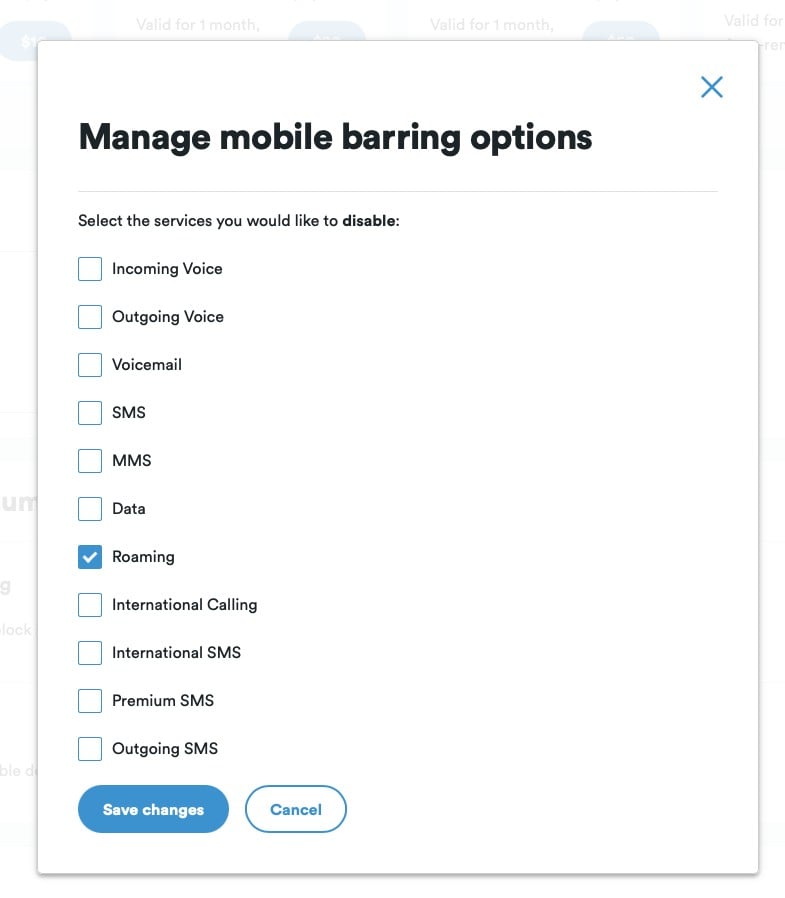
Even though setting mobile barring for roaming, the SIM will attach to the mobile network. 2D will generally roam on all three networks.

However when it works, it works :) 
Loose lips may sink ships - Be smart - Don't post internal/commercially sensitive or confidential information!
OldGeek:
SpartanVXL:
The gist is to set your 2D sim to manual network selection. When you land overseas it will fail to connect as 2D doesn’t exist, the sim will fallback to whichever data connection is available. If you have another active (e)sim then it will use that or wifi if connected.
You can disable data roaming on the 2d sim just in case, whatever you do don’t turn off manual selection when your overseas.
I put this question to 2D mobile support. Once I weeded out all the weasel words and marketing-speak, the answer is no. WIFI calling works only over a wifi network, so it will not use the 'mobile data' provided with a travel esim. Wifi calling requires an active wifi internet connection - cellular data will never be used.
The workaround is therefore to hotspot from on my phone (which has the travel esim) to my wife's phone (which will see the hotspot as a wifi network) and this will activate wifi calling on her phone.
Disregard what support told you. They can only say what is officially allowed which is that wifi calling only works on wifi.
If you search online you can easily verify that it works on iphone with a secondary (e)sim.
SpartanVXL:
Disregard what support told you. They can only say what is officially allowed which is that wifi calling only works on wifi.
If you search online you can easily verify that it works on iphone with a secondary (e)sim.
I did search online - but there was no specific results applicable to 2D. I hope you are right and I intend to test this. Communication from 2D is via email, and if they are wrong I will let them know.
--
OldGeek.
Quic referal code: https://account.quic.nz/refer/581402 and use this code for free setup: R581402E48MJA
OldGeek:
SpartanVXL:
The gist is to set your 2D sim to manual network selection. When you land overseas it will fail to connect as 2D doesn’t exist, the sim will fallback to whichever data connection is available. If you have another active (e)sim then it will use that or wifi if connected.
You can disable data roaming on the 2d sim just in case, whatever you do don’t turn off manual selection when your overseas.
I put this question to 2D mobile support. Once I weeded out all the weasel words and marketing-speak, the answer is no. WIFI calling works only over a wifi network, so it will not use the 'mobile data' provided with a travel esim. Wifi calling requires an active wifi internet connection - cellular data will never be used.
The workaround is therefore to hotspot from on my phone (which has the travel esim) to my wife's phone (which will see the hotspot as a wifi network) and this will activate wifi calling on her phone.
@oldGeek Zero chance of 2degrees offering support on what you want to achieve, not sure why you think they would 🤔
Linux:
@oldGeek Zero chance of 2degrees offering support on what you want to achieve, not sure why you think they would 🤔
Not sure what your point is - I asked and they responded. Time will tell if their answer is correct.
--
OldGeek.
Quic referal code: https://account.quic.nz/refer/581402 and use this code for free setup: R581402E48MJA
OldGeek:
Linux:
@oldGeek Zero chance of 2degrees offering support on what you want to achieve, not sure why you think they would 🤔
Not sure what your point is - I asked and they responded. Time will tell if their answer is correct.
@oldGeek 2degrees can't support if you connect to a Wi-Fi network and Wi-Fi calling does not. They may offer suggestions but some Wi-Fi networks will block Wi-Fi calling capability
OldGeek:
SpartanVXL:
Disregard what support told you. They can only say what is officially allowed which is that wifi calling only works on wifi.
If you search online you can easily verify that it works on iphone with a secondary (e)sim.
I did search online - but there was no specific results applicable to 2D. I hope you are right and I intend to test this. Communication from 2D is via email, and if they are wrong I will let them know.
Your question is not related to the carrier (2D). It is related to your handset (iPhone), the answer is yes it can do this. The only relevant point is whether 2D allow wifi calling while you are overseas.
So an update based on actual experience here in Tasmania.
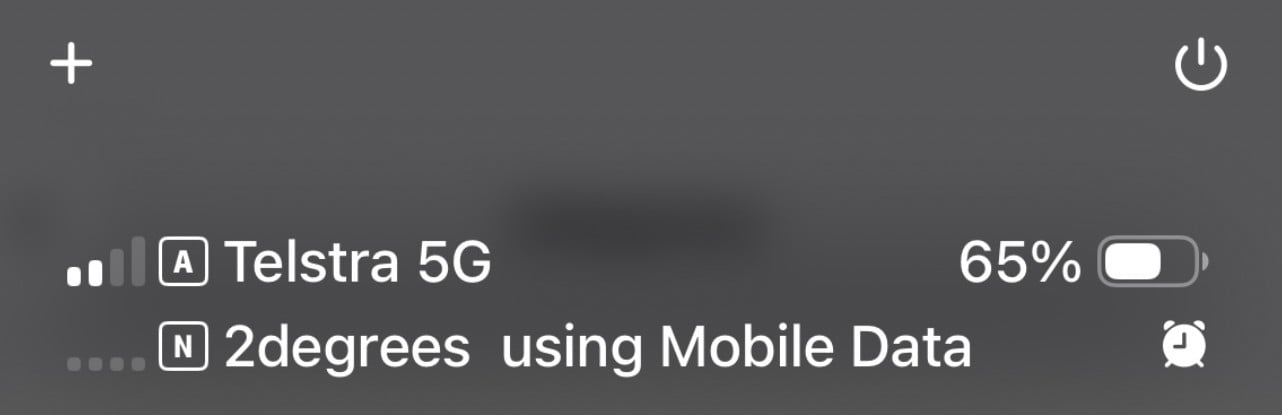
I started with the core settings suggested by @SpartanVXL. I am running with Airplane mode off. These are my Iphone settings (IOS 26) under settings/mobile:
I have two eSIMs - 'Personal' and 'Bcengi'. 'Personal' is my personal eSIM with my 2D credentials, 'Bcengi' is my travel eSIM.
Personal: 'Mobile Plan Label' is 'Personal', 'Turn on this Line is ON. 'Network Selection' is '2 Degrees WiFi Calling' (auto selection is OFF). Wi-Fi Calling is ON. All other options are default prior settings that I do not believe have any effect on what I am doing here. These settings are largely what was used in NZ - except that 'Network Selection' is no longer 'Auto' and this prevents roaming charges as @SpartanVXL posted.
Bcengi: 'Mobile Plan Label' is 'Bcengi', 'Turn on this Line is ON outside NZ, OFF in NZ. 'Network Selection' is 'Yes Optus' (auto selection is OFF, Optus is the sole Bcengi listed service provider for Bcengi in Australia, setting a specific service provider inhibits accidental activation outside Australia). Wi-Fi Calling is ON. All the other settings are defaults.
One unexpected outcome is that when I am connected to a WiFi network in Oz, it seems that data continues to log against the Bcengi Sim - however this may simply be a Bcengi data reporting lag. I am connected to WiFi networks for such short periods that incrementing data reported by Bcengi may simply be catchup before the WiFi connection occurred. As am logging less than $1NZ per day of data, connecting to WiFi networks is simply not worth the bother in restaurants etc. I will test further with overnight accommodation WiFi.
--
OldGeek.
Quic referal code: https://account.quic.nz/refer/581402 and use this code for free setup: R581402E48MJA
Update no 2: Phone calls from Ozzie numbers get an error. Texts work OK. I got my Sydney-based Son to try to call me and it failed with a message 'your international roaming pack does not cover calling in the country'. He thinks the message originates from his telco, not mine (2D). I am not sure how he arrived at that conclusion.
If there are settings on either Personal or Bcengi that affect this it is not obvious to me.
The problem occurred when one of my hotels tried to phone me.
--
OldGeek.
Quic referal code: https://account.quic.nz/refer/581402 and use this code for free setup: R581402E48MJA
Update 3: Back in NZ now. The total costs (2 x Bcengi sims) for 12 days away was around $US4. For this we got coverage 24/7 for data, calling and txts, except that I could not receive calls from Australian numbers (I could call Australian numbers though). So unlike having Australian sims, anyone calling our NZ numbers got through. I also made prolific use of both Apple and Google maps (through carplay to the car's media display).
Given that the equivalent roaming charges would have been $NZ16 per day for both phones, the Bcengi e-sims (or similar) are a good deal. The remaining $US16 does not expire so will be used in the future. The only complication is that attention is needed to turning on and off the travel e-sims (to avoid using NZ data prior to and after the trip).
--
OldGeek.
Quic referal code: https://account.quic.nz/refer/581402 and use this code for free setup: R581402E48MJA
So to confirm, you gave the Australian companies your NZ phone number, and they couldn't call you on it? Or is there a phone number associated with the "Bcengi" that couldn't be called? Looking for an alternative to the eSIM I used last time I was in Australia and incoming calls need to work.
People often mistake me for an adult because of my age.
Keep calm, and carry on posting.
Referral Links: Sharesies -
Are you happy with what you get from Geekzone? If so, please consider supporting us by subscribing.
No matter where you go, there you are.
Stu:
So to confirm, you gave the Australian companies your NZ phone number, and they couldn't call you on it? Or is there a phone number associated with the "Bcengi" that couldn't be called? Looking for an alternative to the eSIM I used last time I was in Australia and incoming calls need to work.
The former. The Bcengi e-sim has no number, it is data only, usable to 200+ countries with a single provider is each country (AFAIK, Spark in NZ, OPTUS in Oz).
The problem with Australians calling my NZ number was tested by my Sydney-based Son - he reports the error message was that 'this number does not have a roaming agreement that allows calls from this number' or weird words to that effect. He has a cellphone number only, and I don't know which Telco he uses. My son reckons the voice resembled the one he normally hears errors from when calling, indicating it came from his Telco instead of 2D. One of my accommodation providers could not call me. Both could respond to texts I sent them.
--
OldGeek.
Quic referal code: https://account.quic.nz/refer/581402 and use this code for free setup: R581402E48MJA
|
|
|