Geekzone: technology news, blogs, forums
Guest
Welcome Guest.
You haven't logged in yet. If you don't have an account you can register now.


Acrux

56 posts

Master Geek
+1 received by user: 3


#72414 25-Nov-2010 23:20
Send private message

I am looking at buying a good quality monitor to do resonably good colour grading. I am not using this for commercial work so it does not have to perfect. I do have a Spyder3 colour analyser so I can do a fair amount of sorting myself.

The idea was to get a 32" Samsung 6900 series LED TV which is 1920 x 1080 and seems to have fantastic blacks and rich colours compared to all the others I have looked at and connect it to my Laptop which has a HDMI output. It is of course an IPS screen so the off axis viewing is much better than most of the rubbish we normally use.

Hopefull outcome, huge screen with reasonalbe resolution, wide viewing range and good colour balance.




PC               Core i7 920, Asus P6T motherboard, 6 Gb RAM
Capture      HVR-2200
Video          Gigabyte GTX260
Software     Win 7 64bit, Windows Media Center, Big Screen EPG


Create new topic
b0untypure1
1427 posts

Uber Geek
+1 received by user: 18


  #410040 26-Nov-2010 20:15
Send private message

done my research and sounds like a beautiful screen mate !
i would say LG make good monitors...but IPS sounds awesome and expensive . hope it looks great!!


"IPS - in-plane switching.... the liquid crystals are aligned horizontally instead of on an angle. This procress greatly increases vertical viewing angles. When coupled with the high brightness and contrast of the glaretype displays, color reproduction is almost perfect. Basically it becomes a 1/4" professional graphics flat CRT monitor.... which is why the display is primarily for those in professional graphics."


gz ftw


Acrux

56 posts

Master Geek
+1 received by user: 3


  #412778 4-Dec-2010 11:42
Send private message

Well I have had the new screen for a few days now and all I can say is wow!

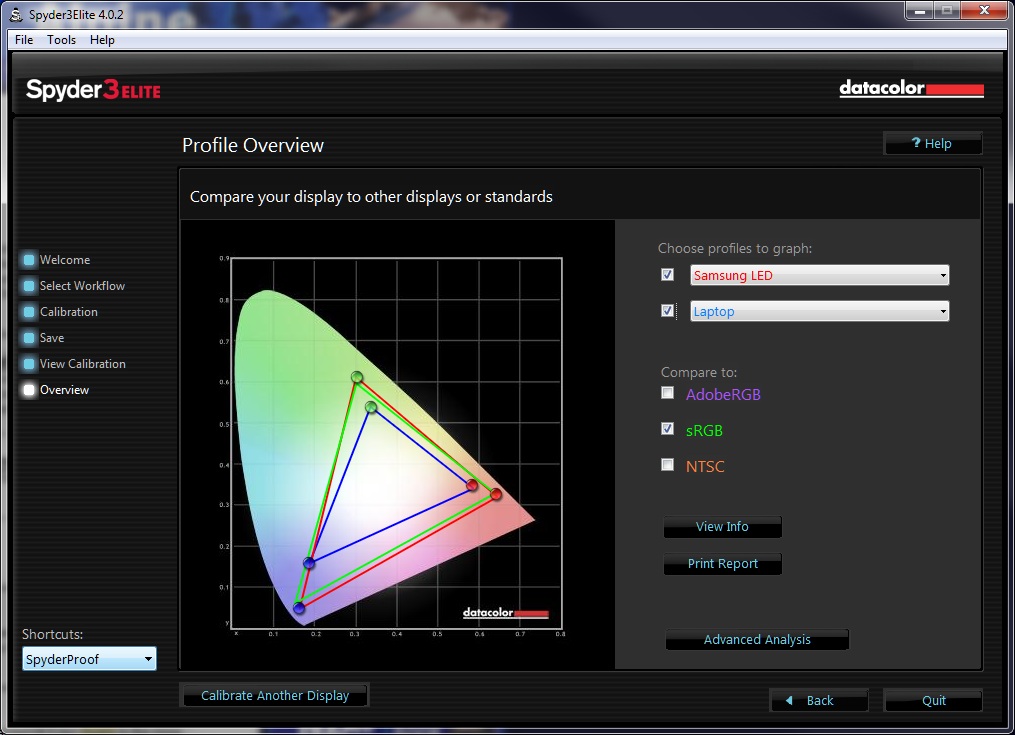
It took me a while as I needed to update the ATI video drivers. Using the generic windows drivers the picture didn't fill the screen. I put my Spyder3 colour analyser on and it hardly had to make any adjustments. The picture is bright and the greys look very natural and track well with brightness changes. I am trying (but failing) to find the colourimetery diagram again but it was very close to sRGB my laptop monitor was miles out

https://cdn.geekzone.co.nz/imagessubs/275554c293909172be5b27b769d5f235.jpg


PC               Core i7 920, Asus P6T motherboard, 6 Gb RAM
Capture      HVR-2200
Video          Gigabyte GTX260
Software     Win 7 64bit, Windows Media Center, Big Screen EPG


Acrux

56 posts

Master Geek
+1 received by user: 3


  #412783 4-Dec-2010 12:04
Send private message


This is a plot of the Laptop and the Samsung vs the sRGB color profile. It is almost perfect! 


PC               Core i7 920, Asus P6T motherboard, 6 Gb RAM
Capture      HVR-2200
Video          Gigabyte GTX260
Software     Win 7 64bit, Windows Media Center, Big Screen EPG


Create new topic


Geekzone Live »

Try automatic live updates from Geekzone directly in your browser, without refreshing the page, with Geekzone Live now.


Are you subscribed to our RSS feed? You can download the latest headlines and summaries from our stories directly to your computer or smartphone by using a feed reader.