Geekzone: technology news, blogs, forums
Guest
Welcome Guest.
You haven't logged in yet. If you don't have an account you can register now.


Filter this topic showing only the reply marked as answer View this topic in a long page with up to 500 replies per page Create new topic
1 | 2 | 3 | 4 | 5
Apsattv

2452 posts

Uber Geek
+1 received by user: 724


  #1416562 30-Oct-2015 03:29
Send private message

All streams for other regions available if there is any interest I will add them


Apsattv

2452 posts

Uber Geek
+1 received by user: 724


  #1416563 30-Oct-2015 03:37
Send private message

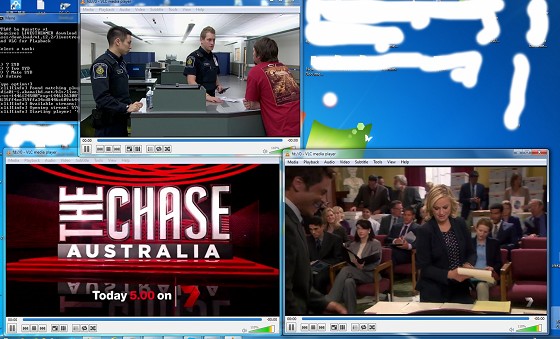
Example
all 3 channels running


littleheaven
2130 posts

Uber Geek
+1 received by user: 327


  #1416677 30-Oct-2015 09:28
Send private message

I need to learn how to do this. It requires VLC for desktop?


Geek girl. Freelance copywriter and editor at Unmistakable.co.nz.


Jaxson
8172 posts

Uber Geek
+1 received by user: 1332

Trusted

  #1416877 30-Oct-2015 11:34
Send private message

It's not working for me.
Page loads ok, but I can't see NZ on the list to set the region.
It's just full of Australian regions?

Apsattv

2452 posts

Uber Geek
+1 received by user: 724


  #1417282 30-Oct-2015 19:13
Send private message

Yes, the source page https://au.tv.yahoo.com/plus7/live/

they are geo blocked on the live streams, however, I've given a work around in the other post. I will update it later with a new .bat file that lists all the streams including the regionalized feeds.

Also I've passed on all the streams to a KODI addon maker and it shouldn't be long before there is a new addon


Apsattv

2452 posts

Uber Geek
+1 received by user: 724


  #1417284 30-Oct-2015 19:13
Send private message

littleheaven: I need to learn how to do this. It requires VLC for desktop?


Yes for the workaround.

Needs VLC and the Livestreamer program


Support Geekzone with one-off or recurring donations Donate via PressPatron.
Apsattv

2452 posts

Uber Geek
+1 received by user: 724


  #1417452 31-Oct-2015 01:37
Send private message

7PLAY-V3 You need VLC for playback You also need to install livestreamer

https://github.com/chrippa/livestreamer/releases/download/v1.12.2/livestreamer-v1.12.2-win32-setup.exe

Then download and Unrar my .bat file and click to start it, choose the channel via keyboard number for the region you want.

https://mega.nz/#!1NZnAKiB!FPAYdnjr8mt5eFAabnTrP-KQre89gbeam26Xd460umI


peejayw
1913 posts

Uber Geek
+1 received by user: 123


  #1417505 31-Oct-2015 06:01
Send private message

Apsattv>Also I've passed on all the streams to a KODI addon maker and it shouldn't be long before there is a new addon


Sounds interesting, where can we see it?


 I'm supposed to respect my elders, but it's getting harder and harder for me to find one now.


Jordan2004
24 posts

Geek
+1 received by user: 1


  #1417766 31-Oct-2015 17:34
Send private message

Thanks Asphattv

Got ur Syd codes working in a .bat file just fine :)

Your regional list didn't work for me though.

Apsattv

2452 posts

Uber Geek
+1 received by user: 724


  #1417777 31-Oct-2015 18:32
Send private message

Jordan2004: Thanks Asphattv

Got ur Syd codes working in a .bat file just fine :)

Your regional list didn't work for me though.


Try the version 3 as uploaded on the mega link. Just tested it working fine, on all regionals


Rikkitic
Awrrr
19063 posts

Uber Geek
+1 received by user: 16302

Lifetime subscriber

  #1417786 31-Oct-2015 19:02
Send private message

littleheaven: I need to learn how to do this. It requires VLC for desktop?


I just got it working. It is actually pretty easy. I installed Livestreamer and ran the exe. Also downloaded and ran latest VLC and clicked on the Stream options. Then I ran the batch file and chose one of the options. After a few moments the stream started on VLC. Easy to do without a clue about how it works.


Plesse igmore amd axxept applogies in adbance fir anu typos


Shop now for Lego sets and other gifts (affiliate link).
Rikkitic
Awrrr
19063 posts

Uber Geek
+1 received by user: 16302

Lifetime subscriber

  #1417790 31-Oct-2015 19:05
Send private message

Apsattv: 7PLAY-V3 You need VLC for playback You also need to install livestreamer

https://github.com/chrippa/livestreamer/releases/download/v1.12.2/livestreamer-v1.12.2-win32-setup.exe

Then download and Unrar my .bat file and click to start it, choose the channel via keyboard number for the region you want.

https://mega.nz/#!1NZnAKiB!FPAYdnjr8mt5eFAabnTrP-KQre89gbeam26Xd460umI


You deserve many plus 1's for this. I gave as many as I could.


Plesse igmore amd axxept applogies in adbance fir anu typos


Apsattv

2452 posts

Uber Geek
+1 received by user: 724


  #1417887 31-Oct-2015 20:45
Send private message

This should work as well if you need to record something


Recording a live stream With VLC player


Have the stream playing in VLC player.
Open the media menu. Then select “Convert/Save”.
In the “Open Media” dialog window, select the “Network” menu.
For the network URL, enter “fd://0″ (without the quotes).
Click “Convert/Save” at the bottom of the “Open Media” dialog window.
In the “Convert” dialog window that next appears, you should see “fd://0″ as the Source.
At the bottom of the “Convert” dialog window, enter where you want to save stream. Then click “Start”.
You can change the Settings in the “Convert” dialog window to use a different codec, if desired. By default, VLC will use the H.264 and MP3 codecs to save to an MP4 file.


garbonzai
317 posts

Ultimate Geek
+1 received by user: 51


  #1417890 31-Oct-2015 21:04
Send private message

Sorry, I don't get this, I have VLC player open but I don't know what to do in it, live streamer is installed but don't see it anywhere, then I click the 7PLAY-V3 bat file and the below message is in the CMD.

Any detailed instructions please.


Type option:1
'livestreamer' is not recognized as an internal or external command,
operable program or batch file.
Press any key to continue . . .


Rikkitic
Awrrr
19063 posts

Uber Geek
+1 received by user: 16302

Lifetime subscriber

  #1417902 31-Oct-2015 21:43
Send private message

Livestreamer should be in Program Files if it is installed. Navigate to the folder with Explorer then click on the .exe file to run it. Then run VLC and select the Stream option from the File menu. After that the batch file should work.


Plesse igmore amd axxept applogies in adbance fir anu typos


1 | 2 | 3 | 4 | 5
Filter this topic showing only the reply marked as answer View this topic in a long page with up to 500 replies per page Create new topic


Geekzone Live »

Try automatic live updates from Geekzone directly in your browser, without refreshing the page, with Geekzone Live now.


Are you subscribed to our RSS feed? You can download the latest headlines and summaries from our stories directly to your computer or smartphone by using a feed reader.