Geekzone: technology news, blogs, forums
Guest
Welcome Guest.
You haven't logged in yet. If you don't have an account you can register now.


View this topic in a long page with up to 500 replies per page Create new topic
1 | 2 
Sidestep
1019 posts

Uber Geek
+1 received by user: 567

Lifetime subscriber

  #2400311 17-Jan-2020 06:13
Send private message

I (in Canada but I'm sure they're available in NZ) recently installed front & rear Garmin Cams in my wife's little Jeep Patriot buzzbox.
A '56' in front, and a rear facing 'mini' - bought as Black Friday bargains back in November.

Placement - on this vehicle at least - took a bit of trial and error. I wanted them both to look out through a glass area swept by the wipers, and the rear window had defroster wires that had to be avoided.
Once I found the sweet spots it was just 'peel & stick'. The mini's mount is more or less permanently fixed, the 56 has a 'stick on' magnetic mount.

Both cameras are relatively small & inconspicuous. They both required microSD's (not included) which were cheap on Amazon.

The included USB cables and dual auxiliary power point -cigarette lighter - USB adaptors that come with the units are pretty clunky.

We used them for initially setting the cameras up, but I'll be removing them & hard wiring the cameras into the car's wiring to take advantage of 'parking mode' and free up the power outlets as soon as I have some time.

Each camera came with a 'short' and 'long' power cord, the 'long' one (at 4m) wasn't long enough to reach from the rear window of the (small) car to the aux power point while being tucked away inside the paneling so I had to bodge it up..


Once stuck in place & powered on, both cameras connected straight to the Garmin Drive app on my phone (about 20 seconds total) and just started working.

After a week wifey got me to turn the forward collision warning system, go alerts and the lane departure warning system features off. They seemed to work fine but she found the gentle chirping and orange warning screen 'annoying' as they went off continuously during her crazy morning commute.
She said the red light and speed camera warnings seemed pretty hit-and-miss. Got camera'd the week after we installed them - a warning came but 'after' the speed camera - so not something you'd rely on, though I haven't had time to really test them out yet. The Cam's speed, time and location readings seemed spot on when I tested after install.


So yes I would buy again. I've previously just used cheap 'Aliexpress' cams, so a couple hundred $ for these seemed expensive, but easy plug and play with the app working so well, simple install and picture quality of these little cams seems to make them a good buy.


Rmani
295 posts

Ultimate Geek
+1 received by user: 98

ID Verified
Lifetime subscriber

  #2401291 18-Jan-2020 13:52
Send private message
lNomNoml
1842 posts

Uber Geek
+1 received by user: 521

ID Verified

  #2401294 18-Jan-2020 13:59
Send private message

billgates:


Viofo A129 Pro is really good value for money.


Agreed, I would recommend this then Blackvue if you have the money for it.


jarledb
Webhead
3319 posts

Uber Geek
+1 received by user: 1983

Moderator
ID Verified
Trusted
Lifetime subscriber

  #2401306 18-Jan-2020 14:44
Send private message

Rmani:


Just came across this on BlackVue


https://www.vice.com/en_us/article/wxedxb/blackvue-dashcams-users-location-tracked


From the article:


"BlackVue lets anyone create an account and then view a map of cameras that are broadcasting their location and live feed. This broadcasting is not enabled by default, and users have to select the option to do so when setting up or configuring their own camera."


So if you decide you want to share your location, people can see your location. 


Jarle Dahl Bergersen | Referral Links: Want $50 off when you join Octopus Energy? Use this referral code
Are you happy with what you get from Geekzone? Please consider supporting us by making a donation or subscribing.


gehenna
8667 posts

Uber Geek
+1 received by user: 3883

Moderator
Trusted
Lifetime subscriber

  #2415664 10-Feb-2020 18:07
Send private message

I picked up the Blackvue DR590-1CH on PB Tech's daily deal a few days ago, and it arrived this morning https://www.blackvue.com/dr590-1ch/


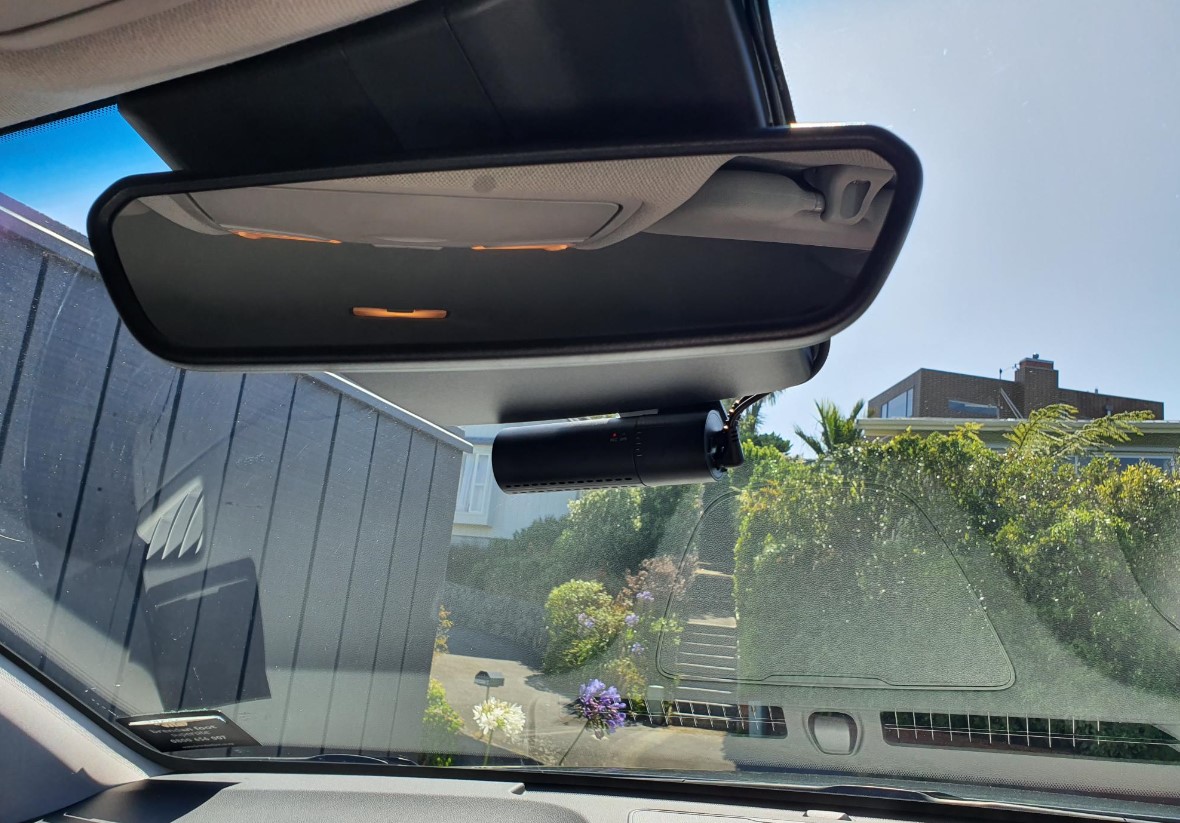
It's just a basic one, but it's replaced my Xiaomi dashcam that was never really installed properly - so I'm happy about that.  


Installation was a breeze and it's super slick and out of the way, I hardly notice it tbh compared to the big Xiaomi "camera" form factor.  It's way more noticeable in the picture, when I'm sitting in the car I can't see it in my eyeline behind the mirror.  The additional GPS module was a nice surprise when I opened the box - I hadn't noticed that was included when I made the purchase ($160 down from $220 IIRC).  Also very impressed that it came with a 32GB SD card out of the box.  


Obraik
2167 posts

Uber Geek
+1 received by user: 1347


  #2415718 10-Feb-2020 20:57
Send private message

gehenna:


I picked up the Blackvue DR590-1CH on PB Tech's daily deal a few days ago, and it arrived this morning https://www.blackvue.com/dr590-1ch/


It's just a basic one, but it's replaced my Xiaomi dashcam that was never really installed properly - so I'm happy about that.  


Installation was a breeze and it's super slick and out of the way, I hardly notice it tbh compared to the big Xiaomi "camera" form factor.  It's way more noticeable in the picture, when I'm sitting in the car I can't see it in my eyeline behind the mirror.  The additional GPS module was a nice surprise when I opened the box - I hadn't noticed that was included when I made the purchase ($160 down from $220 IIRC).  Also very impressed that it came with a 32GB SD card out of the box.  


Are you going to add the parking mode add-on to it for peace of mind in carparks?


Looking to buy a Tesla? Use my referral link and we both get credits


1 | 2 
View this topic in a long page with up to 500 replies per page Create new topic


Geekzone Live »

Try automatic live updates from Geekzone directly in your browser, without refreshing the page, with Geekzone Live now.


Are you subscribed to our RSS feed? You can download the latest headlines and summaries from our stories directly to your computer or smartphone by using a feed reader.