Geekzone: technology news, blogs, forums
Guest
Welcome Guest.
You haven't logged in yet. If you don't have an account you can register now.


schmoogol

77 posts

Master Geek
+1 received by user: 16

ID Verified

#314926 30-May-2024 01:05
Send private message

I have been attempting to troubleshoot some slow downloads from Xbox Live (these seem to come from assets1.xboxlive.com). In doing some digs, it appears that the Quic DNS servers sometimes change their mind about what the best source of files is, and this can drastically affect download speed. I found a link for a game to test on my server rather than trying to reproduce on my Xbox - apologies for all of the screenshots with tiny text. These results seem to correlate with what I'm seeing on the Xbox proper as well when I check which IP is being given by the DNS.


Here you can see a different response from each DNS.
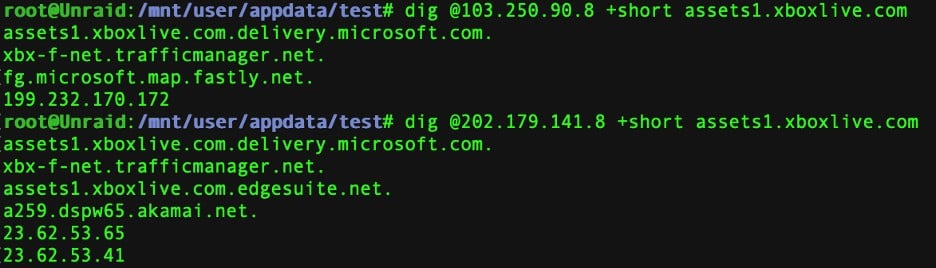
 

Poor download speed from the Fastly server.

 

Ubuntu download from 2degrees is pretty speedy right afterwards as a control.

 

Sometimes the DNS servers agree with one-another.
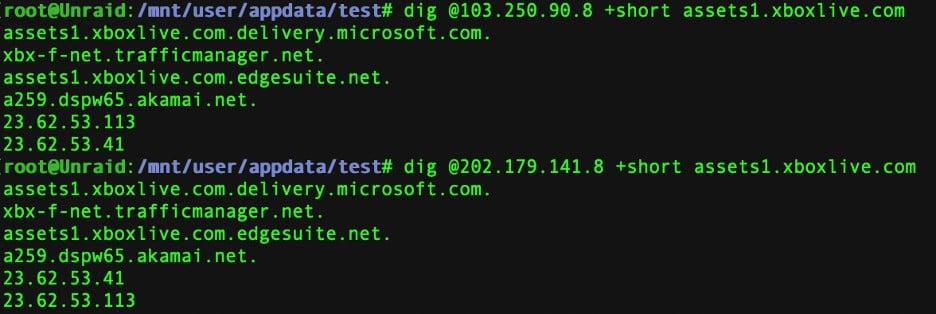
 

Akamai served download is pretty good.

 

Different responses from the DNS servers again.
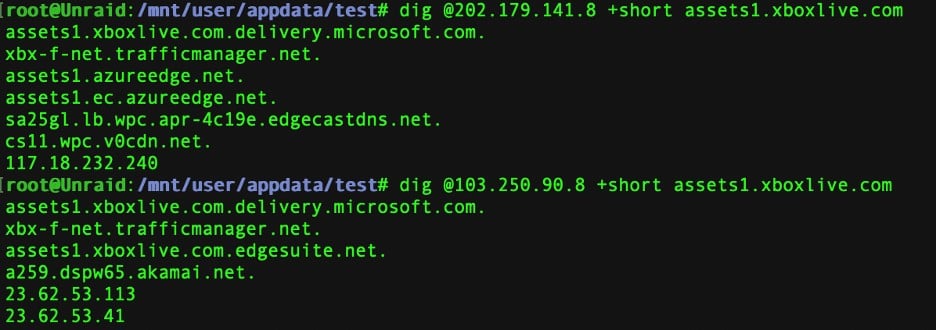
 

And poor download speeds from this one.

 

My question here is whether this is normal DNS behaviour. Do I just need to get lucky about which server IP I get or am I fundamentally doing something wrong here?


Filter this topic showing only the reply marked as answer Create new topic
muppet
2643 posts

Uber Geek
+1 received by user: 1660

Trusted

  #3242470 30-May-2024 02:14
Send private message

This is normal DNS behaviour if that's how someone has chosen to do things.  Probably MS don't "round robin" but use some other funky algo to decide what result they're going to give you.  But yes, you're seeing perfectly normal behaviour.


schmoogol

77 posts

Master Geek
+1 received by user: 16

ID Verified

  #3242545 30-May-2024 08:20
Send private message

Presumably it is also does some geographical estimation as well? If so, something must surely be going wrong when it returns me the Fastly IP (199.232.190.172), which seems to be going to some very distant location.


muppet
2643 posts

Uber Geek
+1 received by user: 1660

Trusted

  #3242702 30-May-2024 13:24
Send private message

schmoogol:Presumably it is also does some geographical estimation as well? If so, something must surely be going wrong when it returns me the Fastly IP (199.232.190.172), which seems to be going to some very distant location.


Trying to extract the "Secret Sauce" some of these people use to calculate what server they point you at is an impossible game.  I don't know, so I'm fully guessing here, but I expect your source IP, your geolocation, load on existing endpoints and probably even "who's cheaper to serve you" probably all play a mix in what you're returned as the endpoint to service your request.


3l3m3nt
120 posts

Master Geek
+1 received by user: 152

ID Verified
Trusted
Lifetime subscriber

  #3242751 30-May-2024 15:52
Send private message

Microsoft have been doing all sorts of weird stuff with their CDN's recently. There's a number of reddit threads on the matter. I had Microsoft pointing me at some USA IP addresses the other day, and this was outside of the Quic network.


Dunedin, NZ
Quic Broadband  | Rocket 1G/1G Hyperfibre (Yes, you read that right!)
Dunedin Live Webcam (4K) | Quic Smokepings


Referral Links:
Quic (use R282731EPGJMG on checkout for free setup, and to help me pay for my fast internet addiction)
Contact Energy (use FRTDD2R for $100 credit)


schmoogol

77 posts

Master Geek
+1 received by user: 16

ID Verified

  #3243223 31-May-2024 12:14
Send private message

I’m getting upwards of 300 ms on traceroutes to some of the IPs, which seems like I’m being directed even further than the US. Do any of the Reddit threads mention that Microsoft is aware of the problem, or it might be worth figuring out how to submit a bug report or equivalent directly to them?

schmoogol

77 posts

Master Geek
+1 received by user: 16

ID Verified

  #3246232 8-Jun-2024 16:12
Send private message

I continued to occasionally have this problem during the week so I have now resorted to doing a DNS rewrite of assets1.xboxlive.com to one of the local server IPs. This seems to have solved my download speed problem, at least temporarily.


Filter this topic showing only the reply marked as answer Create new topic


Geekzone Live »

Try automatic live updates from Geekzone directly in your browser, without refreshing the page, with Geekzone Live now.


Are you subscribed to our RSS feed? You can download the latest headlines and summaries from our stories directly to your computer or smartphone by using a feed reader.