Geekzone: technology news, blogs, forums
Guest
Welcome Guest.
You haven't logged in yet. If you don't have an account you can register now.


Filter this topic showing only the reply marked as answer View this topic in a long page with up to 500 replies per page Create new topic
1 | 2 | 3 | 4 | 5 | 6
Gordy7
gordy7
2001 posts

Uber Geek
+1 received by user: 505

ID Verified
Lifetime subscriber

  #3458663 4-Feb-2026 12:56
Send private message quote this post

Just noticed the IPv6 logo was not showing on GZ.


https://test-ipv6.com/ failed to show IPv6 address.


Restarted my Chrome browser... still no IPv6 logo on GZ


Turned off my Chorus ONT for 10 seconds and on again.


After my internet returned I had IPv6 with test and on GZ.


I am on Quic 100/20.


Gordy


My first ever AM radio network connection was with a 1MHz AM crystal(OA91) radio receiver.


amanzi

Amanzi
1354 posts

Uber Geek
+1 received by user: 331

ID Verified
Trusted
Lifetime subscriber

  #3458665 4-Feb-2026 13:00
Send private message quote this post

Gordy7:


Just noticed the IPv6 logo was not showing on GZ.


https://test-ipv6.com/ failed to show IPv6 address.


Restarted my Chrome browser... still no IPv6 logo on GZ


Turned off my Chorus ONT for 10 seconds and on again.


After my internet returned I had IPv6 with test and on GZ.


I am on Quic 100/20.


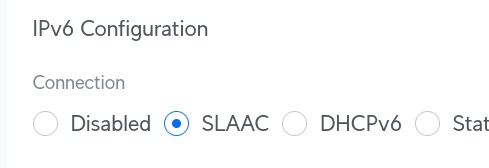
What type of router do you have? My IPv6 breaks fairly often (at least once per week) and I need to fiddle with my Unifi settings to get it back. For whatever reason, switching my Unifi between either DHCPv6 mode or SLAAC mode seems to fix it?


freitasm
BDFL - Memuneh
80646 posts

Uber Geek
+1 received by user: 41030

Administrator
ID Verified
Trusted
Geekzone
Lifetime subscriber

  #3458666 4-Feb-2026 13:02
Send private message quote this post

Interesting. My router never seems to lose IPv6 and it goes for a month or longer without a restart. But I read about some that seem to have constant up and downs.


Referral links: Quic Broadband (free setup code: R587125ERQ6VE) | Samsung | AliExpress | Wise | Sharesies 


Support Geekzone by subscribing (browse ads-free), or making a one-off or recurring donation through PressPatron.


Gordy7
gordy7
2001 posts

Uber Geek
+1 received by user: 505

ID Verified
Lifetime subscriber

  #3458668 4-Feb-2026 13:10
Send private message quote this post

amanzi:


What type of router do you have? My IPv6 breaks fairly often (at least once per week) and I need to fiddle with my Unifi settings to get it back. For whatever reason, switching my Unifi between either DHCPv6 mode or SLAAC mode seems to fix it?


Router I am using is a Grandstream GWN7062E I bought off Quic.


Running PPPoE and stateless DHCPv6.


Gordy


My first ever AM radio network connection was with a 1MHz AM crystal(OA91) radio receiver.


Gordy7
gordy7
2001 posts

Uber Geek
+1 received by user: 505

ID Verified
Lifetime subscriber

  #3458685 4-Feb-2026 13:41
Send private message quote this post

freitasm:


Interesting. My router never seems to lose IPv6 and it goes for a month or longer without a restart. But I read about some that seem to have constant up and downs.


I have only lost IPv6 a couple of times over the last couple of months.


As part of my diags a month ago I tried restarting my router which did not restore my IPv6.


Restarting my ONT only restores my IPv6.


Of course breaking my internet link by restarting my ONT does not entirely solve where the loss of my IPv6 occurred.


Edit: I have only been with Quic since the begining of December 2025 so I don't have a lot of history.


Gordy


My first ever AM radio network connection was with a 1MHz AM crystal(OA91) radio receiver.


Behodar
11094 posts

Uber Geek
+1 received by user: 6071

Trusted
Lifetime subscriber

  #3458686 4-Feb-2026 13:43
Send private message quote this post

freitasm:


Interesting. My router never seems to lose IPv6 and it goes for a month or longer without a restart. But I read about some that seem to have constant up and downs.


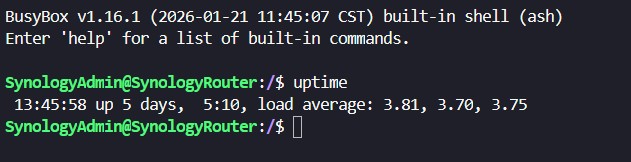
If I recall correctly, I have the same one (Synology RT6600ax). I'm not sure where to find the uptime but it's likely about a year, and IPv6 seems to be reliable.


Edit: It looks like there are some security updates available. I thought I was set up to get email notifications of them...


Shop on-line at New World now for your groceries (affiliate link).
freitasm
BDFL - Memuneh
80646 posts

Uber Geek
+1 received by user: 41030

Administrator
ID Verified
Trusted
Geekzone
Lifetime subscriber

  #3458689 4-Feb-2026 13:46
Send private message quote this post

Behodar:


freitasm:


Interesting. My router never seems to lose IPv6 and it goes for a month or longer without a restart. But I read about some that seem to have constant up and downs.


If I recall correctly, I have the same one (Synology RT6600ax). I'm not sure where to find the uptime but it's likely about a year, and IPv6 seems to be reliable.


Edit: It looks like there are some security updates available. I thought I was set up to get email notifications of them...


Mine was restarted a few days ago to install the latest OS update...


Referral links: Quic Broadband (free setup code: R587125ERQ6VE) | Samsung | AliExpress | Wise | Sharesies 


Support Geekzone by subscribing (browse ads-free), or making a one-off or recurring donation through PressPatron.


Gordy7
gordy7
2001 posts

Uber Geek
+1 received by user: 505

ID Verified
Lifetime subscriber

  #3458756 4-Feb-2026 14:34
Send private message quote this post

I have just updated my Quic Grandstream GWN7062E firmware.


It appears there were known bugs causing IPv6 dropouts.


Hopefully now fixed.


Gordy


My first ever AM radio network connection was with a 1MHz AM crystal(OA91) radio receiver.


Senecio
2851 posts

Uber Geek
+1 received by user: 3159

ID Verified
Lifetime subscriber

  #3458853 4-Feb-2026 20:15
Send private message quote this post

It was there yesterday for me, gone today. When I check my router it says I have an active IPv6 session?


freitasm
BDFL - Memuneh
80646 posts

Uber Geek
+1 received by user: 41030

Administrator
ID Verified
Trusted
Geekzone
Lifetime subscriber

  #3458854 4-Feb-2026 20:19
Send private message quote this post

What happens if you ping www.geekzone.co.nz? Does it use IPv4? Restarted your computer?


Referral links: Quic Broadband (free setup code: R587125ERQ6VE) | Samsung | AliExpress | Wise | Sharesies 


Support Geekzone by subscribing (browse ads-free), or making a one-off or recurring donation through PressPatron.


MaxineN
Max
2049 posts

Uber Geek
+1 received by user: 1662

ID Verified
Trusted
Subscriber

  #3458855 4-Feb-2026 20:19
Send private message quote this post

Fwiw I did not have ipv6 on Mercury the other day, but only specific to the [advertiser friendly word] cambium AP I run... Which if you know.. you know.


It did eventually start giving me global v6 addresses out again. Wired network was totally unaffected.


Not even gonna question why.


Ramblings from a mysterious lady who's into tech. Warning I may often create zingers.


Shop on-line at New World now for your groceries (affiliate link).
Technofreak
6656 posts

Uber Geek
+1 received by user: 3474

Trusted

  #3458858 4-Feb-2026 20:35
Send private message quote this post

Currently using Starlink, no IPv6.


Sony Xperia XA2 running Sailfish OS. https://sailfishos.org The true independent open source mobile OS 
Samsung Galaxy Tab S6
Dell Inspiron 14z i5


Xile
175 posts

Master Geek
+1 received by user: 31

ID Verified

  #3458905 5-Feb-2026 07:32
Send private message quote this post

Gordy7:


Just noticed the IPv6 logo was not showing on GZ.


https://test-ipv6.com/ failed to show IPv6 address.


Restarted my Chrome browser... still no IPv6 logo on GZ


Turned off my Chorus ONT for 10 seconds and on again.


After my internet returned I had IPv6 with test and on GZ.


I am on Quic 100/20.


Same thing happened to me yesterday. Same ISP and same router. Restarted ONT and IPV6 returned. My firmware on the router was already up to date. Interestingly I had a closer look at the router and the up time was 17 days and some hours but IPV6 had only been up for 17 hours so obviously had dropped out previously but I hadn't noticed.


Gordy7
gordy7
2001 posts

Uber Geek
+1 received by user: 505

ID Verified
Lifetime subscriber

  #3458921 5-Feb-2026 08:49
Send private message quote this post

I have IPvFoo on my Chrome Extensions which shows visited website IPv...


Gordy


My first ever AM radio network connection was with a 1MHz AM crystal(OA91) radio receiver.


Gordy7
gordy7
2001 posts

Uber Geek
+1 received by user: 505

ID Verified
Lifetime subscriber

  #3459388 6-Feb-2026 20:30
Send private message quote this post

IPv6 found missing again at 8pm. Don't know how long it has been out today.


IPv6 Test did not find an IPv6 address.


Tried restarting my computer.


Finally restarted my ONT. IPv6 back again.


Gordy


My first ever AM radio network connection was with a 1MHz AM crystal(OA91) radio receiver.


1 | 2 | 3 | 4 | 5 | 6
Filter this topic showing only the reply marked as answer View this topic in a long page with up to 500 replies per page Create new topic


Geekzone Live »

Try automatic live updates from Geekzone directly in your browser, without refreshing the page, with Geekzone Live now.


Are you subscribed to our RSS feed? You can download the latest headlines and summaries from our stories directly to your computer or smartphone by using a feed reader.