Geekzone: technology news, blogs, forums
Guest
Welcome Guest.
You haven't logged in yet. If you don't have an account you can register now.


Filter this topic showing only the reply marked as answer View this topic in a long page with up to 500 replies per page Create new topic
1 | 2 | 3 | 4 | 5 | 6
Xile
175 posts

Master Geek
+1 received by user: 31

ID Verified

  #3459448 7-Feb-2026 10:15
Send private message quote this post

Gordy7:


IPv6 found missing again at 8pm. Don't know how long it has been out today.


IPv6 Test did not find an IPv6 address.


Tried restarting my computer.


Finally restarted my ONT. IPv6 back again.


Your post prompted me to check my IPV6. Sure enough mine was also down. ONT reboot and back up.


Gordy7
gordy7
2001 posts

Uber Geek
+1 received by user: 505

ID Verified
Lifetime subscriber

  #3459451 7-Feb-2026 10:52
Send private message quote this post

Again Quic IPv6 out for me this morning.


Went thru some tests but in the wrong sequence but finally the ONT reboot restored my IPv6.


Gordy


My first ever AM radio network connection was with a 1MHz AM crystal(OA91) radio receiver.


fearandloathing
537 posts

Ultimate Geek
+1 received by user: 206

ID Verified
Lifetime subscriber

  #3459458 7-Feb-2026 12:01
Send private message quote this post

Im on Quic, using a UDM-PRO ipv6 stops working intermittently, sometimes after a short period of time sometimes longer.


To restore ipv6, I SSH into the UDM-PRO and run


```


sudo killall pppd


```


That fixes the IPv6 issue without any down time.


michaelmurfy
meow
13579 posts

Uber Geek
+1 received by user: 10910

Moderator
ID Verified
Trusted
Lifetime subscriber

  #3459462 7-Feb-2026 12:55
Send private message quote this post

Gordy7: Went thru some tests but in the wrong sequence but finally the ONT reboot restored my IPv6.


The ONT is simply a bridge. It shouldn't cause IPv6 to drop.


If a router reboot isn't fixing it and an ONT reboot is required then this is something else - you should log a problem report in the Quic portal.


I assume your router is also configured with IPoE (DHCP). If this is the case, reconfigure it with PPPoE (any username / password except blank) and see if that helps. Note, when coming from DHCP you'll need to wait 22mins for your lease to fully expire before PPPoE will establish.


Michael Murphy | https://murfy.nz
Referral Links: Quic Broadband (use R122101E7CV7Q for free setup)

Are you happy with what you get from Geekzone? Please consider supporting us by subscribing.
Opinions are my own and not the views of my employer.


farcus
1626 posts

Uber Geek
+1 received by user: 437


  #3459465 7-Feb-2026 12:58
Send private message quote this post

Gordy7:


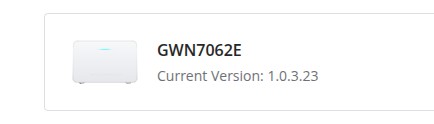
I have just updated my Quic Grandstream GWN7062E firmware.


It appears there were known bugs causing IPv6 dropouts.


Hopefully now fixed.


I am running an identical setup to you (Quic 100/20 with a GWN7062E) and not seeing any IPv6 dropouts


Xile
175 posts

Master Geek
+1 received by user: 31

ID Verified

  #3459469 7-Feb-2026 13:31
Send private message quote this post

michaelmurfy:


Gordy7: Went thru some tests but in the wrong sequence but finally the ONT reboot restored my IPv6.


The ONT is simply a bridge. It shouldn't cause IPv6 to drop.


If a router reboot isn't fixing it and an ONT reboot is required then this is something else - you should log a problem report in the Quic portal.


I assume your router is also configured with IPoE (DHCP). If this is the case, reconfigure it with PPPoE (any username / password except blank) and see if that helps. Note, when coming from DHCP you'll need to wait 22mins for your lease to fully expire before PPPoE will establish.


My IPV6 dropouts have all been on a PPoE configuration, so that doesn't seem to be the solution.


Shop now on AliExpress (affiliate link).
michaelmurfy
meow
13579 posts

Uber Geek
+1 received by user: 10910

Moderator
ID Verified
Trusted
Lifetime subscriber

  #3459475 7-Feb-2026 14:27
Send private message quote this post

@Xile: My IPV6 dropouts have all been on a PPoE configuration, so that doesn't seem to be the solution.


See the post above yours. Also log a problem record in the Quic portal if this configuration still doesn't work.


You shouldn't ever need to reboot your ONT...


Michael Murphy | https://murfy.nz
Referral Links: Quic Broadband (use R122101E7CV7Q for free setup)

Are you happy with what you get from Geekzone? Please consider supporting us by subscribing.
Opinions are my own and not the views of my employer.


Xile
175 posts

Master Geek
+1 received by user: 31

ID Verified

  #3459492 7-Feb-2026 16:07
Send private message quote this post

michaelmurfy:


@Xile: My IPV6 dropouts have all been on a PPoE configuration, so that doesn't seem to be the solution.


See the post above yours. Also log a problem record in the Quic portal if this configuration still doesn't work.


You shouldn't ever need to reboot your ONT...


Thanks. Same set up that I have. 


I have logged a problem report.


mdf

mdf
3566 posts

Uber Geek
+1 received by user: 1519

Trusted

  #3459498 7-Feb-2026 16:49
Send private message quote this post

I've been having weird connectivity issues for a couple of weeks on Voyager e.g. V slow image loads in some apps. My instinct was it was something IPv6 related but hadn't gotten to the bottom of it yet. Find this thread and lo and behold, no IPv6 in thr geekzone logo. Now I will feel even more guilty when I don't get around to sorting it out. 


Gordy7
gordy7
2001 posts

Uber Geek
+1 received by user: 505

ID Verified
Lifetime subscriber

  #3459577 7-Feb-2026 19:41
Send private message quote this post

michaelmurfy:


The ONT is simply a bridge. It shouldn't cause IPv6 to drop.


If a router reboot isn't fixing it and an ONT reboot is required then this is something else - you should log a problem report in the Quic portal.


I assume your router is also configured with IPoE (DHCP). If this is the case, reconfigure it with PPPoE (any username / password except blank) and see if that helps. Note, when coming from DHCP you'll need to wait 22mins for your lease to fully expire before PPPoE will establish.


I am not saying the ONT is the cause of the IPv6 drop. Simply, a reboot of the ONT restores a dropped IPv6.


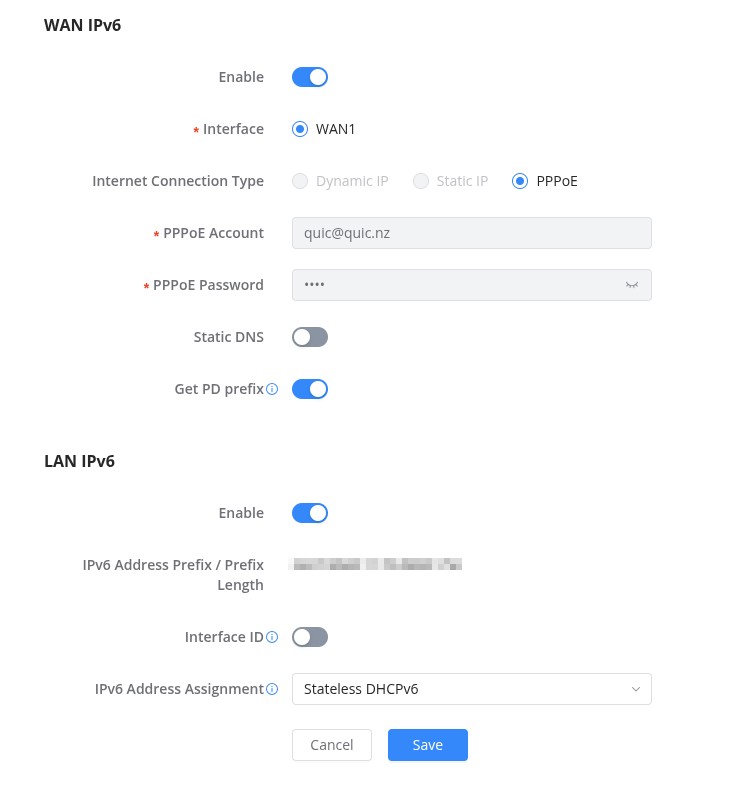
I am Using WAN IPv4 PPPoE


and WAN IPv6 PPPoE


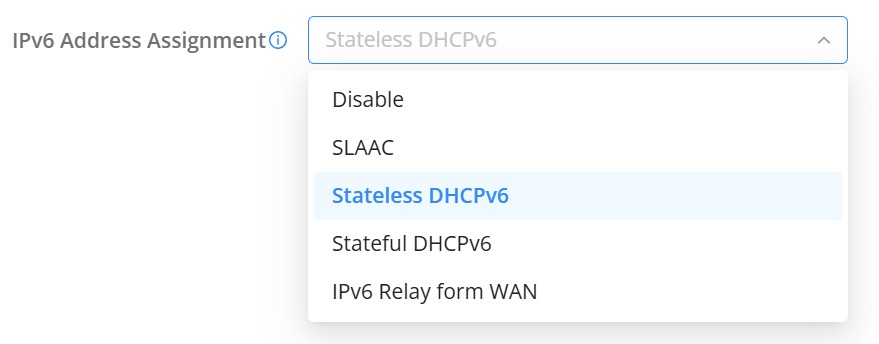
IPv6 Address Assignment: Stateless DHCPv6 (I think was the default)


What address assignment should I be using?


Using Quic Grandstream GWN7062E


Gordy


My first ever AM radio network connection was with a 1MHz AM crystal(OA91) radio receiver.


freitasm
BDFL - Memuneh
80652 posts

Uber Geek
+1 received by user: 41042

Administrator
ID Verified
Trusted
Geekzone
Lifetime subscriber

  #3459582 7-Feb-2026 20:07
Send private message quote this post

I am at MIL and had to restart her router to get IPv6 going again. Wellington region.


Referral links: Quic Broadband (free setup code: R587125ERQ6VE) | Samsung | AliExpress | Wise | Sharesies 


Support Geekzone by subscribing (browse ads-free), or making a one-off or recurring donation through PressPatron.


Shop now for Lenovo laptops and other devices (affiliate link).
freitasm
BDFL - Memuneh
80652 posts

Uber Geek
+1 received by user: 41042

Administrator
ID Verified
Trusted
Geekzone
Lifetime subscriber

  #3460423 11-Feb-2026 08:39
Send private message quote this post

My IPv6 at home dropped yesterday. I've restarted my router twice, disabled/enabled IPv6 in each VLAN and still nothing.


Referral links: Quic Broadband (free setup code: R587125ERQ6VE) | Samsung | AliExpress | Wise | Sharesies 


Support Geekzone by subscribing (browse ads-free), or making a one-off or recurring donation through PressPatron.


mdf

mdf
3566 posts

Uber Geek
+1 received by user: 1519

Trusted

  #3460460 11-Feb-2026 09:55
Send private message quote this post

So given the random assortment of IPv6 issues across people, places and providers... does that mean its a Chorus issue?


michaelmurfy
meow
13579 posts

Uber Geek
+1 received by user: 10910

Moderator
ID Verified
Trusted
Lifetime subscriber

  #3460489 11-Feb-2026 11:13
Send private message quote this post

mdf: So given the random assortment of IPv6 issues across people, places and providers... does that mean its a Chorus issue?


Could be.


But IPv6 is hard to get right. So many vendors doing different things. You can follow standards but different vendors treat standards differently. I've experienced hit and miss IPv6 with 2degrees, One NZ and Mercury.


Some examples - EdgeOS (Edgerouter / old UniFi Security Gateways) seems to be either terrible or great with IPv6 depending on provider. Mikrotik you can basically configure to work with anything and other routers like the Spark Smart Modem are hit and miss between providers.


It could be a Chorus issue but I doubt it is given people here are also using PPPoE. I know there is some new Wellington IPv6 issues with Quic right now that'll be fixed in the next maintenance window.


Michael Murphy | https://murfy.nz
Referral Links: Quic Broadband (use R122101E7CV7Q for free setup)

Are you happy with what you get from Geekzone? Please consider supporting us by subscribing.
Opinions are my own and not the views of my employer.


MaxineN
Max
2049 posts

Uber Geek
+1 received by user: 1663

ID Verified
Trusted
Subscriber

  #3460545 11-Feb-2026 11:31
Send private message quote this post

Not to be cheeky Michael...


But Wellington does always seem to be the problem child with v6 on the vetta network ;)


Ramblings from a mysterious lady who's into tech. Warning I may often create zingers.


1 | 2 | 3 | 4 | 5 | 6
Filter this topic showing only the reply marked as answer View this topic in a long page with up to 500 replies per page Create new topic


Geekzone Live »

Try automatic live updates from Geekzone directly in your browser, without refreshing the page, with Geekzone Live now.


Are you subscribed to our RSS feed? You can download the latest headlines and summaries from our stories directly to your computer or smartphone by using a feed reader.