|
|
|
Using a Synology router, IPv6 still going, no drops since the release work done yesterday.
Referral links: Quic Broadband (free setup code: R587125ERQ6VE) | Samsung | AliExpress | Wise | Sharesies
Support Geekzone by subscribing (browse ads-free), or making a one-off or recurring donation through PressPatron.

Having strange issues with IPv6 myself with Quic. All of a sudden stopped working. Tried a couple different config. Then all of a sudden it started working again -- but using PPPoE instead of DHCP. YMMV but I've had some feedback that it could be my EdgeRouter at fault so am looking into switching to a Microtik. Not WLG based though, oddly enough.
Join us in Mikrotik land... It's good here...
Ramblings from a mysterious lady who's into tech. Warning I may often create zingers.
KiwiSurfer:
Having strange issues with IPv6 myself with Quic. All of a sudden stopped working. Tried a couple different config. Then all of a sudden it started working again -- but using PPPoE instead of DHCP. YMMV but I've had some feedback that it could be my EdgeRouter at fault so am looking into switching to a Microtik. Not WLG based though, oddly enough.
I have a RB5009UPr+S+IN that I'll be listing on the "Offers and Wanted" forum soon, let me know if you're interested. I'm only using it as a dumb PoE switch at the moment, but looking to replace it with a Unifi switch soon.
In the midst of my IPv6 dropping i discovered in the logs that my Quic router was was giving warnings that it was exceeding 110C.
Router case was only warm to touch.
A Google search suggested the warning may be a false positive.
Quic are replacing my router.
Gordy
My first ever AM radio network connection was with a 1MHz AM crystal(OA91) radio receiver.
amanzi:
KiwiSurfer:
Having strange issues with IPv6 myself with Quic. All of a sudden stopped working. Tried a couple different config. Then all of a sudden it started working again -- but using PPPoE instead of DHCP. YMMV but I've had some feedback that it could be my EdgeRouter at fault so am looking into switching to a Microtik. Not WLG based though, oddly enough.
I have a RB5009UPr+S+IN that I'll be listing on the "Offers and Wanted" forum soon, let me know if you're interested. I'm only using it as a dumb PoE switch at the moment, but looking to replace it with a Unifi switch soon.
Unfourtently it needs to replace the tiny EdgeRouter that is currently in our comms cupboard so I'll be looking to get the smallest possible Microtik that has >=4 ports of GigE. Thanks for the offer. :)
MaxineN:
Join us in Mikrotik land... It's good here...
What is the model you are using?
Thanks.
Gordy
My first ever AM radio network connection was with a 1MHz AM crystal(OA91) radio receiver.
MichaelNZ:
Works for me and I have a different ISP path to the internet then any of the posters in this thread.
So, completely off topic then.
Referral links: Quic Broadband (free setup code: R587125ERQ6VE) | Samsung | AliExpress | Wise | Sharesies
Support Geekzone by subscribing (browse ads-free), or making a one-off or recurring donation through PressPatron.
Lucky I quoted because the person deleted the post.
Referral links: Quic Broadband (free setup code: R587125ERQ6VE) | Samsung | AliExpress | Wise | Sharesies
Support Geekzone by subscribing (browse ads-free), or making a one-off or recurring donation through PressPatron.
Gordy7:
MaxineN:
Join us in Mikrotik land... It's good here...
What is the model you are using?
Thanks.
I'm running an x86 RouterOS build that has a lot of 10 gig interfaces (copper and fibre) for maximum flexibility and I can route a lot of packets.
However. Do as I say, not as I do. Don't do what I did.
A hAP AX3 is a nice all in one from Mikrotik or if you want the home labbers favorite, it is the RB5009.
Ramblings from a mysterious lady who's into tech. Warning I may often create zingers.
A week ago, I switched to DHCP authentication from PPPoE, and my IPv6 connectivity has been solid since then.
Not sure if this is a Quic issue or an issue with my Unifi UCG-fiber? Might be worth others switching to DHCP auth too if still having issues.
My personal experience is PPPoE being solid, but different router.
Referral links: Quic Broadband (free setup code: R587125ERQ6VE) | Samsung | AliExpress | Wise | Sharesies
Support Geekzone by subscribing (browse ads-free), or making a one-off or recurring donation through PressPatron.
Had an email from Quic re IPv6 problems I reported;
"We believe that we have identified the issue here with DHCPv6 over IPoE. This is something we are now working on putting maintenance window in place for to get fixed and upgraded on our end."
I hadn't noticed this before . . .
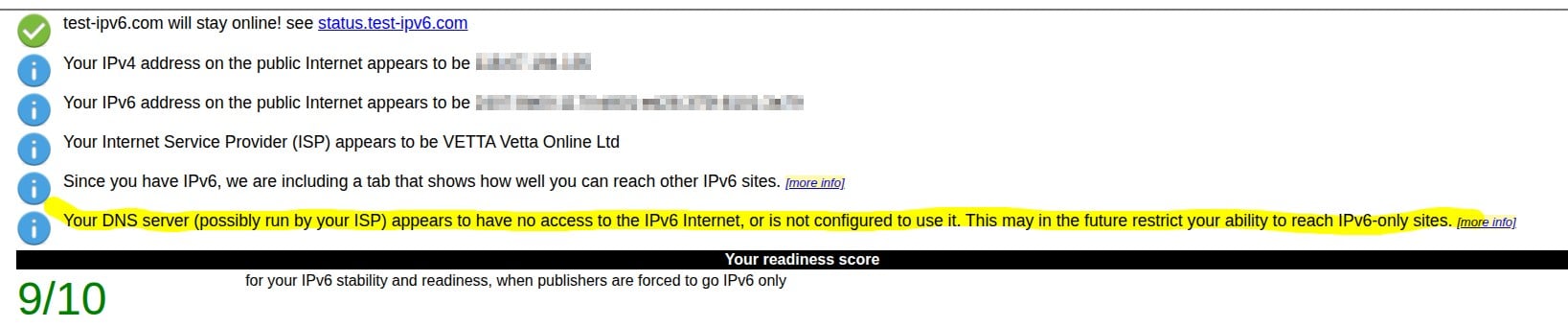
Is this correct and to be expected?
Using default Quic dns provided settings
(btw - this is now using a fritz 7490 instead of my gwn7062e - that threw a tantrum - I put my 7490 in line while I sorted out the probs with the grandstream but have decided to leave it in place for now as there is nothing wrong with it).

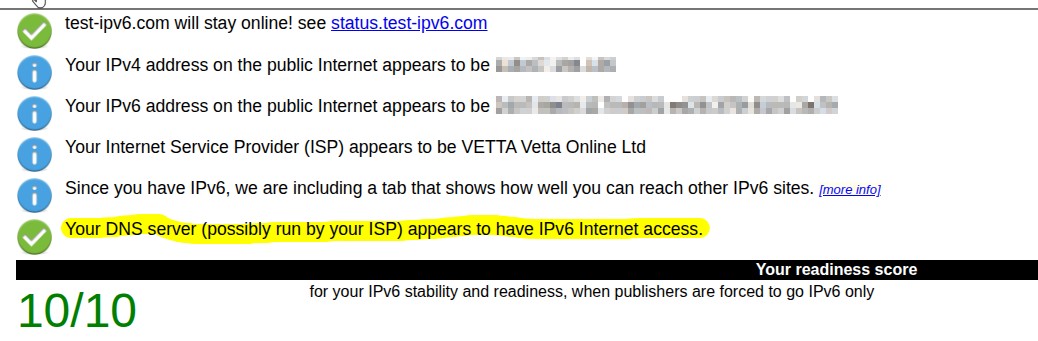
if I switch to Google's dns servers I get this
|
|
|