Geekzone: technology news, blogs, forums
Guest
Welcome Guest.
You haven't logged in yet. If you don't have an account you can register now.


View this topic in a long page with up to 500 replies per page Create new topic
1 | 2 | 3
HTPCnewbie

57 posts

Master Geek


  #157866 19-Aug-2008 00:34
Send private message

kiwijunglist: vista ultimate includes something even more powerful that system restore.
it includes something that allows you to do a backup image of the system drive, similar to the above programs.
however i have never used it myself, but google is your friend.


Thanks for the tip!  You may have saved me some $$$.

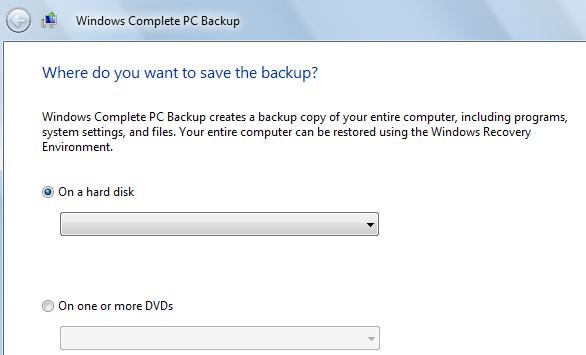
I've done a bit of research on the Internet and people are saying pretty favourable things about Vista Complete PC Backup.

Anyone out there want to scare me off using it before I take the plunge?  Any war stories?

Thanks.


Antec Fusion V2 case | Asustek P5E-VM | Intel E7200 2.5Ghz | 2Gb RAM | Seagate Barracuda 1Tb SATA HDD | ASUS NVIDIA 8600GT HDMI 256MB | Hauppauge HVR-2200 | Asus 20x SATA DVD | Windows 7 Home Premium 64bit


freitasm
BDFL - Memuneh
80682 posts

Uber Geek
+1 received by user: 41136

Administrator
ID Verified
Trusted
Geekzone
Lifetime subscriber

#157875 19-Aug-2008 03:31
Send private message

It does work. But it won't have all the features other programs have. For example Acronis allows you to restore to a different hardware configuration (of course you still need to activate if you do this), loading drivers, etc as you need it. And you can backup to a network drive (NAS, servers, etc) while the Windows solution requires an external drive - so lots of things.

Different programs, different capabilities. But if you need a simple backup/restore solution then it will work well.


Referral links: Quic Broadband (free setup code: R587125ERQ6VE) | Samsung | AliExpress | Wise | Sharesies 


Support Geekzone by subscribing (browse ads-free), or making a one-off or recurring donation through PressPatron.


exportgoldman
1202 posts

Uber Geek
+1 received by user: 3

Trusted

  #158114 19-Aug-2008 20:15
Send private message

freitasm: It does work. But it won't have all the features other programs have. For example Acronis allows you to restore to a different hardware configuration (of course you still need to activate if you do this), loading drivers, etc as you need it. And you can backup to a network drive (NAS, servers, etc) while the Windows solution requires an external drive - so lots of things.

Different programs, different capabilities. But if you need a simple backup/restore solution then it will work well.


As much as I hate to flag the Windows flag, Vista's full PC backup is actually quite powerful, I'm pretty sure you can send it to a network drive/NAS box and Vista will usually boot and demand drivers on different hardware, or you can run through a setup/repair.

Not the super quick easy Actronis/Shadowprotect but still great for a builtin Windows feature (but only in certain Vista versions - stink!)


Tyler - Parnell Geek - iPhone 3G - Lenovo X301 - Kaseya - Great Western Steak House, these are some of my favourite things.


manhinli
2483 posts

Uber Geek
+1 received by user: 4

Trusted

  #158118 19-Aug-2008 20:22
Send private message

I've used Windows Vista's Complete PC Backup - and it works fine (though slowly in comparison to any other backup solution)

In the case of an emergency, pop the Vista setup disc in, and start the restore process from there (and if I remember properly, it'll ask for the last disc to be placed in before starting the restore - a bit odd...)

I would definitely recommend to get dedicated software - far more features, flexibility, and more importantly, recovery tools. I'm now using a free version of Paragon's Drive Backup 8.5 software from a magazine (great places to get free versions of paid software) - and backup and restore is a breeze.


Find me on Twitter!

I posted 1, 2 x 10^3 times!

freitasm
BDFL - Memuneh
80682 posts

Uber Geek
+1 received by user: 41136

Administrator
ID Verified
Trusted
Geekzone
Lifetime subscriber

#158121 19-Aug-2008 20:24
Send private message

exportgoldman: As much as I hate to flag the Windows flag, Vista's full PC backup is actually quite powerful, I'm pretty sure you can send it to a network drive/NAS box and Vista will usually boot and demand drivers on different hardware, or you can run through a setup/repair.


The Windows Vista backup is for local drives only. It won't copy to the network.


Referral links: Quic Broadband (free setup code: R587125ERQ6VE) | Samsung | AliExpress | Wise | Sharesies 


Support Geekzone by subscribing (browse ads-free), or making a one-off or recurring donation through PressPatron.


bigal_nz
635 posts

Ultimate Geek
+1 received by user: 32
Inactive user


#158130 19-Aug-2008 20:47
Send private message

I have used:

Shadow Protect
Acronis
Ghost

I like Ghost because I have seen it image drives with errors that Acronis and SP wont do.

If you are not worried about that then Shadow Protect is awsome.

-Al


Want to support Geekzone and browse the site without the ads? Subscribe to Geekzone now (monthly, annual and lifetime options).
exportgoldman
1202 posts

Uber Geek
+1 received by user: 3

Trusted

  #158170 19-Aug-2008 22:10
Send private message

bigal_nz: I have used:
I like Ghost because I have seen it image drives with errors that Acronis and SP wont do.


I haven't used ghost in a while, can ghost now do online imaging of the system drives?


Tyler - Parnell Geek - iPhone 3G - Lenovo X301 - Kaseya - Great Western Steak House, these are some of my favourite things.

bigal_nz
635 posts

Ultimate Geek
+1 received by user: 32
Inactive user


  #158207 20-Aug-2008 05:54
Send private message

I dont think so. And dont get me wrong its got real limitations, like the only way to do a whole drive rather than partitions is to do a direct to direct clone.

But as I said before it seems very robust at imaging drives with bad sectors and other errors.

exportgoldman
1202 posts

Uber Geek
+1 received by user: 3

Trusted

  #160949 30-Aug-2008 20:21
Send private message

bigal_nz: I dont think so. And dont get me wrong its got real limitations, like the only way to do a whole drive rather than partitions is to do a direct to direct clone.

But as I said before it seems very robust at imaging drives with bad sectors and other errors.


Don't get me wrong, I love GHOST, I use it everyday, but after symantec brought it and left it to rot, it hasn't keep up with the times.

Shame really. Most powerful piece of software written under 1 Megabyte I reckon.


Tyler - Parnell Geek - iPhone 3G - Lenovo X301 - Kaseya - Great Western Steak House, these are some of my favourite things.

ChrisPenrose
11 posts

Geek


  #160970 31-Aug-2008 01:26
Send private message

I purchased Acronis 8.0 some years ago. I have found it a great tool, no issues.

In building up my HTPC I have now got 14 images of various hardware / software configurations.
I generally experiment with new drivers, players, codes etc until I get another baseline, or things turn to crap.
It takes about 3 minuites to reboot, restore to baseline and off you go again.

My image sizes range from 1.4GB to 1.6GB (XP SP3+.NET2,3,3.5+Catalyst+...)
I have XP on C: and the pagefile, IE cache etc on another partition.

browned
636 posts

Ultimate Geek
+1 received by user: 36


  #161200 1-Sep-2008 10:12
Send private message


wbadmin will backup to network by using command line. Great for scheduled task.

wbadmin start backup -backupTarget:\\myserver  backup include:c:,d:

Otherwise if you have a spare pc/server run Windows Home server and not worry about it ever again.

cheers
db

HP


Shop now for HP laptops and other devices (affiliate link).
HTPCnewbie

57 posts

Master Geek


  #162834 7-Sep-2008 16:45
Send private message

Thanks for all the advice everyone...

I ended up downloading a 15 day trial copy of Acronis, to test out.  I did a full backup and restore of my system partition, and it seems to have worked fine, however upon restart it did do a couple of strange things.

To all the Acronis users out there, is the normal following a restore of the system partition:
* Upon restart, Vista came up saying that Windows didn't shutdown correctly last time and asked me if I wanted to start in Safe Mode (I said no, start in normal mode)
* It then came up saying new hardware found - generic volume
* Once it had 'correctly installed' the new generic volume, it said I had to restart.

Following this, I ran a system reliability report, disk check, and disk defrag.  Everything looks fine, but I thought I would check with you guys.

Thanks.


Antec Fusion V2 case | Asustek P5E-VM | Intel E7200 2.5Ghz | 2Gb RAM | Seagate Barracuda 1Tb SATA HDD | ASUS NVIDIA 8600GT HDMI 256MB | Hauppauge HVR-2200 | Asus 20x SATA DVD | Windows 7 Home Premium 64bit

zimbonz
96 posts

Master Geek
+1 received by user: 1


  #163054 8-Sep-2008 12:46
Send private message

I use Shadowprotect also but I have one gripe about it. It claims to enable remote restores - but the only option for restoring, is to use the recovery disk? If the server is in a datacentre for eg, then remote restore still needs an onsite person to load the disk up  and make some selections before you can use VNC to connect to it.

I know Acronis alows you to create a partition on the disk, that you can boot to, and run the recovery form there - but not sure how well that would work as a remote recovery solution either.


amanzi
Amanzi
1355 posts

Uber Geek
+1 received by user: 335

ID Verified
Trusted
Lifetime subscriber

  #163056 8-Sep-2008 12:50
Send private message

zimbonz: I use Shadowprotect also but I have one gripe about it. It claims to enable remote restores - but the only option for restoring, is to use the recovery disk? If the server is in a datacentre for eg, then remote restore still needs an onsite person to load the disk up  and make some selections before you can use VNC to connect to it.

I know Acronis alows you to create a partition on the disk, that you can boot to, and run the recovery form there - but not sure how well that would work as a remote recovery solution either.


If the server has an RSA or ILO card, then you can load an ISO image of the restore CD and then kick off the restore all remotely.

zimbonz
96 posts

Master Geek
+1 received by user: 1


  #163058 8-Sep-2008 12:59
Send private message

Ah ok. Where would the ISO image be stored though? Also you will need the advanced version of the iLO license right, and is this an expensive option


1 | 2 | 3
View this topic in a long page with up to 500 replies per page Create new topic


Geekzone Live »

Try automatic live updates from Geekzone directly in your browser, without refreshing the page, with Geekzone Live now.


Are you subscribed to our RSS feed? You can download the latest headlines and summaries from our stories directly to your computer or smartphone by using a feed reader.