Geekzone: technology news, blogs, forums
Guest
Welcome Guest.
You haven't logged in yet. If you don't have an account you can register now.


timmmay

20859 posts

Uber Geek
+1 received by user: 5350

Trusted
Lifetime subscriber

#239553 23-Jul-2018 16:29
Send private message

I've put a new SSD hard drive into my Mums Lenovo E520 and installed fresh using the official Windows 10 recovery media. It's not booting quite right.


The Windows 10 logo shows up and the spinning circle starts spinning for a fraction of a second, but then stops spinning. To continue the boot I have to push any key - space and enter both work. Once I do that it boots normally and works fine.


This image shows the circle of dots, which is still / not animated.


Click to see full size


Any ideas how to resolve this? It's an annoying rather than a big problem.


Filter this topic showing only the reply marked as answer Create new topic
Oblivian
7345 posts

Uber Geek
+1 received by user: 2117

ID Verified

  #2061116 23-Jul-2018 16:37
Send private message

I was going to suggest verbose boot method. But doesn't appear to exist for W10 - in 7 it use to say what it was doing at the time and pause on the trouble


/edit may be for reghackage.. https://superuser.com/questions/1006850/how-to-boot-in-verbose-boot-for-windows-10 


msconfig, enable logging and view %SystemRoot%\ntbtlog.txt it seems.


timmmay

20859 posts

Uber Geek
+1 received by user: 5350

Trusted
Lifetime subscriber

  #2061376 23-Jul-2018 21:18
Send private message

Here's what comes out. My working PC looks much the same, though the bits that load and don't load are different.


Microsoft (R) Windows (R) Version 10.0 (Build 16299)
7 23 2018 21:14:16.493
BOOTLOG_LOADED \SystemRoot\system32\ntoskrnl.exe
BOOTLOG_LOADED \SystemRoot\system32\hal.dll
BOOTLOG_LOADED \SystemRoot\system32\kd.dll
BOOTLOG_LOADED \SystemRoot\system32\mcupdate_GenuineIntel.dll
BOOTLOG_LOADED \SystemRoot\System32\drivers\msrpc.sys
BOOTLOG_LOADED \SystemRoot\System32\drivers\ksecdd.sys
BOOTLOG_LOADED \SystemRoot\System32\drivers\werkernel.sys
BOOTLOG_LOADED \SystemRoot\System32\drivers\CLFS.SYS
BOOTLOG_LOADED \SystemRoot\System32\drivers\tm.sys
BOOTLOG_LOADED \SystemRoot\system32\PSHED.dll
BOOTLOG_LOADED \SystemRoot\system32\BOOTVID.dll
BOOTLOG_LOADED \SystemRoot\System32\drivers\FLTMGR.SYS
BOOTLOG_LOADED \SystemRoot\System32\drivers\clipsp.sys
BOOTLOG_LOADED \SystemRoot\System32\drivers\cmimcext.sys
BOOTLOG_LOADED \SystemRoot\System32\drivers\ntosext.sys
BOOTLOG_LOADED \SystemRoot\system32\CI.dll
BOOTLOG_LOADED \SystemRoot\System32\drivers\cng.sys
BOOTLOG_LOADED \SystemRoot\system32\drivers\Wdf01000.sys
BOOTLOG_LOADED \SystemRoot\system32\drivers\WDFLDR.SYS
BOOTLOG_LOADED \SystemRoot\system32\drivers\WppRecorder.sys
BOOTLOG_LOADED \SystemRoot\system32\drivers\SleepStudyHelper.sys
BOOTLOG_LOADED \SystemRoot\System32\Drivers\acpiex.sys
BOOTLOG_LOADED \SystemRoot\system32\drivers\mssecflt.sys
BOOTLOG_LOADED \SystemRoot\System32\drivers\ACPI.sys
BOOTLOG_LOADED \SystemRoot\System32\drivers\WMILIB.SYS
BOOTLOG_LOADED \SystemRoot\System32\drivers\intelpep.sys
BOOTLOG_LOADED \SystemRoot\system32\drivers\WindowsTrustedRT.sys
BOOTLOG_LOADED \SystemRoot\System32\drivers\WindowsTrustedRTProxy.sys
BOOTLOG_LOADED \SystemRoot\System32\drivers\pcw.sys
BOOTLOG_LOADED \SystemRoot\System32\drivers\msisadrv.sys
BOOTLOG_LOADED \SystemRoot\System32\drivers\pci.sys
BOOTLOG_LOADED \SystemRoot\System32\drivers\vdrvroot.sys
BOOTLOG_LOADED \SystemRoot\system32\drivers\pdc.sys
BOOTLOG_LOADED \SystemRoot\system32\drivers\CEA.sys
BOOTLOG_LOADED \SystemRoot\System32\drivers\partmgr.sys
BOOTLOG_LOADED \SystemRoot\System32\drivers\spaceport.sys
BOOTLOG_LOADED \SystemRoot\System32\drivers\volmgr.sys
BOOTLOG_LOADED \SystemRoot\System32\drivers\volmgrx.sys
BOOTLOG_LOADED \SystemRoot\System32\drivers\mountmgr.sys
BOOTLOG_LOADED \SystemRoot\System32\drivers\storahci.sys
BOOTLOG_LOADED \SystemRoot\System32\drivers\storport.sys
BOOTLOG_LOADED \SystemRoot\System32\drivers\EhStorClass.sys
BOOTLOG_LOADED \SystemRoot\System32\drivers\fileinfo.sys
BOOTLOG_LOADED \SystemRoot\System32\Drivers\Wof.sys
BOOTLOG_LOADED \SystemRoot\System32\drivers\PxHlpa64.sys
BOOTLOG_LOADED \SystemRoot\System32\Drivers\NTFS.sys
BOOTLOG_LOADED \SystemRoot\System32\Drivers\Fs_Rec.sys
BOOTLOG_LOADED \SystemRoot\system32\drivers\ndis.sys
BOOTLOG_LOADED \SystemRoot\system32\drivers\NETIO.SYS
BOOTLOG_LOADED \SystemRoot\System32\Drivers\ksecpkg.sys
BOOTLOG_LOADED \SystemRoot\System32\drivers\tcpip.sys
BOOTLOG_LOADED \SystemRoot\System32\drivers\fwpkclnt.sys
BOOTLOG_LOADED \SystemRoot\System32\drivers\wfplwfs.sys
BOOTLOG_LOADED \SystemRoot\System32\DRIVERS\fvevol.sys
BOOTLOG_LOADED \SystemRoot\System32\drivers\volume.sys
BOOTLOG_LOADED \SystemRoot\System32\drivers\volsnap.sys
BOOTLOG_LOADED \SystemRoot\System32\drivers\rdyboost.sys
BOOTLOG_LOADED \SystemRoot\System32\Drivers\mup.sys
BOOTLOG_LOADED \SystemRoot\system32\drivers\iorate.sys
BOOTLOG_LOADED \SystemRoot\System32\drivers\hwpolicy.sys
BOOTLOG_LOADED \SystemRoot\System32\drivers\disk.sys
BOOTLOG_LOADED \SystemRoot\System32\drivers\CLASSPNP.SYS
BOOTLOG_LOADED \SystemRoot\system32\DRIVERS\avdevprot.sys
BOOTLOG_LOADED \SystemRoot\system32\ambakdrv.sys
BOOTLOG_LOADED \SystemRoot\System32\drivers\cdrom.sys
BOOTLOG_LOADED \SystemRoot\system32\drivers\filecrypt.sys
BOOTLOG_LOADED \SystemRoot\System32\Drivers\Null.SYS
BOOTLOG_LOADED \SystemRoot\System32\Drivers\Beep.SYS
BOOTLOG_LOADED \SystemRoot\System32\drivers\dxgkrnl.sys
BOOTLOG_LOADED \SystemRoot\System32\drivers\BasicDisplay.sys
BOOTLOG_NOT_LOADED \SystemRoot\System32\drivers\dxgkrnl.sys
BOOTLOG_LOADED \SystemRoot\System32\drivers\BasicRender.sys
BOOTLOG_LOADED \SystemRoot\System32\Drivers\Npfs.SYS
BOOTLOG_LOADED \SystemRoot\System32\Drivers\Msfs.SYS
BOOTLOG_LOADED \SystemRoot\system32\DRIVERS\tdx.sys
BOOTLOG_LOADED \SystemRoot\system32\drivers\ws2ifsl.sys
BOOTLOG_LOADED \SystemRoot\System32\DRIVERS\netbt.sys
BOOTLOG_LOADED \SystemRoot\system32\drivers\afd.sys
BOOTLOG_LOADED \SystemRoot\system32\DRIVERS\VBoxNetLwf.sys
BOOTLOG_LOADED \SystemRoot\System32\drivers\vwififlt.sys
BOOTLOG_LOADED \SystemRoot\System32\drivers\pacer.sys
BOOTLOG_LOADED \SystemRoot\system32\drivers\netbios.sys
BOOTLOG_LOADED \SystemRoot\system32\DRIVERS\avkmgr.sys
BOOTLOG_LOADED \SystemRoot\system32\DRIVERS\avipbb.sys
BOOTLOG_LOADED \SystemRoot\system32\DRIVERS\rdbss.sys
BOOTLOG_LOADED \SystemRoot\system32\drivers\csc.sys
BOOTLOG_LOADED \SystemRoot\System32\drivers\veracrypt.sys
BOOTLOG_LOADED \SystemRoot\system32\DRIVERS\VBoxUSBMon.sys
BOOTLOG_LOADED \SystemRoot\system32\DRIVERS\VBoxDrv.sys
BOOTLOG_LOADED \SystemRoot\System32\drivers\truecrypt.sys
BOOTLOG_LOADED \SystemRoot\system32\drivers\nsiproxy.sys
BOOTLOG_LOADED \SystemRoot\System32\drivers\npsvctrig.sys
BOOTLOG_LOADED \SystemRoot\System32\drivers\mssmbios.sys
BOOTLOG_LOADED \SystemRoot\System32\drivers\gpuenergydrv.sys
BOOTLOG_LOADED \SystemRoot\System32\Drivers\dfsc.sys
BOOTLOG_LOADED \SystemRoot\system32\drivers\bam.sys
BOOTLOG_LOADED \SystemRoot\system32\DRIVERS\ahcache.sys
BOOTLOG_LOADED \SystemRoot\System32\drivers\VBoxNetAdp6.sys
BOOTLOG_LOADED \SystemRoot\System32\DriverStore\FileRepository\compositebus.inf_amd64_9c1fb8f4db31c348\CompositeBus.sys
BOOTLOG_LOADED \SystemRoot\System32\drivers\kdnic.sys
BOOTLOG_LOADED \SystemRoot\System32\drivers\umbus.sys
BOOTLOG_NOT_LOADED \SystemRoot\System32\drivers\dxgkrnl.sys
BOOTLOG_LOADED \SystemRoot\system32\DRIVERS\igdkmd64.sys
BOOTLOG_LOADED \SystemRoot\system32\drivers\ucx01000.sys
BOOTLOG_LOADED \SystemRoot\System32\drivers\USBXHCI.SYS
BOOTLOG_LOADED \SystemRoot\System32\drivers\HECIx64.sys
BOOTLOG_LOADED \SystemRoot\System32\drivers\usbehci.sys
BOOTLOG_LOADED \SystemRoot\System32\drivers\HDAudBus.sys
BOOTLOG_LOADED \SystemRoot\System32\drivers\FLxHCIc.sys
BOOTLOG_LOADED \SystemRoot\System32\drivers\rt640x64.sys
BOOTLOG_LOADED \SystemRoot\System32\drivers\serial.sys
BOOTLOG_LOADED \SystemRoot\System32\drivers\serenum.sys
BOOTLOG_LOADED \SystemRoot\System32\drivers\parport.sys
BOOTLOG_LOADED \SystemRoot\system32\DRIVERS\Smb_driver_Intel.sys
BOOTLOG_LOADED \SystemRoot\System32\drivers\intelppm.sys
BOOTLOG_LOADED \SystemRoot\system32\DRIVERS\serscan.sys
BOOTLOG_LOADED \SystemRoot\system32\drivers\ksthunk.sys
BOOTLOG_LOADED \SystemRoot\System32\drivers\asvpndrv.sys
BOOTLOG_LOADED \SystemRoot\System32\drivers\NdisVirtualBus.sys
BOOTLOG_LOADED \SystemRoot\System32\drivers\swenum.sys
BOOTLOG_LOADED \SystemRoot\System32\drivers\rdpbus.sys
BOOTLOG_LOADED \SystemRoot\System32\drivers\usbhub.sys
BOOTLOG_LOADED \SystemRoot\System32\Drivers\ReFSv1.SYS
BOOTLOG_LOADED \SystemRoot\System32\drivers\UsbHub3.sys
BOOTLOG_LOADED \SystemRoot\System32\drivers\FLxHCIh.sys
BOOTLOG_LOADED \SystemRoot\system32\drivers\RTKVHD64.sys
BOOTLOG_LOADED \SystemRoot\System32\drivers\HdAudio.sys
BOOTLOG_LOADED \SystemRoot\System32\drivers\USBSTOR.SYS
BOOTLOG_LOADED \SystemRoot\System32\drivers\EhStorClass.sys
BOOTLOG_LOADED \SystemRoot\System32\Drivers\fastfat.SYS
BOOTLOG_NOT_LOADED \SystemRoot\System32\drivers\dxgkrnl.sys
BOOTLOG_LOADED \SystemRoot\System32\drivers\EhStorClass.sys
BOOTLOG_LOADED \SystemRoot\System32\drivers\usbccgp.sys
BOOTLOG_LOADED \SystemRoot\System32\drivers\hidusb.sys
BOOTLOG_LOADED \SystemRoot\System32\drivers\mouhid.sys
BOOTLOG_LOADED \SystemRoot\System32\drivers\mouclass.sys
BOOTLOG_LOADED \SystemRoot\System32\drivers\kbdhid.sys
BOOTLOG_LOADED \SystemRoot\System32\drivers\kbdclass.sys
BOOTLOG_LOADED \SystemRoot\System32\drivers\monitor.sys
BOOTLOG_NOT_LOADED \SystemRoot\System32\drivers\dxgkrnl.sys
BOOTLOG_LOADED \SystemRoot\system32\drivers\wcifs.sys
BOOTLOG_LOADED \SystemRoot\system32\DRIVERS\WUDFRd.sys
BOOTLOG_LOADED \SystemRoot\System32\drivers\WpdUpFltr.sys
BOOTLOG_LOADED \SystemRoot\system32\drivers\luafv.sys
BOOTLOG_LOADED \SystemRoot\system32\drivers\cldflt.sys
BOOTLOG_LOADED \SystemRoot\system32\drivers\storqosflt.sys
BOOTLOG_LOADED \SystemRoot\system32\DRIVERS\avgntflt.sys
BOOTLOG_LOADED \SystemRoot\System32\drivers\condrv.sys
BOOTLOG_LOADED \SystemRoot\system32\drivers\mslldp.sys
BOOTLOG_LOADED \SystemRoot\system32\drivers\lltdio.sys
BOOTLOG_LOADED \SystemRoot\system32\drivers\rspndr.sys
BOOTLOG_LOADED \SystemRoot\System32\DRIVERS\wanarp.sys
BOOTLOG_LOADED \SystemRoot\system32\drivers\HTTP.sys
BOOTLOG_LOADED \SystemRoot\system32\DRIVERS\bowser.sys
BOOTLOG_LOADED \SystemRoot\System32\drivers\mpsdrv.sys
BOOTLOG_LOADED \SystemRoot\system32\DRIVERS\mrxsmb.sys
BOOTLOG_LOADED \SystemRoot\system32\DRIVERS\mrxsmb20.sys
BOOTLOG_LOADED \??\C:\WINDOWS\system32\ammntdrv.sys
BOOTLOG_LOADED \??\C:\WINDOWS\system32\amwrtdrv.sys
BOOTLOG_LOADED \SystemRoot\system32\DRIVERS\avnetflt.sys
BOOTLOG_LOADED \SystemRoot\System32\DRIVERS\srvnet.sys
BOOTLOG_LOADED \SystemRoot\system32\drivers\Ndu.sys
BOOTLOG_LOADED \SystemRoot\system32\drivers\mmcss.sys
BOOTLOG_LOADED \SystemRoot\system32\drivers\peauth.sys
BOOTLOG_LOADED \SystemRoot\System32\DRIVERS\srv2.sys
BOOTLOG_LOADED \SystemRoot\System32\drivers\tcpipreg.sys
BOOTLOG_LOADED \SystemRoot\System32\DRIVERS\srv.sys
BOOTLOG_LOADED \SystemRoot\System32\drivers\rassstp.sys
BOOTLOG_LOADED \SystemRoot\System32\DRIVERS\NDProxy.sys
BOOTLOG_LOADED \SystemRoot\System32\drivers\AgileVpn.sys
BOOTLOG_NOT_LOADED \SystemRoot\System32\DRIVERS\NDProxy.sys
BOOTLOG_LOADED \SystemRoot\System32\drivers\rasl2tp.sys
BOOTLOG_NOT_LOADED \SystemRoot\System32\DRIVERS\NDProxy.sys
BOOTLOG_LOADED \SystemRoot\System32\drivers\raspptp.sys
BOOTLOG_NOT_LOADED \SystemRoot\System32\DRIVERS\NDProxy.sys
BOOTLOG_LOADED \SystemRoot\System32\DRIVERS\raspppoe.sys
BOOTLOG_NOT_LOADED \SystemRoot\System32\DRIVERS\NDProxy.sys
BOOTLOG_LOADED \SystemRoot\System32\DRIVERS\ndistapi.sys
BOOTLOG_LOADED \SystemRoot\System32\drivers\ndiswan.sys
BOOTLOG_LOADED \SystemRoot\System32\drivers\tunnel.sys
BOOTLOG_NOT_LOADED \SystemRoot\system32\DRIVERS\avgntflt.sys


yitz
2239 posts

Uber Geek
+1 received by user: 594


  #2061388 23-Jul-2018 21:26
Send private message

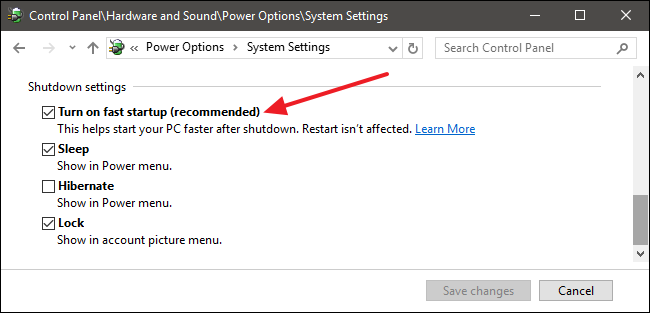
Does disabling fast startup make a difference?


Actually, reading your other thread sounds like keyboard issues...


I would start by reseating the connector...


gzt

gzt
18689 posts

Uber Geek
+1 received by user: 7827

Lifetime subscriber

  #2061393 23-Jul-2018 21:50
Send private message

First call I would try the recovery / fix startup issues option. It's been good to me so far..

timmmay

20859 posts

Uber Geek
+1 received by user: 5350

Trusted
Lifetime subscriber

  #2061419 24-Jul-2018 05:37
Send private message

Thanks @yitz I'll try that


@gzt I'll try that too. It's a one day old Windows install on a new SSD, it shouldn't have problems.


1101
3141 posts

Uber Geek
+1 received by user: 1143


  #2061577 24-Jul-2018 10:30
Send private message

Is it a 'live' windows login , if so try changing to a local win 10 a/c
try disconnecting from the network, remove saved wifi connection & then try
have a look in Windows update, see if its trying to install updates (or trying & failing to install updates)
disable/unistall things like printers,dropbox, 3rd party AV etc


none of that should matter (in a perfect world), but its something to check.
It may be doing HD checks, updates, online sync/connections as win loads .
It was v1803 you installed ?


Move to New Zealand's best fibre broadband service (affiliate link). Free setup code: R587125ERQ6VE. Note that to use Quic Broadband you must be comfortable with configuring your own router.
timmmay

20859 posts

Uber Geek
+1 received by user: 5350

Trusted
Lifetime subscriber

  #2061951 24-Jul-2018 21:09
Send private message

@1101 thanks for that. I'm using a local login, ethernet, updates are done. I'll try safe mode.


I think that having a faulty keyboard with the shift or function key held done for random intervals is looking like a potential cause for this. When I get time I'm going to unplug the internal keyboard and plug in an external keyboard to see if that fixes it.


timmmay

20859 posts

Uber Geek
+1 received by user: 5350

Trusted
Lifetime subscriber

  #2065864 31-Jul-2018 20:28
Send private message

The problem was a faulty keyboard - see related thread - the shift key was stuck down. When I disconnected the keyboard it started working fine. My Mum said not to bother replacing the keyboard, she'll use an external one.


Filter this topic showing only the reply marked as answer Create new topic


Geekzone Live »

Try automatic live updates from Geekzone directly in your browser, without refreshing the page, with Geekzone Live now.


Are you subscribed to our RSS feed? You can download the latest headlines and summaries from our stories directly to your computer or smartphone by using a feed reader.