Geekzone: technology news, blogs, forums
Guest
Welcome Guest.
You haven't logged in yet. If you don't have an account you can register now.


View this topic in a long page with up to 500 replies per page Create new topic
1 | 2 
askelon
942 posts

Ultimate Geek
+1 received by user: 233

ID Verified

  #2803299 29-Oct-2021 09:25
Send private message

Im guessing your on a spark internet connection.  Have you tried turning off your router for a while so it can renew its IP address?  I have had this happen to multiple people in the past where certain ip addresses of spark were blocked by their mail servers (could not find etc) yet webmail still worked.  


Kerrym

18 posts

Geek


  #2806877 3-Nov-2021 19:01
Send private message

Yoban:


Spyware:


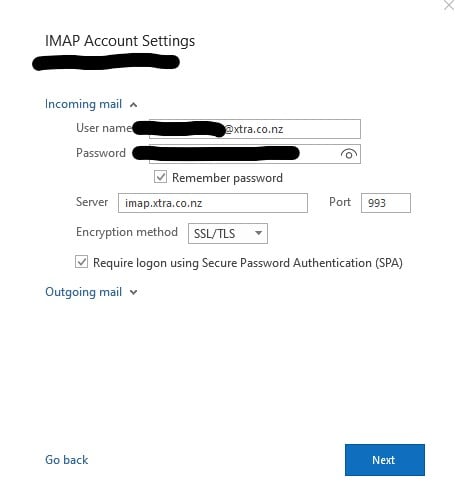
SPA should NOT be selected.


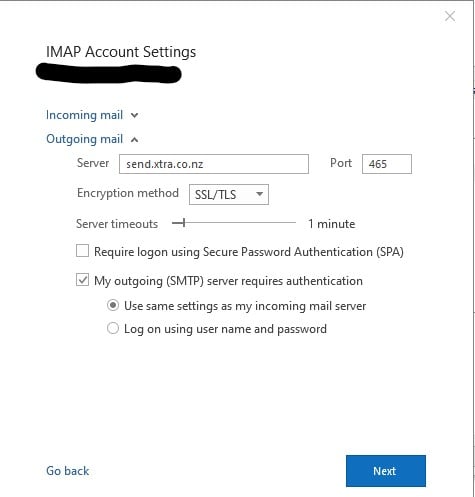
Oh...odd as it works fine for me. Here are my settings for the OP if they help


Thanks all for your help so far. I just haven't had the patience to try again - except I did try the settings you gave me Yoban. This time it didn't say something went wrong, it just kept spinning round and round, like it was thinking. It didn't time out this time, but neither did it go anywhere. I'm going to have another go when I have a few hours up my sleeve.


I think I'll try the password again and unplug/plug the computer, and at the same time be prepared for another phone call to the unhelpful Spark :(


Just haven't been able to face it again yet and work a full day so not too much spare time at home computer.  I'm still accessing on my phone, but that's kind of annoying.


tdgeek
30048 posts

Uber Geek
+1 received by user: 9455

Trusted
Lifetime subscriber

  #2806994 3-Nov-2021 19:40
Send private message

Technofreak:

That'll do it. I hate it when I do something like this. So obvious yet so hard to see.


You got that right, so obvious, but the brain sees @xtra.co.nz as normal


1 | 2 
View this topic in a long page with up to 500 replies per page Create new topic


Geekzone Live »

Try automatic live updates from Geekzone directly in your browser, without refreshing the page, with Geekzone Live now.


Are you subscribed to our RSS feed? You can download the latest headlines and summaries from our stories directly to your computer or smartphone by using a feed reader.