Geekzone: technology news, blogs, forums
Guest
Welcome Guest.
You haven't logged in yet. If you don't have an account you can register now.


View this topic in a long page with up to 500 replies per page Create new topic
1 | ... | 58 | 59 | 60 | 61 | 62 | 63 | 64 | 65 | 66 | 67 | 68 | ... | 78
Spartangy
2 posts

Wannabe Geek


  #2631120 6-Jan-2021 13:09
Send private message

Spartangy:


empacher48: Anyone else finding the router version v6.00.16 build01 really really buggy?

I’ve noticed this afternoon my router has been resetting itself every 20 minutes or so. Over the last week it has reset itself almost daily on this build?

Previously it has been rock solid, so was surprised to see it become really unstable.


I'm having the same issue, Spark already sent me a replacement modem as I complained about the old one rebooting itself. Modem has literally rebooted itself over 5 times over the past 2 hours.


I will get in touch with them to see if they can send me old firmware files so I can roll back the firmware on the modem and see if it helps.


Conclusion appears to be Spark does not offer you the firmware files to update the modem. This may just be because the support agent I was speaking to didn't quite understand what I was after. They were a bit painful to speak with.


They told me to just factory reset the modem as this resolves "most issues customers experience", though it did not change the firmware version (v6.00.16 build01). Have done so and going to keep my fingers crossed, otherwise I'll get back in touch with them.


Unrelated note: I'm new here and don't seem to be able to edit my old posts, hence my posting again instead of editing my old post.


empacher48
376 posts

Ultimate Geek
+1 received by user: 283


  #2632646 9-Jan-2021 07:21
Send private message

Spartangy:


Conclusion appears to be Spark does not offer you the firmware files to update the modem. This may just be because the support agent I was speaking to didn't quite understand what I was after. They were a bit painful to speak with.


They told me to just factory reset the modem as this resolves "most issues customers experience", though it did not change the firmware version (v6.00.16 build01). Have done so and going to keep my fingers crossed, otherwise I'll get back in touch with them.


Unrelated note: I'm new here and don't seem to be able to edit my old posts, hence my posting again instead of editing my old post.


Unfortunately the factory reset made my router go from resetting daily to about every half hour.


scobb
32 posts

Geek
+1 received by user: 5


  #2643268 27-Jan-2021 22:57
Send private message

empacher48: Anyone else finding the router version v6.00.16 build01 really really buggy?

I’ve noticed this afternoon my router has been resetting itself every 20 minutes or so. Over the last week it has reset itself almost daily on this build?

Previously it has been rock solid, so was surprised to see it become really unstable.


Same for me (and same firmware version).  Previously rock solid, but in the last week, it has started to randomly restart, sometimes multiple times a day.  Far from ideal given I WFH 2-3 days per week and spend several hours a day on MS Teams calls.


Is the firmware updated over the wire automatically?  Can anyone confirm what the latest firmware is and if later than V6.00.16 Build 01, where to find the firmware files to manually update?


Failing that, I'll have to start jumping through Spark's support hoops I guess...


Gordy7
gordy7
2001 posts

Uber Geek
+1 received by user: 505

ID Verified
Lifetime subscriber

  #2643538 28-Jan-2021 13:14
Send private message

Having seen a few reports on Geekzone of Spark Smart Modems rebooting, I decided to do a test as I was concerned my spare Spark Smart Modem my have the same problem.


I am on a Skinny Network Unlimited Fibre 900/450 plan.


I have been using a Skinny Smart Modem which had an uptime of 54days - F/W v6.00.15 build05.


I pulled out my spare Spark Smart Modem (bought off Trademe some time ago) and hooked it up to my Skinny network - Up time now 18 days and still connected  - F/W v6.00.16 build01.


I am using my modem without any Mesh networking add-ons.


I used the same power adapter provided by Skinny for testing both modems. I have the modem power adapter plugged into a standby power supply.


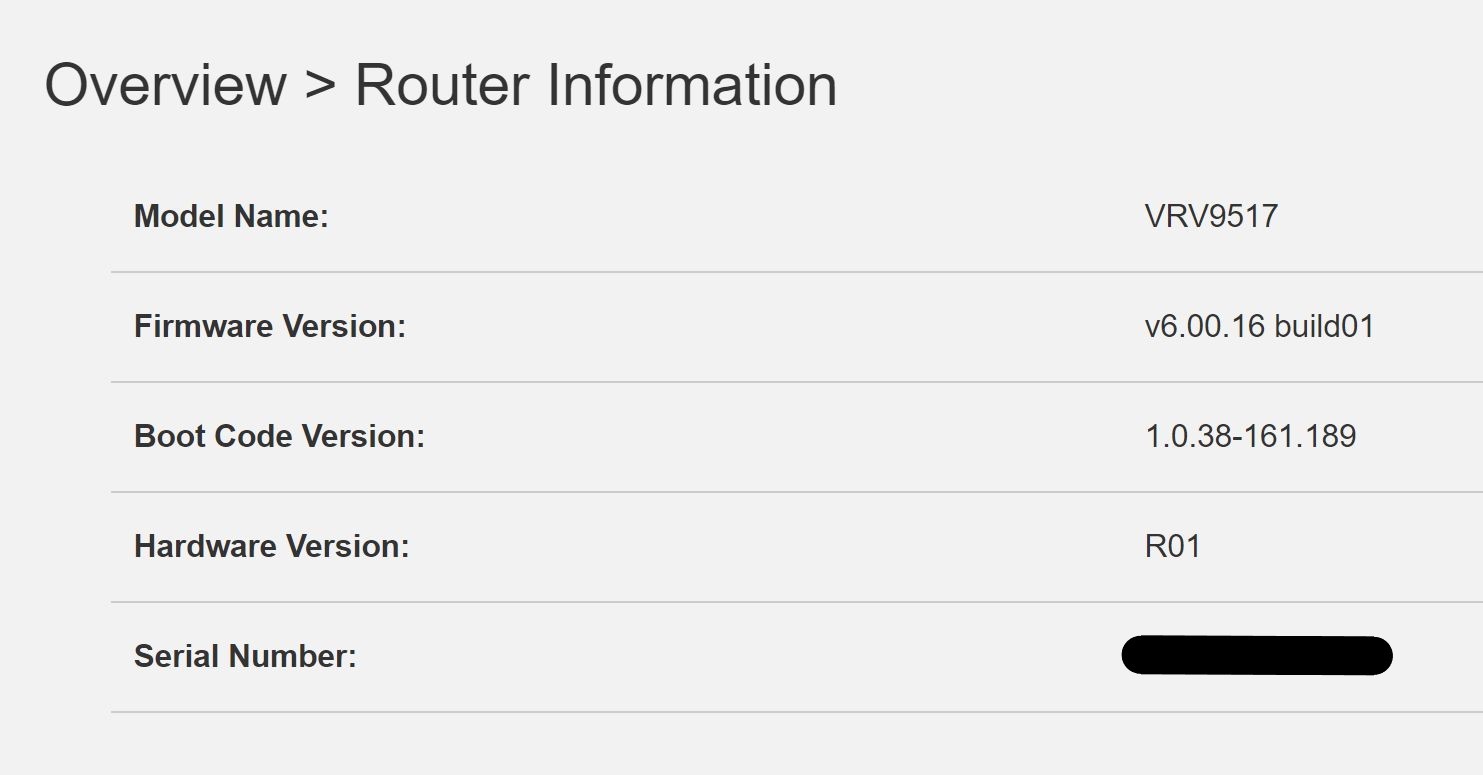
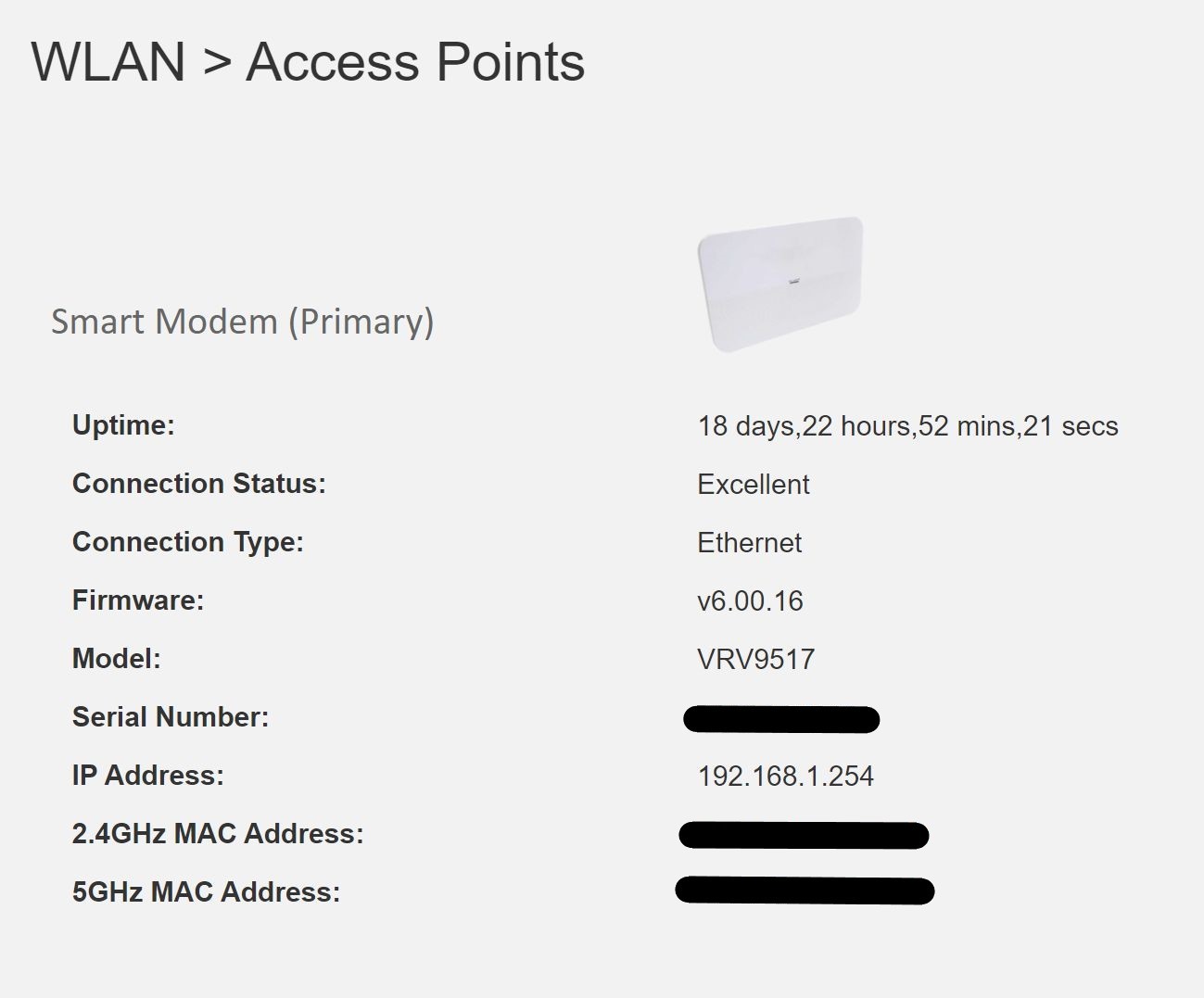
Just in case other users have different modem hardware that may be an issue, I am including a couple of snapshots from my Spark Smart Modem.


Click to see full size


Click to see full size


Gordy


My first ever AM radio network connection was with a 1MHz AM crystal(OA91) radio receiver.


scobb
32 posts

Geek
+1 received by user: 5


  #2643574 28-Jan-2021 13:53
Send private message

Gordy7:


Having seen a few reports on Geekzone of Spark Smart Modems rebooting, I decided to do a test as I was concerned my spare Spark Smart Modem my have the same problem.


I am on a Skinny Network Unlimited Fibre 900/450 plan.


I have been using a Skinny Smart Modem which had an uptime of 54days - F/W v6.00.15 build05.


I pulled out my spare Spark Smart Modem (bought off Trademe some time ago) and hooked it up to my Skinny network - Up time now 18 days and still connected  - F/W v6.00.16 build01.


I am using my modem without any Mesh networking add-ons.


I used the same power adapter provided by Skinny for testing both modems. I have the modem power adapter plugged into a standby power supply.


Just in case other users have different modem hardware that may be an issue, I am including a couple of snapshots from my Spark Smart Modem.


Click to see full size


Click to see full size


That's very helpful.  My hardware is identical in version/firmware to yours.  I had been looking in the router's logs to see if it kept a history of reboots, but my logs appear to clear on each reboot (not sure if that's configurable; I couldn't see anywhere to change the log settings), so your WLAN Access Points screen shot was very useful to me as a means of at least knowing how long the router has been up.  In my case, it's 15 hours since the last reboot, whereas the 3 SmartMesh devices I also have around the house have been up for months, no issue.


scobb
32 posts

Geek
+1 received by user: 5


  #2645393 1-Feb-2021 17:04
Send private message

Quick update on this.  I did ring Spark, who (after a 40 minute wait to get through) were pretty helpful.  They accepted my explanation of the situation, checked the logs and could see the router was restarting frequently, and didn't make me jump through any more hoops, authorising a replacement router, which I picked up in person from my local Spark retail store on Saturday morning.


Touch wood, it's been rock solid since I switched it on.


Stream your favourite shows now on Apple TV (affiliate link).
BuzzLightyear
416 posts

Ultimate Geek
+1 received by user: 106


  #2645416 1-Feb-2021 17:44
Send private message

scobb:

Quick update on this.  I did ring Spark, who (after a 40 minute wait to get through) were pretty helpful.  They accepted my explanation of the situation, checked the logs and could see the router was restarting frequently, and didn't make me jump through any more hoops, authorising a replacement router, which I picked up in person from my local Spark retail store on Saturday morning.


Touch wood, it's been rock solid since I switched it on.


That’s good. Let us know if it hold up. Mine has been rock solid for a good six months or longer now so hopefully it was just a faulty unit.

Gordy7
gordy7
2001 posts

Uber Geek
+1 received by user: 505

ID Verified
Lifetime subscriber

  #2646227 2-Feb-2021 22:44
Send private message

Looks like my Spark Smart Modem has had firmware dropped back to v6.00.15 build 05... 8 hours ago.
Has been on v6.00.16 build 01 for some time.


Gordy


My first ever AM radio network connection was with a 1MHz AM crystal(OA91) radio receiver.


Benji23
32 posts

Geek
+1 received by user: 3


  #2646273 3-Feb-2021 08:40
Send private message

Mine too has dropped back to 15


Have you tried turning it off then on again

ElBroka
5 posts

Wannabe Geek


  #2646311 3-Feb-2021 09:22
Send private message

Same. I think it happened last night in my case.

grolschie
911 posts

Ultimate Geek
+1 received by user: 159


  #2646323 3-Feb-2021 09:37

Mines been stuck on v6.00.15 build 16 for months.

HP


Shop now for HP laptops and other devices (affiliate link).
Benji23
32 posts

Geek
+1 received by user: 3


  #2646366 3-Feb-2021 11:24
Send private message

Anyone know why this happened thanks  


Forum Subscription Management


Your subscription to this discussion was removed.


Have you tried turning it off then on again

baza1
16 posts

Geek
+1 received by user: 2


  #2646388 3-Feb-2021 12:24
Send private message

Gordy7: Looks like my Spark Smart Modem has had firmware dropped back to v6.00.15 build 05... 8 hours ago.
Has been on v6.00.16 build 01 for some time.


Mine also now on 15. I had noticed recently a recurrence of some of the old problems of wifi connection but no internet availability occasionally. Also much slower internet speeds over about the last maybe 3 - 4 weeks  for unknown reason(s). But that of course may or may not be related to the modem.


Gordy7
gordy7
2001 posts

Uber Geek
+1 received by user: 505

ID Verified
Lifetime subscriber

  #2646405 3-Feb-2021 12:35
Send private message

grolschie: Mines been stuck on v6.00.15 build 16 for months.


I seem to recall that hio77 may have set you up with a special firmware build to solve a problem you were having.


Maybe Spark can re-configure your modem to auto track firmware updates.... unless you are happy with the build you are on.


Gordy


My first ever AM radio network connection was with a 1MHz AM crystal(OA91) radio receiver.


grolschie
911 posts

Ultimate Geek
+1 received by user: 159


  #2646442 3-Feb-2021 13:37

Gordy7:


grolschie: Mines been stuck on v6.00.15 build 16 for months.


I seem to recall that hio77 may have set you up with a special firmware build to solve a problem you were having.


Maybe Spark can re-configure your modem to auto track firmware updates.... unless you are happy with the build you are on.


True.  But he said in this thread that he asked them to remove the block. I wouldn't even know who to contact at Spark about it. I imagine the tech support are just following scripts, right?


1 | ... | 58 | 59 | 60 | 61 | 62 | 63 | 64 | 65 | 66 | 67 | 68 | ... | 78
View this topic in a long page with up to 500 replies per page Create new topic


Geekzone Live »

Try automatic live updates from Geekzone directly in your browser, without refreshing the page, with Geekzone Live now.


Are you subscribed to our RSS feed? You can download the latest headlines and summaries from our stories directly to your computer or smartphone by using a feed reader.