Geekzone: technology news, blogs, forums
Guest
Welcome Guest.
You haven't logged in yet. If you don't have an account you can register now.


Filter this topic showing only the reply marked as answer View this topic in a long page with up to 500 replies per page Create new topic
1 | 2 | 3
Dratsab
3964 posts

Uber Geek
+1 received by user: 1728

Trusted
Lifetime subscriber

  #1449898 13-Dec-2015 22:14
Send private message

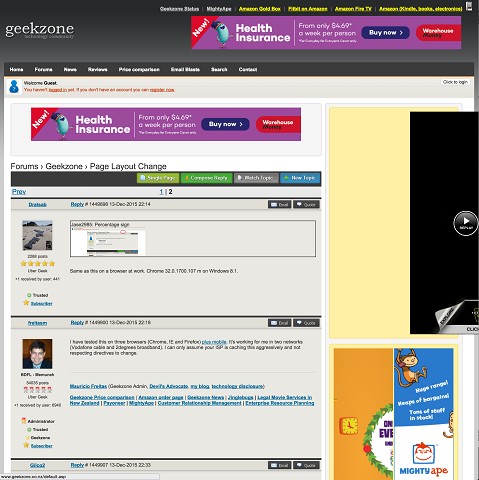
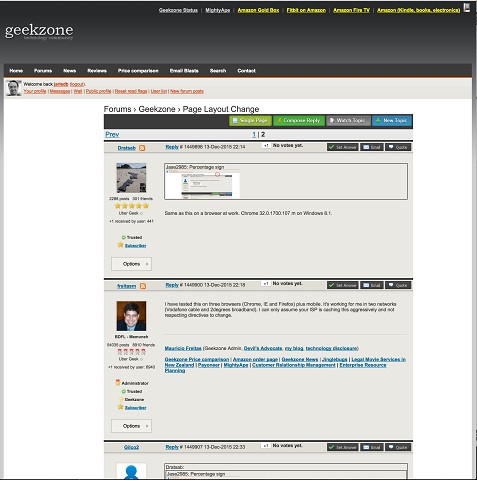
Jase2985: Percentage sign
Click to see full size


Same as this on a browser at work. Chrome 32.0.1700.107 m on Windows 8.1.


freitasm
BDFL - Memuneh
80682 posts

Uber Geek
+1 received by user: 41136

Administrator
ID Verified
Trusted
Geekzone
Lifetime subscriber

  #1449900 13-Dec-2015 22:18
Send private message

I have tested this on three browsers (Chrome, IE and Firefox) plus mobile. It's working for me in two networks (Vodafone cable and 2degrees broadband). I can only assume your ISP is caching this aggressively and not respecting directives to change.


Referral links: Quic Broadband (free setup code: R587125ERQ6VE) | Samsung | AliExpress | Wise | Sharesies 


Support Geekzone by subscribing (browse ads-free), or making a one-off or recurring donation through PressPatron.



Gilco2
1556 posts

Uber Geek
+1 received by user: 134


  #1449907 13-Dec-2015 22:33
Send private message

Dratsab:
Jase2985: Percentage sign
Click to see full size


Same as this on a browser at work. Chrome 32.0.1700.107 m on Windows 8.1.
I also have the percentage sign there. I am using WINDOWS 8.1pro 64 on this pc  with Firefox 42.0 and am on Vodafone adsl


HTPC Intel Pentium G3258 cpu, Gigabyte H97n-wifi motherboard, , 8GB DDR3 ram, onboard  graphics. Hauppuage HVR 5500 tuner,  Silverstone LC16M case, Windows 10 pro 64 bit using Nextpvr and Kodi


michaelmurfy
meow
13586 posts

Uber Geek
+1 received by user: 10931

Moderator
ID Verified
Trusted
Lifetime subscriber

  #1449908 13-Dec-2015 22:38
Send private message

Noticed this happened on my OSX machine. I have cleared the cache.

Out of interest I pulled out my Chromebook and am getting the same on that - 2degrees broadband. Maybe Cloudflare is caching something?


Michael Murphy | https://murfy.nz
Referral Links: Quic Broadband (use R122101E7CV7Q for free setup)

Are you happy with what you get from Geekzone? Please consider supporting us by subscribing.
Opinions are my own and not the views of my employer.


Sideface
9662 posts

Uber Geek
+1 received by user: 15653

Trusted
DR
Lifetime subscriber

  #1449909 13-Dec-2015 22:43
Send private message

As above.
White space on both sides.
Firefox (latest), with cache cleared.


Sideface


jarledb
Webhead
3320 posts

Uber Geek
+1 received by user: 1984

Moderator
ID Verified
Trusted
Lifetime subscriber

  #1449966 14-Dec-2015 01:57
Send private message

I don't think its browser cache.

This is what I am seeing on OS-X, with the latest version of Firefox, Safari and Chrome. When logged out everything looks fine. But when logged in something isn't right.


Tried to use Crossbrowsertestings virtual servers to test, but wasn't able to log in for some reason.


Jarle Dahl Bergersen | Referral Links: Want $50 off when you join Octopus Energy? Use this referral code
Are you happy with what you get from Geekzone? Please consider supporting us by making a donation or subscribing.


Shop now on Samsung phones, tablets, TVs and more (affiliate link).
blackjack17
1713 posts

Uber Geek
+1 received by user: 865


  #1449978 14-Dec-2015 06:25
Send private message

Every thing fine with me opera mobile s4 over wifi with snap (2 degrees)


freitasm
BDFL - Memuneh
80682 posts

Uber Geek
+1 received by user: 41136

Administrator
ID Verified
Trusted
Geekzone
Lifetime subscriber

  #1449979 14-Dec-2015 06:40
Send private message

Thank you folks, and sorry. This is a change to make the forum sidebar a bit wider so that we can start moving ads around. I didn't put in a condition for subscribers that browse without the sidebar. This now have been corrected and should look ok, cache or no cache.


Referral links: Quic Broadband (free setup code: R587125ERQ6VE) | Samsung | AliExpress | Wise | Sharesies 


Support Geekzone by subscribing (browse ads-free), or making a one-off or recurring donation through PressPatron.


Sideface
9662 posts

Uber Geek
+1 received by user: 15653

Trusted
DR
Lifetime subscriber

  #1449980 14-Dec-2015 07:01
Send private message

Normal services have been resumed smile

Now looks OK with Firefox, even on a 4k screen.


Sideface


Behodar
11117 posts

Uber Geek
+1 received by user: 6116

Trusted
Lifetime subscriber

  #1449985 14-Dec-2015 07:30
Send private message

Confirmed working in Safari now. Thanks!

This thread has turned into a subscriber gathering tongue-out

RunningMan
9210 posts

Uber Geek
+1 received by user: 4854


  #1450290 14-Dec-2015 18:58
Send private message

In Firefox /OSX, I'm seeing this.


Making the browser window wider fixes the email / quote / set answer button overlap. Making the window narrower drops the adds completely.

The right hand sidebar seems to remain fixed width to the point of causing the main window to wrap on to the next line.


Move to New Zealand's best fibre broadband service (affiliate link). Free setup code: R587125ERQ6VE. Note that to use Quic Broadband you must be comfortable with configuring your own router.
freitasm
BDFL - Memuneh
80682 posts

Uber Geek
+1 received by user: 41136

Administrator
ID Verified
Trusted
Geekzone
Lifetime subscriber

  #1450295 14-Dec-2015 19:03
Send private message

Having the right sidebar fixed allows us to not have those ads floating on the middle of the page. And if you narrow the window - as you noticed - the sidebar (and the square ad on the top of the topic) disappears so you don't have worry about it. I was already hiding the sidebar and the square ad on mobile visits.

Also I have changed the stylesheet so now even if you upload a gigantic image (or paste it) then it will always use at max 100% of the space, automatically adjusting the width/height if you resize the window.

Slowly making the page more responsive. I will look at the buttons sometime later as this is just cosmetic.


Referral links: Quic Broadband (free setup code: R587125ERQ6VE) | Samsung | AliExpress | Wise | Sharesies 


Support Geekzone by subscribing (browse ads-free), or making a one-off or recurring donation through PressPatron.


RunningMan
9210 posts

Uber Geek
+1 received by user: 4854


  #1450306 14-Dec-2015 19:23
Send private message

My bad for the giant image upload ;-)

freitasm
BDFL - Memuneh
80682 posts

Uber Geek
+1 received by user: 41136

Administrator
ID Verified
Trusted
Geekzone
Lifetime subscriber

  #1450312 14-Dec-2015 19:43
Send private message

Which now shouldn't be an issue ;)


Referral links: Quic Broadband (free setup code: R587125ERQ6VE) | Samsung | AliExpress | Wise | Sharesies 


Support Geekzone by subscribing (browse ads-free), or making a one-off or recurring donation through PressPatron.


freitasm
BDFL - Memuneh
80682 posts

Uber Geek
+1 received by user: 41136

Administrator
ID Verified
Trusted
Geekzone
Lifetime subscriber

  #1450391 14-Dec-2015 21:51
Send private message

I am thinking of replicating this model (fixed width sidebar, disappearing when window goes under a certain width) and swapping the skinny ad with the wide one (only one) on the news page: http://www.geekzone.co.nz/content.asp?contentid=19674

I will probably do it next weekend. Ideas, comments on the current implementation so I can tweak on forums as well?


Referral links: Quic Broadband (free setup code: R587125ERQ6VE) | Samsung | AliExpress | Wise | Sharesies 


Support Geekzone by subscribing (browse ads-free), or making a one-off or recurring donation through PressPatron.


1 | 2 | 3
Filter this topic showing only the reply marked as answer View this topic in a long page with up to 500 replies per page Create new topic


Geekzone Live »

Try automatic live updates from Geekzone directly in your browser, without refreshing the page, with Geekzone Live now.


Are you subscribed to our RSS feed? You can download the latest headlines and summaries from our stories directly to your computer or smartphone by using a feed reader.