Geekzone: technology news, blogs, forums
Guest
Welcome Guest.
You haven't logged in yet. If you don't have an account you can register now.


View this topic in a long page with up to 500 replies per page Create new topic
1 | 2 
Geektastic

18009 posts

Uber Geek
+1 received by user: 8465

Trusted
Lifetime subscriber

  #2767662 27-Aug-2021 15:28
Send private message

Here's another new one.

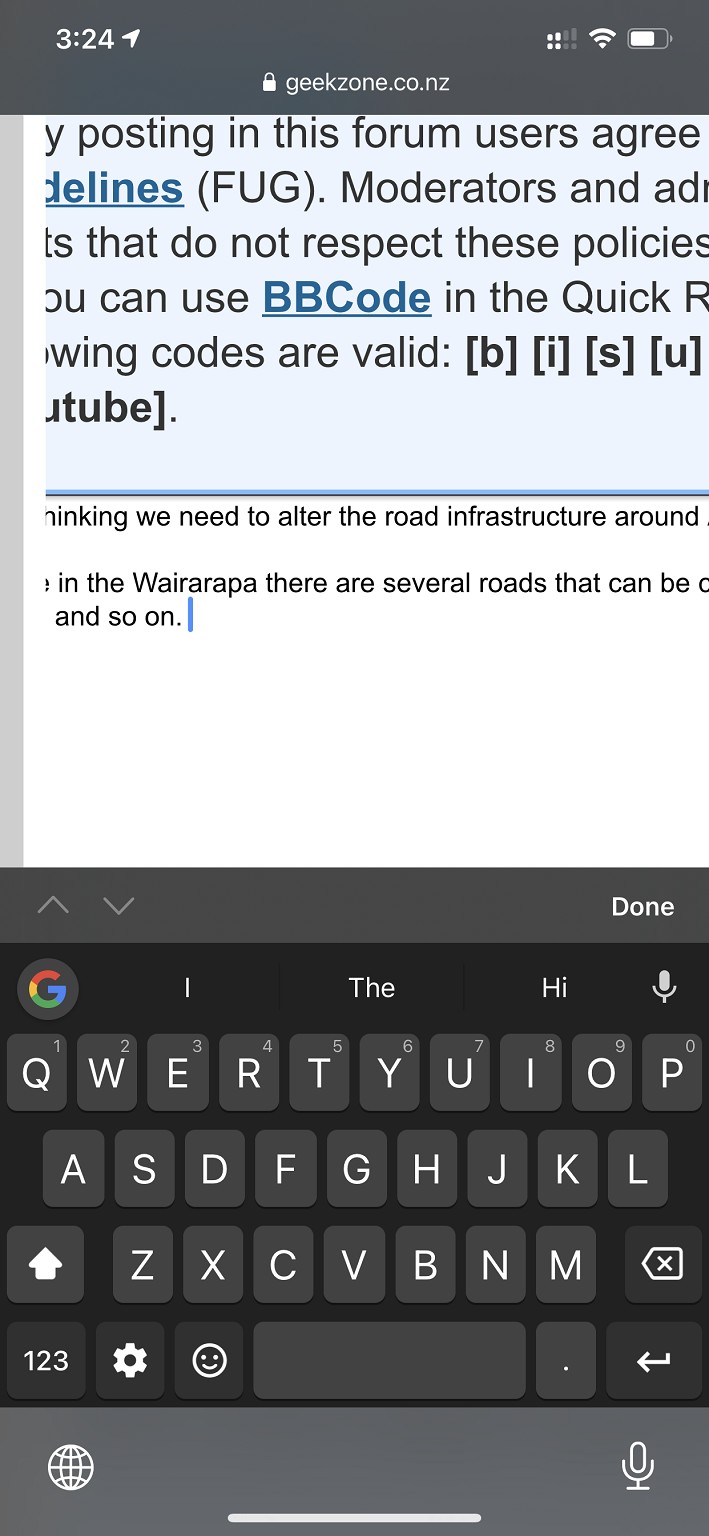
You cannot access the text under the left margin.


michaelmurfy
meow
13579 posts

Uber Geek
+1 received by user: 10910

Moderator
ID Verified
Trusted
Lifetime subscriber

  #2767783 27-Aug-2021 19:20
Send private message

Again I don't understand how you're getting all these problems. I even installed Google Keyboard (am using it to type this message) and can't replicate the issue.

Considering nobody else can replicate this I strongly suspect the problem is with you, an add on you’ve got installed or even with Gboard.

As others have asked - if you go with the Apple bulk standard keyboard does the problems still crop up? Hold your finger down on the globe button to switch.

Lastly. Please clear your cache. Settings —> Safari —> Clear Website Data.


Michael Murphy | https://murfy.nz
Referral Links: Quic Broadband (use R122101E7CV7Q for free setup)

Are you happy with what you get from Geekzone? Please consider supporting us by subscribing.
Opinions are my own and not the views of my employer.


MaxineN
Max
2049 posts

Uber Geek
+1 received by user: 1662

ID Verified
Trusted
Subscriber

  #2767787 27-Aug-2021 19:41
Send private message

So I decided to try and replicate(all these lovely errors that gboard decide to make, it's terrible stop using it) it and I also cannot. Even with Gboard installed.

Also gboard is extremely bad on iOS im not surprised...

Edit... Going back broke the reply button... Even though the text was cached. Just had to copy and paste this just to reply


Ramblings from a mysterious lady who's into tech. Warning I may often create zingers.


Geektastic

18009 posts

Uber Geek
+1 received by user: 8465

Trusted
Lifetime subscriber

  #2767856 27-Aug-2021 21:11
Send private message

GBoard makes marginally fewer errors in swipe typing than the Apple version.

The back button thing always happens to me. Even in OSX. If I try and post something with too many quotes for example, when it refuses to post it and I click back, all the text I typed is gone.


michaelmurfy
meow
13579 posts

Uber Geek
+1 received by user: 10910

Moderator
ID Verified
Trusted
Lifetime subscriber

  #2767859 27-Aug-2021 21:47
Send private message

MaxineN:


Edit... Going back broke the reply button... Even though the text was cached. Just had to copy and paste this just to reply


The reply button disables itself as designed after somebody clicks / taps it to prevent double, or 20x posts (seriously - don't know how somebody did that). I think Mauricio made the change around a month ago.


Michael Murphy | https://murfy.nz
Referral Links: Quic Broadband (use R122101E7CV7Q for free setup)

Are you happy with what you get from Geekzone? Please consider supporting us by subscribing.
Opinions are my own and not the views of my employer.


Geektastic

18009 posts

Uber Geek
+1 received by user: 8465

Trusted
Lifetime subscriber

  #2780704 19-Sep-2021 16:24
Send private message

I think I figured it out.

On iOS Safari, you can change the font size on the page in real time by pressing on the AA logo in the address bar. Great if you don't like squinting at 2mm high text!

The GZ software doesn't play nice with that feature. It causes the formatting to go all wrong but the font size doesn't actually change.

What should happen is that the fonts get bigger and nothing else changes (I think) but that's not what happens.


1 | 2 
View this topic in a long page with up to 500 replies per page Create new topic


Geekzone Live »

Try automatic live updates from Geekzone directly in your browser, without refreshing the page, with Geekzone Live now.


Are you subscribed to our RSS feed? You can download the latest headlines and summaries from our stories directly to your computer or smartphone by using a feed reader.