Geekzone: technology news, blogs, forums
Guest
Welcome Guest.
You haven't logged in yet. If you don't have an account you can register now.


mattbush

784 posts

Ultimate Geek
+1 received by user: 102
Inactive user


#107735 18-Aug-2012 10:50
Send private message

Since the main thread appears to be locked, I am seeking advise on a new router for home use only - 2-3 connects max...

Any recommendations? assume I will need a 1gb one?

View this topic in a long page with up to 500 replies per page Create new topic
 1 | 2
Skillie
192 posts

Master Geek
+1 received by user: 14


  #673956 18-Aug-2012 11:14
Send private message

I use the Netgear WNDR4500 N900 Wireless Dual Band Gigabit Router on my WarpSpeed 100G plan - http://www.netgear.co.nz/home/products/wirelessrouters/ultimate-performance/WNDR4500.aspx

A
bsolutely great performance (streaming HD via WiFi to PS3) with multiple devices connected.

Check pricing: - https://price.geekzone.co.nz/product.aspx?pid=885713754


Speedtest FibreX Max (via 5G WiFi)


Ropata
318 posts

Ultimate Geek
+1 received by user: 33
Inactive user


  #682444 6-Sep-2012 16:41
Send private message

I too am looking for a new router for my 100mbps connection. Does anyone know of a DD-WRT capable model preferably Linksys/cisco branded? It took me ages to work out how to throttle my kids if you know what I mean, and don't feel like starting again. I have up to 7 devices connected at any one time both wireless and wired.

mattbush

784 posts

Ultimate Geek
+1 received by user: 102
Inactive user


  #682512 6-Sep-2012 18:40
Send private message

I purchased the one described above and its very good.


DoomlordVekk
129 posts

Master Geek
+1 received by user: 16

Trusted

  #682587 6-Sep-2012 22:39
Send private message

I'm currently running DD-WRT v24sp2 on a TP-Link 1043ND.  Rock solid performance.  Good price as well, compared to a comparable Cisco/Linksys.  If Wireless is your interconnect method of choice, find a dual band system, throughput on and lack of interference in the 5GHz ISM band will benefit you, if your equipment supports 5GHz


"Customers don’t expect you to be perfect. They do expect you to fix things when they go wrong." Donald Porter – British Airways

The views expressed here are my own and are not reflective of other organisms or organisations.

Ropata
318 posts

Ultimate Geek
+1 received by user: 33
Inactive user


  #682624 7-Sep-2012 00:58
Send private message

Awesome, the TP-Link one looks like a winner. Actually looks too good to be true. So what is this lacking? or is it just that you pay for all the features that DD-wrt allow with the $300 ONES?

NakedSnake
6 posts

Wannabe Geek


  #683035 8-Sep-2012 10:50
Send private message

In reply to:  use the Netgear WNDR4500 N900 Wireless Dual Band Gigabit Router on my WarpSpeed 100G plan - http://www.netgear.co.nz/home/products/wirelessrouters/ultimate-performance/WNDR4500.aspx 

Absolutely great performance (streaming HD via WiFi to PS3) with multiple devices connected. 

Check pricing: - https://price.geekzone.co.nz/product.aspx?pid=885713754


What were your thoughts on the NP805N router telstra supplied? Im having huge troubles with it! I v gone through all the config settings with both telstra and netcom, im now on channel 5 and changed pool settings to 110 and 200,  

Im only getting 2bar ping on my ps3 while playing modern warfare 3, would that be because of the LAG comp infinityward have put in place?

it also keeps cutting whilst on laptop etc etc etc...


Shop now on Samsung phones, tablets, TVs and more (affiliate link).
NakedSnake
6 posts

Wannabe Geek


  #683040 8-Sep-2012 11:13
Send private message

This is the one I've got http://www.netcommwireless.com/product/wifi/np805n

Whats the difference between that and this http://www.itexpress.co.nz/epages/shop.sf/?ObjectPath=/Shops/itexpress/Products/58735

Cheers

Shadbolt
130 posts

Master Geek
+1 received by user: 45


  #683688 10-Sep-2012 08:47
Send private message

Being a responsible parent, I configure my router to allow the IP address of my own laptop to receive packets 24 hours a day, but all other IP addresses (that is, things that the kids use to connect to the internet) to only receive packets between 7am and 11pm.

Before I upgrade to a router suitable for the 100mbps service - can these recommended routers be configured to do this "time of day" routing?

Shadbolt

DoomlordVekk
129 posts

Master Geek
+1 received by user: 16

Trusted

  #684829 12-Sep-2012 11:11
Send private message

NakedSnake: This is the one I've got http://www.netcommwireless.com/product/wifi/np805n

Whats the difference between that and this http://www.itexpress.co.nz/epages/shop.sf/?ObjectPath=/Shops/itexpress/Products/58735

Cheers


The Netcomm Router and AP is a 2.4GHz unit, whereas the Netgear is both 2.4GHz and 5.8GHz.
They both have GE LAN and WAN ports.

The Netgear would be a more expensive unit to buy, given it's feature differences and as such, might have a better UI feel (often more $$ = better thought out interface/features, but not always)

The Netgear also looks to offer IPv6 support.  From memory the Netcomm IPv6 support was fairly minimal.
(As an aside, DD-WRT IPv6 support is quite nasty, you have to configure the unit from a command line level to enable & configure IPv6 on v24SP2 for things like the TP-Link/Atheros based radio equipment).

Honestly, the Netcomm is a good value, reasonably featured AP.  It's not a Linksys or a Netgear in terms of what it offers feature or UI wise but it is good value for money and you wouldn't pay for it in the shop what you would for said Linksys or Netgear.


"Customers don’t expect you to be perfect. They do expect you to fix things when they go wrong." Donald Porter – British Airways

The views expressed here are my own and are not reflective of other organisms or organisations.

DonGould
3892 posts

Uber Geek
+1 received by user: 164


  #684918 12-Sep-2012 13:05
Send private message

Netgear is my next stop to look at.

I've just had a look at a dir-615 from dlink and was anything but impressed. The wizards say they will find your net connection for you. I had dhcp and pppoe enabled and it found neither. They don't do auto mtu discovery correctly (if at all), so failed pppoe auth. On the TCL network you won't care, you have to set junk, but if you want to be preped for UFB then I wouldn't recommend this one.

I had two netcomm's last week and both failed to even talk to my Acer netbook at all wirelessly, and wouldn't dish up an IP for my mobile. So they just went back in the box.

I'm loving the Mikrotik gear. They now have a single form set up in the latest firmware as well.

http://www.gowifi.co.nz/access-points-802.11/indoor-wireless-access-points/mikrotik-routerboard-rb751u-2hnd-high-power-wireless-router.html

If you're running your SOHO and want to still be online when your provider isn't, they have USB on them which you can put a 3G dongle on.

If you're wanting something for home that you can 'manage' the kids, then they've got built in 'hotspotting' (hey, you can even set up a paypal gateway if you want to and collect the kids pocket money back from them in return for internet usage!)

They support v6 tunnels, so you can get your v6 Geek on now even though TCL don't have V6 native yet.

You can even set up a pppoe server on them if you really want and share the fast goodness with your neighbour!


Promote New Zealand - Get yourself a .kiwi.nz domain name!!!

Check out mine - i.am.a.can.do.kiwi.nz - don@i.am.a.can.do.kiwi.nz


StevieT
706 posts

Ultimate Geek
+1 received by user: 34


  #685007 12-Sep-2012 15:25
Send private message

I've had my eye on this router: http://www.tp-link.com.au/common/subject/wireless/TL-WDR4300/?siteid=5

I'm not sure where I'd obtain it from, but I plan on replacing our router when we're connected to fibre (sign put up today giving us the start and end dates of the installation down our street: Sept - Nov).


Support Geekzone with one-off or recurring donations Donate via PressPatron.
DoomlordVekk
129 posts

Master Geek
+1 received by user: 16

Trusted

  #685215 12-Sep-2012 21:57
Send private message

Shadbolt: Being a responsible parent, I configure my router to allow the IP address of my own laptop to receive packets 24 hours a day, but all other IP addresses (that is, things that the kids use to connect to the internet) to only receive packets between 7am and 11pm.

Before I upgrade to a router suitable for the 100mbps service - can these recommended routers be configured to do this "time of day" routing?

Shadbolt


Shadbolt, here is a screengrab of the Time of Day WAN access page from DD-WRT.
I haven't tested this, however the configurations options are in the software.


"Customers don’t expect you to be perfect. They do expect you to fix things when they go wrong." Donald Porter – British Airways

The views expressed here are my own and are not reflective of other organisms or organisations.

Shadbolt
130 posts

Master Geek
+1 received by user: 45


  #687629 18-Sep-2012 11:28
Send private message

Thanks DV. That doesn't seem to cover what I need, though. With the ancient Dick Smith wireless router I have now, I can enter an IP address or a range of IP addresses, and tell it what daily hours they can send and receive packets. Simple as anything, and possible to set up individual times for any individual IP address. That screenshot doesn't fill me with confidence.

Shadbolt

kharris
1209 posts

Uber Geek
+1 received by user: 327

ID Verified
Trusted

  #689955 22-Sep-2012 18:07
Send private message

Shadbolt: Thanks DV. That doesn't seem to cover what I need, though. With the ancient Dick Smith wireless router I have now, I can enter an IP address or a range of IP addresses, and tell it what daily hours they can send and receive packets. Simple as anything, and possible to set up individual times for any individual IP address. That screenshot doesn't fill me with confidence.

Shadbolt


looking closely at the screenshot it looks as though you can set up multiple access policies for different times of day and edit the device list attached to each policy.  This seems to do exactly what you want... however I don't have one I can test it on.

Ragnor
8279 posts

Uber Geek
+1 received by user: 585

Trusted

  #690129 23-Sep-2012 12:33
Send private message

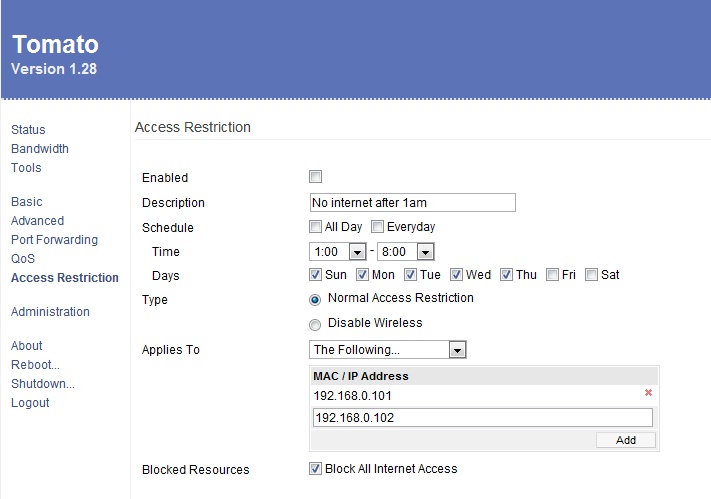
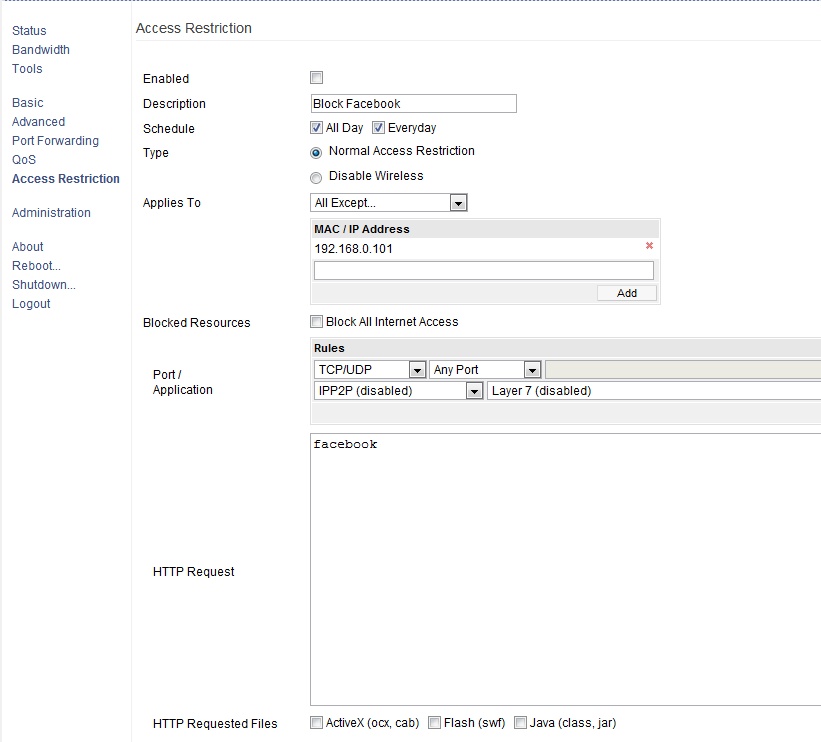
TomatoUSB has good access restriction options


Lots of options


 1 | 2
View this topic in a long page with up to 500 replies per page Create new topic


Geekzone Live »

Try automatic live updates from Geekzone directly in your browser, without refreshing the page, with Geekzone Live now.


Are you subscribed to our RSS feed? You can download the latest headlines and summaries from our stories directly to your computer or smartphone by using a feed reader.