Geekzone: technology news, blogs, forums
Guest
Welcome Guest.
You haven't logged in yet. If you don't have an account you can register now.


xkicken

74 posts

Master Geek
+1 received by user: 5

ID Verified

#269869 12-Apr-2020 13:47
Send private message

I am currently on 200/20 on fiber but getting the full download speed but my upload speed is about 0.2mbps.
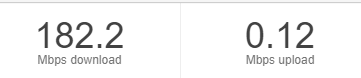
 

I have tested with a different router and reset my router and my ONT. I have a wired connection to my router and the router that I am using is the Asus ac-88u but I am using merlin on it.


Create new topic
freitasm
BDFL - Memuneh
80646 posts

Uber Geek
+1 received by user: 41030

Administrator
ID Verified
Trusted
Geekzone
Lifetime subscriber

  #2459818 12-Apr-2020 14:00
Send private message

Any client running torrents?


Referral links: Quic Broadband (free setup code: R587125ERQ6VE) | Samsung | AliExpress | Wise | Sharesies 


Support Geekzone by subscribing (browse ads-free), or making a one-off or recurring donation through PressPatron.


cyril7
9073 posts

Uber Geek
+1 received by user: 2499

ID Verified
Trusted
Subscriber

  #2459819 12-Apr-2020 14:00
Send private message

Hi Antony, welcome to Geekzone. So what sites have use tested against so far.


Cyril


xkicken

74 posts

Master Geek
+1 received by user: 5

ID Verified

  #2459822 12-Apr-2020 14:06
Send private message

I log in to my router to check if anyone is using any bandwidth but no one is.


I have used 2 different speed testers and also ping from cmd on windows to google.com and I get a 25% to 50% packet lost.


richms
29098 posts

Uber Geek
+1 received by user: 10208

Trusted
Lifetime subscriber

  #2459830 12-Apr-2020 14:15
Send private message

Are you trying to apply any QOS on the router at all? 20 meg upstream is pretty bad, and very easy to saturate so perhaps the router is trying to apply some throttling to it, but has been configured incorrectly?


Richard rich.ms

xkicken

74 posts

Master Geek
+1 received by user: 5

ID Verified

  #2459833 12-Apr-2020 14:20
Send private message

it can't be my router and the config since I have tested the internet with the ultrahub that they provide me with and the results are still the same.


freitasm
BDFL - Memuneh
80646 posts

Uber Geek
+1 received by user: 41030

Administrator
ID Verified
Trusted
Geekzone
Lifetime subscriber

  #2459835 12-Apr-2020 14:22
Send private message

Which services have you used to test speed and what servers?


Referral links: Quic Broadband (free setup code: R587125ERQ6VE) | Samsung | AliExpress | Wise | Sharesies 


Support Geekzone by subscribing (browse ads-free), or making a one-off or recurring donation through PressPatron.


Move to New Zealand's best fibre broadband service (affiliate link). Free setup code: R587125ERQ6VE. Note that to use Quic Broadband you must be comfortable with configuring your own router.
xkicken

74 posts

Master Geek
+1 received by user: 5

ID Verified

  #2459837 12-Apr-2020 14:29
Send private message

I used the speed test on google, speedtest by ookla. I have tested multiple servers from vodafone, myrepublic and worldxchnage comm and its all been sub 1mbps.


phantomdb
585 posts

Ultimate Geek
+1 received by user: 103

Lifetime subscriber

  #2459968 12-Apr-2020 15:59
Send private message

pending on the install has the fibre been kinked? (Relates to the internal install and is probably leaning more to an enable install as they had exposed loop of fibre)


[ SIGNATURE HERE ]


xkicken

74 posts

Master Geek
+1 received by user: 5

ID Verified

  #2460050 12-Apr-2020 16:49
Send private message

the fiber was installed 2 years ago and I had the same setup for 1 and a half years


Create new topic


Geekzone Live »

Try automatic live updates from Geekzone directly in your browser, without refreshing the page, with Geekzone Live now.


Are you subscribed to our RSS feed? You can download the latest headlines and summaries from our stories directly to your computer or smartphone by using a feed reader.
