Geekzone: technology news, blogs, forums
Guest
Welcome Guest.
You haven't logged in yet. If you don't have an account you can register now.


View this topic in a long page with up to 500 replies per page Create new topic
1 | 2 | 3 | 4
MikeB4

MikeB4
18776 posts

Uber Geek
+1 received by user: 12769

ID Verified
Trusted
Subscriber

  #1277604 5-Apr-2015 19:10
Send private message

I think its the Netcomm router that maybe the issue, when I connected directly to the Cisco Modem  the speed was 114mbps download. I have a spare Apple Airport extreme I was going to try but not sure what the setting are in order to connect this to VF Cable.


Here is a crazy notion, lets give peace a chance.


MikeB4

MikeB4
18776 posts

Uber Geek
+1 received by user: 12769

ID Verified
Trusted
Subscriber

  #1277610 5-Apr-2015 19:14
Send private message

johnr:
KiwiNZ: our speed has tanked again with test to wellington returning download 4.55mbps and upload 7.88mbps using the VF speed test


Sounds like you could have a hardware issue, Is the Cable modem getting hot?


I have lifted the Router to give it greater airflow, its warm but not hot however I am not sure of the heat tolerances of the Netcomms


Here is a crazy notion, lets give peace a chance.


MikeB4

MikeB4
18776 posts

Uber Geek
+1 received by user: 12769

ID Verified
Trusted
Subscriber

  #1277643 5-Apr-2015 21:17
Send private message

swapped out the router with an Apple Airport Extreme. it connects OK but speed is still poor, download 12.76mbps, upload 10.03mbps


Here is a crazy notion, lets give peace a chance.


DeepBlueSky
549 posts

Ultimate Geek
+1 received by user: 67


  #1277674 6-Apr-2015 07:41
Send private message

Just a thought, connect the CISCO modem directly again to confirm it was no fluke. If the download speed is high again and you have tried two routers is it possible the ethernet cable between the modem and router is damaged can you swap and try again.

MikeB4

MikeB4
18776 posts

Uber Geek
+1 received by user: 12769

ID Verified
Trusted
Subscriber

  #1277683 6-Apr-2015 08:16
Send private message

DeepBlueSky: Just a thought, connect the CISCO modem directly again to confirm it was no fluke. If the download speed is high again and you have tried two routers is it possible the ethernet cable between the modem and router is damaged can you swap and try again.


Strangely I was thinking that during the night. Going to give it try this morning


Here is a crazy notion, lets give peace a chance.


BigMal
998 posts

Ultimate Geek
+1 received by user: 160

ID Verified
Trusted

  #1277684 6-Apr-2015 08:21
Send private message

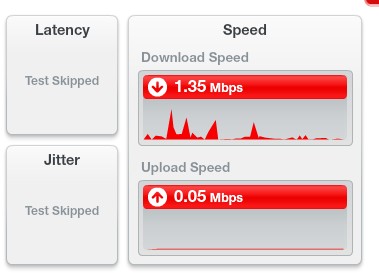
I'm in Miramar.  Just got cable installed (100/10) less than a week ago.  This is my speed on Easter Monday morning at approx 8am.


Move to New Zealand's best fibre broadband service (affiliate link). Free setup code: R587125ERQ6VE. Note that to use Quic Broadband you must be comfortable with configuring your own router.
MikeB4

MikeB4
18776 posts

Uber Geek
+1 received by user: 12769

ID Verified
Trusted
Subscriber

  #1277685 6-Apr-2015 08:25
Send private message

What was your speed prior


Here is a crazy notion, lets give peace a chance.


BigMal
998 posts

Ultimate Geek
+1 received by user: 160

ID Verified
Trusted

  #1277687 6-Apr-2015 08:33
Send private message

around 70/10 over wifi.

I'm going through a process of elimiation right now.  I rebooted the cable modem and speeds went back to normal (hard wired).

Wireless was still a bit sh*t.

Rebooted netcomm router and wireless speeds are back up again.

I have a feeling that the Netcomm routers are rubbish.  Anyone have any experience with these? In particular the N5 N300?

itxtme
2102 posts

Uber Geek
+1 received by user: 557


  #1277695 6-Apr-2015 09:04
Send private message

No issue over easter for me KiwiNZ, am on 120/10 in central Lower Hutt 


@BigMal,

Havent used that router per say.  I did have an old Lynksis that I used in the first instance that would have similar issues, Max out at 70ish and then after a while jam up, speeds drop to 1-5, and a reboot would fix the issue.  I have been recently using a TL-WR1043ND.  No issues in the last 2 months I have had it, no reboots required.  Cost me $80ish from PBtech, I see they are $78.20 at the moment, they had some in stock at the Wellington store

johnr
19282 posts

Uber Geek
+1 received by user: 2526
Inactive user


  #1277696 6-Apr-2015 09:08
Send private message

BigMal: I'm in Miramar.  Just got cable installed (100/10) less than a week ago.  This is my speed on Easter Monday morning at approx 8am.


Please don't test over WiFi

StevieT
706 posts

Ultimate Geek
+1 received by user: 34


  #1277698 6-Apr-2015 09:14
Send private message

Speed test over wifi (TP Link AC1750 router): https://www.speedtest.net/my-result/4267707205


Location: Petone, Lower Hutt


Move to New Zealand's best fibre broadband service (affiliate link). Free setup code: R587125ERQ6VE. Note that to use Quic Broadband you must be comfortable with configuring your own router.
DeepBlueSky
549 posts

Ultimate Geek
+1 received by user: 67


  #1277757 6-Apr-2015 11:50
Send private message

I agree that testing should be via eithernet, but these days most peoples only hard wired device is the PC.

The Vodafone supplied router is in its box I never used it. It was worth investing In a good quality router in my case an Asus router running Merlin Firmware resulting in a rock solid, reliable and most importantly fast Wifi connection.

MikeB4

MikeB4
18776 posts

Uber Geek
+1 received by user: 12769

ID Verified
Trusted
Subscriber

  #1277767 6-Apr-2015 12:24
Send private message

The Vodafone tech rang again this morning as promised, has sent me info to test for interference, also going to put a new Cat 6 cable and relocate the router.


Here is a crazy notion, lets give peace a chance.


sbiddle
30853 posts

Uber Geek
+1 received by user: 9996

Retired Mod
Trusted
Biddle Corp
Lifetime subscriber

  #1277769 6-Apr-2015 12:29
Send private message

DeepBlueSky: I agree that testing should be via eithernet, but these days most peoples only hard wired device is the PC.

The Vodafone supplied router is in its box I never used it. It was worth investing In a good quality router in my case an Asus router running Merlin Firmware resulting in a rock solid, reliable and most importantly fast Wifi connection.


While wireless performance will vary between devices, the fact a device can be worth 10x the price is no guarantee that you will get better performance.

In many urban areas 2.4Ghz WiFi is heavily congested and verging on almost being unusable. While people can jump up and down at their ISP, that's not something the ISP can fix. While people don't want to listen and understand (and you could argue shouldn't have to), the simple fact is that positioning of hardware, interference (from 2.4Ghz cordless phones and video senders), building materials, background RF noise and more importantly channel selection are all beyond the control of an ISP and an end user needs to have a basic understanding.


Aredwood
3885 posts

Uber Geek
+1 received by user: 1749


  #1277817 6-Apr-2015 13:19

sbiddle:
DeepBlueSky: I agree that testing should be via eithernet, but these days most peoples only hard wired device is the PC.

The Vodafone supplied router is in its box I never used it. It was worth investing In a good quality router in my case an Asus router running Merlin Firmware resulting in a rock solid, reliable and most importantly fast Wifi connection.


While wireless performance will vary between devices, the fact a device can be worth 10x the price is no guarantee that you will get better performance.

In many urban areas 2.4Ghz WiFi is heavily congested and verging on almost being unusable. While people can jump up and down at their ISP, that's not something the ISP can fix. While people don't want to listen and understand (and you could argue shouldn't have to), the simple fact is that positioning of hardware, interference (from 2.4Ghz cordless phones and video senders), building materials, background RF noise and more importantly channel selection are all beyond the control of an ISP and an end user needs to have a basic understanding.


Also some houses (mostly in the 80s) were built using a type of gib board that has metal foil on the back. If your house has this type then it will block almost all WIfi signal from travelling between rooms. And if your house has more than 1 level. Sometime metal insulating foil is used between floors as well. (the foil never worked that well insulating against heat loss, but works well to block Wifi) So if your router is upstairs, then almost no Wifi downstairs. In this situation best option is ethernet cables. (As is always the best). Or multiple Wifi access points.


1 | 2 | 3 | 4
View this topic in a long page with up to 500 replies per page Create new topic


Geekzone Live »

Try automatic live updates from Geekzone directly in your browser, without refreshing the page, with Geekzone Live now.


Are you subscribed to our RSS feed? You can download the latest headlines and summaries from our stories directly to your computer or smartphone by using a feed reader.