Geekzone: technology news, blogs, forums
Guest
Welcome Guest.
You haven't logged in yet. If you don't have an account you can register now.


View this topic in a long page with up to 500 replies per page Create new topic
1 | 2 
Niel
3267 posts

Uber Geek
+1 received by user: 80

Trusted

  #160533 28-Aug-2008 19:42
Send private message

It should go away within a day or so, but give it up to a week.  It is not uncommon to rework a circuit board after it has gone through the proper manufacturing processes (I develop automated test systems for an electronics manufacturer).


You can never have enough Volvos!


coffeebaron
6304 posts

Uber Geek
+1 received by user: 3567

Trusted
Lifetime subscriber

  #160551 28-Aug-2008 21:03
Send private message

Maybe it's a top secret mod, that actually turns it into a high end Cisco model :)


Rural IT and Broadband support.


Broadband troubleshooting and master filter installs.
Starlink installer - one month free: https://www.starlink.com/?referral=RC-32845-88860-71 
Wi-Fi and networking
Cel-Fi supply and installer - boost your mobile phone coverage legally


Need help in Auckland, Waikato or BoP? Click my email button, or email me direct: [my user name] at geekzonemail dot com


testing123
176 posts

Master Geek


  #160608 29-Aug-2008 07:46
Send private message

shermanp: Cry definately something wrong there.

I have the same router as you and have no problem whatsoever with recieving incoming calls.

Instead I have problems with choppy audio if there's even a hint of uploading (or downloading for that matter!!) going on - despite the fact I have a perfecltly good 8Mbit/s/750Kbit/s connection to the net Cry


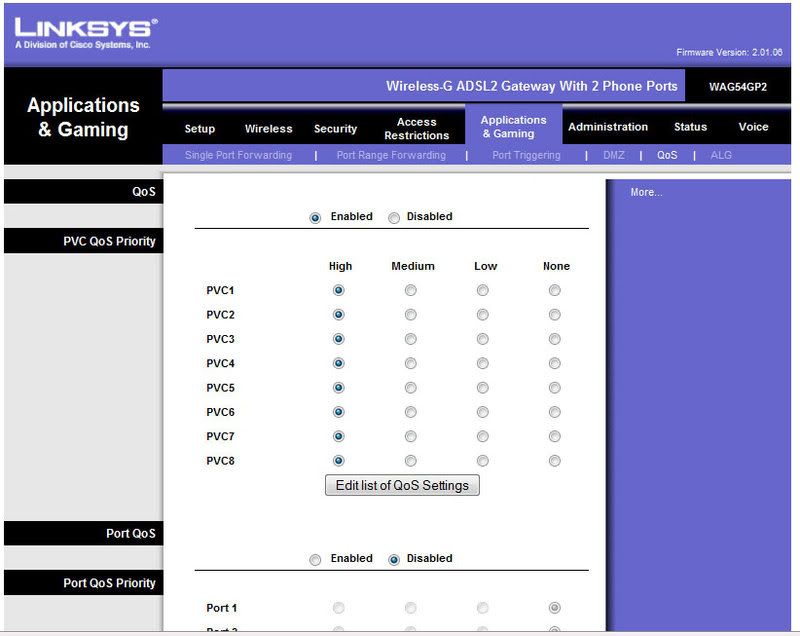
i had this problem for a while. Turns out the QoS on my WAG54GPv2 had been turned off during a factory reset (which could realisticly have happened on the first day i got it), have a look and see if the same thing has happened to you. Cleared it right up when switched back on.


shermanp
357 posts

Ultimate Geek
+1 received by user: 36

Trusted

  #160625 29-Aug-2008 09:19
Send private message

Which Q0S settings are you talking about.. and where???
Please tell!!!

testing123
176 posts

Master Geek


  #160628 29-Aug-2008 09:22
Send private message

i dont have the device in front of me at the moment but it had it's own tab, possibly under "voice"?

might have been under Applications and Gaming (was playing with the port forwarding when i found it).... have a quick poke around, shouldnt be hard to find Smile


shermanp
357 posts

Ultimate Geek
+1 received by user: 36

Trusted

  #160648 29-Aug-2008 10:12
Send private message

Ah, that one..

Problem is that I have no idea what to set so that I get good VFX...
One almost needs a degree in rocket science to understand the QoS settings on that device :(


Shop now for Lenovo laptops and other devices (affiliate link).
testing123
176 posts

Master Geek


  #160653 29-Aug-2008 10:15
Send private message

i dont claim to know what i'm doing, but i'll take a screenshot tonight and post it up for you.

...for all i know i may have severely handicapped all other traffic.... *shrug* at least it works :D


testing123
176 posts

Master Geek


  #160779 29-Aug-2008 17:33
Send private message

QoS

if i'm doing something seriously wrong someone please let me know, when i had issues all the boxes at the top were set to "disabled" and "none"


shermanp
357 posts

Ultimate Geek
+1 received by user: 36

Trusted

  #160788 29-Aug-2008 18:59
Send private message

thanks, will give it a go.

1 | 2 
View this topic in a long page with up to 500 replies per page Create new topic


Geekzone Live »

Try automatic live updates from Geekzone directly in your browser, without refreshing the page, with Geekzone Live now.


Are you subscribed to our RSS feed? You can download the latest headlines and summaries from our stories directly to your computer or smartphone by using a feed reader.