Geekzone: technology news, blogs, forums
Guest
Welcome Guest.
You haven't logged in yet. If you don't have an account you can register now.


View this topic in a long page with up to 500 replies per page Create new topic
1 | 2 
xclusive
10 posts

Wannabe Geek
Inactive user


  #179344 22-Nov-2008 04:43
Send private message

freakalad: Picked up on a discontinued discussion a while back; you can in fact get VoIP to work on you mobile handset, with a bit of tweaking. A couple of clients exits that may be able to help you achieve this, but the protocol may get blocked by you mobile service provider. Otherwise you may be able to manage it over a WiFi connection. Worth a try (goes back to when i was looking at VoIP & IM via mobiles)

* Fring
* iSkoot
* Gizmo/Gizmodo

there are a few others, but these are the ones of principal note


You can patch Fring to use it over 3G..


coffeebaron
6304 posts

Uber Geek
+1 received by user: 3567

Trusted
Lifetime subscriber

  #179365 22-Nov-2008 09:24
Send private message

mdf: Deleting all except ALAW meant it didn't work at all. 

So I guess 2talk is definitely in the G729 camp.

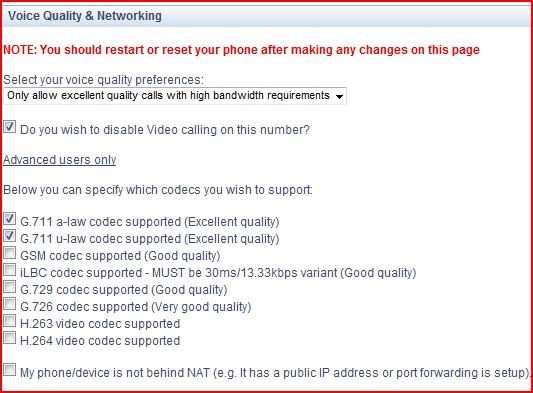
Ok, there's a big clue then. 2talk do support alaw. Try setting to ulaw only, then ulaw+alaw only. If you can't get it working with only these two, check your settings on the 2talk preference page:

2talk

EDIT: & PS, if you do want to use over 3G, then this won't work so well - G729 is much better for over mobile data


Rural IT and Broadband support.


Broadband troubleshooting and master filter installs.
Starlink installer - one month free: https://www.starlink.com/?referral=RC-32845-88860-71 
Wi-Fi and networking
Cel-Fi supply and installer - boost your mobile phone coverage legally


Need help in Auckland, Waikato or BoP? Click my email button, or email me direct: [my user name] at geekzonemail dot com


mdf

mdf
3566 posts

Uber Geek
+1 received by user: 1519

Trusted

  #180334 25-Nov-2008 23:55
Send private message

 
Ok, there's a big clue then. 2talk do support alaw. Try setting to ulaw only, then ulaw+alaw only. If you can't get it working with only these two, check your settings on the 2talk preference page:

2talk

EDIT: & PS, if you do want to use over 3G, then this won't work so well - G729 is much better for over mobile data


Success! Thanks Coffeebaron!

These settings make it much much better - still not quite perfect on the ring ring, but much better and voice quality is excellent. I only want to use this where there is LAN coverage, so no issues there, but thanks for the warning.

What I did to make it work (Nokia E60 + 2talk):

1. Change 2talk settings as described in coffeebaron's post above;

2. Installed SIP_VoIP_Settings_v1_0_en (later version available for later phones - see http://www.forum.nokia.com/main/resources/technologies/voice_over_IP/voip_support_in_nokia_devices.html for compatibility)

3. Created new profile using VoIP services application

4. Edit codecs - delete all codecs EXCEPT "PCMU" and "PCMA". --> This is the bit that caused me problems because I was being a muppet and not reading things right - G.711 A-law = PCMA and G.711 U-law = PCMU. Nokia uses the PCMx option as a name. It even says this in the Nokia instruction manual for the VoIP services application. Kicking myself for this one now.

5. Move PCMA to top of priority list (not sure if this is necessary or not - I did not notice much of a difference, but this is the order 2talk has it in.

6. "Register with Internet Telephone Service" (Nokia's words) - and all is well!


coffeebaron
6304 posts

Uber Geek
+1 received by user: 3567

Trusted
Lifetime subscriber

  #180366 26-Nov-2008 09:54
Send private message

Great to hear you're sorted - yea, forgot about the other variant name for G711. As for the ring, not sure on that one, it could just be the way your phone decides to generate it.


Rural IT and Broadband support.


Broadband troubleshooting and master filter installs.
Starlink installer - one month free: https://www.starlink.com/?referral=RC-32845-88860-71 
Wi-Fi and networking
Cel-Fi supply and installer - boost your mobile phone coverage legally


Need help in Auckland, Waikato or BoP? Click my email button, or email me direct: [my user name] at geekzonemail dot com


1 | 2 
View this topic in a long page with up to 500 replies per page Create new topic


Geekzone Live »

Try automatic live updates from Geekzone directly in your browser, without refreshing the page, with Geekzone Live now.


Are you subscribed to our RSS feed? You can download the latest headlines and summaries from our stories directly to your computer or smartphone by using a feed reader.