Geekzone: technology news, blogs, forums
Guest
Welcome Guest.
You haven't logged in yet. If you don't have an account you can register now.


JimmyH

2898 posts

Uber Geek
+1 received by user: 1554


#262240 12-Jan-2020 09:02
Send private message

I week ago Windows 10 updated itself to a new version, which took about 45 minutes. Among other problems it totally broke sound on my system completely (just keeps insisting speakers aren't plugged in), and so I rolled it back to the previous build (as I have done before), which fixed all the issues.


Previously when I have rolled back it Windows has been smart enough to know that the build I question didn't work, and to not try installing an update until a new build is available.


Now, every time I restart my machine it decides to install the same broken update, which I have to wait around 45-55 minutes for with multiple machine reboots, and then I have to roll it back to the previous build again so that Windows actually works.


I am now on my eighth update/rollback cycle for the same broken version of Windows in eight days. Which is becoming incredibly annoying.


Is there anyway to stop the insanity of Windows continually reinstalling the same broken update over, and over, and over?


Create new topic
TheMaskedOnion
51 posts

Master Geek
+1 received by user: 4


  #2390479 12-Jan-2020 09:09
Send private message

what build of Windows 10 do you have installed?


did you look for updated sound drivers after the feature update?


ANglEAUT
altered-ego
2436 posts

Uber Geek
+1 received by user: 842

Trusted
Lifetime subscriber

  #2390480 12-Jan-2020 09:10
Send private message

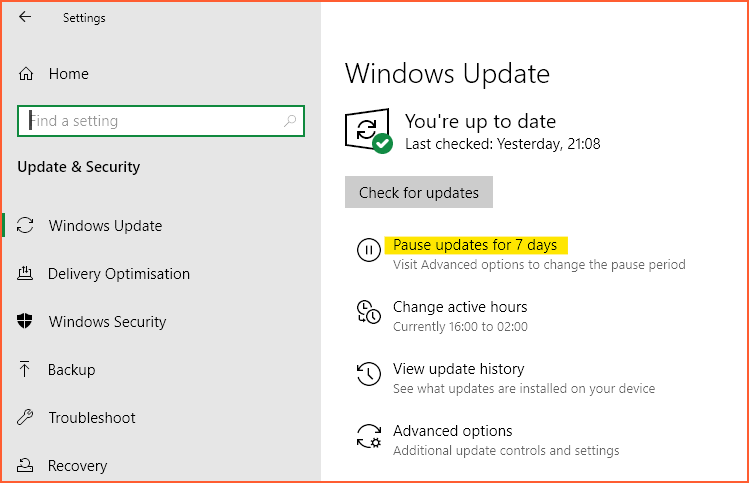
At the very least, you can pause your updates for 7 days.


Settings > Update & Security > Windows Update.


  • You can also try to see what is available under Advanced options.
  • You can also disable the Windows Update service for now. Note, that this is not a recommended long term solution.
  • You can also try to delete the contents of C:\Windows\SoftwareDistribution\Download & have your PC re-download the updates.


Please keep this GZ community vibrant by contributing in a constructive & respectful manner.


sbiddle
30853 posts

Uber Geek
+1 received by user: 9996

Retired Mod
Trusted
Biddle Corp
Lifetime subscriber

  #2390491 12-Jan-2020 10:11
Send private message

As already mentioned above have you checked for updates audio and video drivers? My pick would be this being a very likely candidate for the issue rather than the update being "broken".


Remember drivers are completely separate from Windows updates and typically don't auto update themselves. You just need to click on "update driver" from device manager.


Rickles
3108 posts

Uber Geek
+1 received by user: 445

Trusted

  #2390556 12-Jan-2020 11:09
Send private message

Have you tried uninstalling speaker drivers and then unplugging speakers before performing O/S update.


When all done plug in speakers and see if the drivers etc reinstall correctly.


Jogre
182 posts

Master Geek
+1 received by user: 40


  #2391015 13-Jan-2020 14:10
Send private message

I had this with my soundcard and basically I've dumped my Creative soundcard and plugged the on-board Realtek back in as Creative have discontinued my soundcard and won't keep drivers up to date.


Jono Green


Microsoft New Zealand

SpartanVXL
1498 posts

Uber Geek
+1 received by user: 666


  #2391089 13-Jan-2020 15:11
Send private message

Just to put clarity on what’s happening, when windows 10 does these ‘feature’ updates every half year or so really what’s going on is that it’s re-installing the entire OS (while keeping your personal bits).

The re-install does some funky stuff to drivers, usually you will have to uninstall and re-install from the vendor if a device isn’t working as intended.


Stream your favourite shows now on Apple TV (affiliate link).
richms
29099 posts

Uber Geek
+1 received by user: 10210

Trusted
Lifetime subscriber

  #2391116 13-Jan-2020 16:27
Send private message

That reinstall crap cost me my storage space because it installed a generic driver for my esata card that didnt handle port multipliers, so when it came up it only saw the first drive in each box, and with only 4 of the 9 drives it wouldnt mount.


When I went in there to look it told me that I needed to update my storage space which I assumed was why it wasnt working. But that just totally screwed it up because it only updated the drives it could see. THen when I realised the driver was back to the generic AHCI one and fixed that, the remaining drives were not updated so it saw it as a seperate broken storage space.


FFFFFFffff so now have to re-do it and decide what to bother restoring vs just forgetting about.


Really over this forced update BS.


Richard rich.ms

Create new topic


Geekzone Live »

Try automatic live updates from Geekzone directly in your browser, without refreshing the page, with Geekzone Live now.


Are you subscribed to our RSS feed? You can download the latest headlines and summaries from our stories directly to your computer or smartphone by using a feed reader.