Geekzone: technology news, blogs, forums
Guest
Welcome Guest.
You haven't logged in yet. If you don't have an account you can register now.


alienstew

58 posts

Master Geek
+1 received by user: 1


#40147 25-Aug-2009 21:13
Send private message

There are two notebooks (both with Vista Home Premium) using my wifi network one a "low spec" Toshiba using Internet Explorer and one a "speedy" Dell using Firefox. Thing is "speedy" is painfully slow to load some sites eg Facebook, Yahoo. Most pages from other sites load OK. While "low spec" seems to zip along, loading the other machines "failed" pages without problem. I notice that the "speedy" Dell has constant hard drive activity, haven't a clue what it's doing but obviously slowing things down.

Any suggestions to what I can do to see what all the HDD activity is about? Task Manager shows loads of running processes, not sure which are important. Why is the page load on only some sites so slow? Grateful for any suggestions.


Create new topic
hellonearthisman
1819 posts

Uber Geek
+1 received by user: 52

Trusted

  #250546 25-Aug-2009 23:39
Send private message

Here some info about speed testing web browsers.

firefox might need to be configed, as its setting default into more of a desktop configeration.

LifeHacker has a nice bit on browser localisation. This could help manage the drive load, by useing a 2nd drive.

This tweak on Lifehacker again Which says, and I quote.
  " The quick fix for this problem, at least for my own sake, is to
     increase the time between each of the saves performed by session restore.
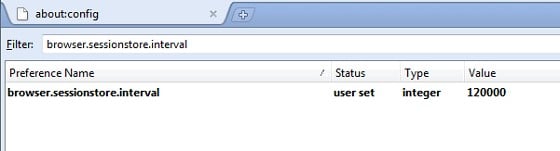
     By opening about:config in your Firefox address bar,
     then typing browser.sessionstore.interval in the filter box,
     you'll see a value of 10000, which is in milliseconds. (Meaning your session is saved every 10 seconds.)
     I changed this to 300000, or every 5 minutes, as I don't have the urgent need for tab restoration.
     If you feel like being more on the safe side, try increasing it to something a bit lower,
     say 120000, or every 2 minutes."


HybridE506r
59 posts

Master Geek


  #250561 26-Aug-2009 01:20
Send private message

Hi there,
i also use firefox and have also had various sites slow loading

am trialling 2 experimental addons that may be useful:

Vacuum Places Improved v0.3
Defragments your Firefox "Places" database
https://addons.mozilla.org/en-US/firefox/addon/13878

and

Fasterfox Lite 3.81
https://addons.mozilla.org/en-US/firefox/addon/9148


Fasterfox certainly has sped up page loading using the "optimised"setting

Hope that may be useful

cheers

Create new topic


Geekzone Live »

Try automatic live updates from Geekzone directly in your browser, without refreshing the page, with Geekzone Live now.


Are you subscribed to our RSS feed? You can download the latest headlines and summaries from our stories directly to your computer or smartphone by using a feed reader.