Geekzone: technology news, blogs, forums
Guest
Welcome Guest.
You haven't logged in yet. If you don't have an account you can register now.


View this topic in a long page with up to 500 replies per page Create new topic
1 | 2 | 3
Jaxson
8172 posts

Uber Geek
+1 received by user: 1332

Trusted

  #636527 6-Jun-2012 10:25
Send private message

Thanks for the update Kingy as I was about to do the same and install on a spare netbook....


sbiddle
30853 posts

Uber Geek
+1 received by user: 9996

Retired Mod
Trusted
Biddle Corp
Lifetime subscriber

  #636534 6-Jun-2012 10:39
Send private message

haakuturi: Yeah, I've installed those.


My 24" monitor has the same issue under Windows7 as well. I have to rescale the display using the AMD driver to fill the full screen.

AMD write such crappy software that this setting will randomly reset itself, so it's something I have to frequently change.


old3eyes
9158 posts

Uber Geek
+1 received by user: 1364

Subscriber

  #636616 6-Jun-2012 12:45
Send private message

Looks like PCs with P4 chips sets are out for installing this RP. The previous edition installed fine but this one says "windows 8 cannot be installed on this PC..

Seems a common complaint when i look on line..


Regards,

Old3eyes


mattwnz
20515 posts

Uber Geek
+1 received by user: 4795


  #636650 6-Jun-2012 13:22
Send private message

Kingy: I took a leap of faith and installed this on my netbook (Eee PC) (after running CP/DP in just a VM). One major problem I have come across is that natively netbooks have a screen resolution of 1024*600. Annoyingly metro apps require a minimum 1024*768 in order to work.

Users of CP/DP Windows 8 found a registry hack in order to change the resolution and get apps to work. However, I think this was limited to Intel chipsets and I believe it no longer works in the Release Preview.

I have downloaded/installed the latest Catalyst drivers (specifically released for the Release Preview) which doesn't help at all.

This is extremely frustrating as the 'Metro Start' screen is pretty useless if I can't use any of the apps. Basically right now it's only use for me is to have a Desktop button and other buttons for my Programs.

Does anyone have any sort of work around for this? Googling hasn't really helped and I'm hoping someone has come across the same problem and found a solution :)


I have the same problem. Ironic really, becuase the metro interface is designed for portable devices, and that is exactly what a netbook is. I've gone back to windows 7 which is far more usable then 8 on a netbook. Also hate how you have to go to multiple menus just to shutdown the computer. Its fine for a touch interface, but useless on a windows PC with a mouse or touchpad

Kingy
395 posts

Ultimate Geek
+1 received by user: 32


  #636654 6-Jun-2012 13:29
Send private message

mattwnz: 
I have the same problem. Ironic really, becuase the metro interface is designed for portable devices, and that is exactly what a netbook is. I've gone back to windows 7 which is far more usable then 8 on a netbook. Also hate how you have to go to multiple menus just to shutdown the computer. Its fine for a touch interface, but useless on a windows PC with a mouse or touchpad


I thought exactly the same thing. However, having said that a lot of the newer devices coming out (tablets, phones etc etc) have the recommended screen resolution. Seems to me that netbooks aren't on the radar in Microsofts eyes. I think i'll be going back to Windows 7 today or tomorrow unless some sort of solution is found. Gah!


Web development blog: http://www.devhour.net
Follow me on twitter: @JAGracie

surfisup1000
5288 posts

Uber Geek
+1 received by user: 2159


  #636655 6-Jun-2012 13:32
Send private message

sbiddle:
haakuturi: Yeah, I've installed those.


My 24" monitor has the same issue under Windows7 as well. I have to rescale the display using the AMD driver to fill the full screen.

AMD write such crappy software that this setting will randomly reset itself, so it's something I have to frequently change.


Maybe it is just a bug?    

I've used AMD drivers in the past, and usually they've been ok. 


Shop now for Lego sets and other gifts (affiliate link).
Regs
4066 posts

Uber Geek
+1 received by user: 206

Trusted
Snowflake

  #636815 6-Jun-2012 17:23
Send private message

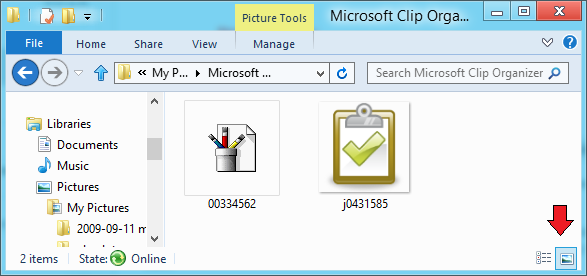
this was probably also in the release preview, but I only just noticed it and will make heavy use of it:

two buttons to switch between details view and large thumbnails view, see bottom right in image below.

win8 list change buttons

I often switch between these two views, and the 'old' way was too long winded. 5 stars for this feature :-)


Regs
4066 posts

Uber Geek
+1 received by user: 206

Trusted
Snowflake

  #636816 6-Jun-2012 17:25
Send private message

old3eyes: Looks like PCs with P4 chips sets are out for installing this RP. The previous edition installed fine but this one says "windows 8 cannot be installed on this PC..

Seems a common complaint when i look on line..


P4 - as in "Pentium 4" - as in discontinued a few years ago?  bah, who cares.....


Kingy
395 posts

Ultimate Geek
+1 received by user: 32


  #636864 6-Jun-2012 18:24
Send private message

You could quite simply say the same thing about XP but of course the people still using that proved otherwise. Same can be said for P4 users. A lot of those are still floating around. I can't see people upgrading their entire PC just in order to use Windows 8. Silly move.


Web development blog: http://www.devhour.net
Follow me on twitter: @JAGracie

Regs
4066 posts

Uber Geek
+1 received by user: 206

Trusted
Snowflake

  #636986 6-Jun-2012 21:41
Send private message

XP on *new* hardware runs great. Windows Vista, Windows 7, and now windows 8 on *OLD* hardware sucks. the argument about XP is not the same argument.


Kingy
395 posts

Ultimate Geek
+1 received by user: 32


  #637104 7-Jun-2012 08:17
Send private message

Well it kind of is the same. *OLD* software runs great on XP. *NEW* software does not. Not that different :)


Web development blog: http://www.devhour.net
Follow me on twitter: @JAGracie

HP


Shop now for HP laptops and other devices (affiliate link).
boys
44 posts

Geek
Inactive user


  #638894 11-Jun-2012 13:14
Send private message

i did not think windows 8 was any good i miss the start button

hairy1
3352 posts

Uber Geek
+1 received by user: 644

ID Verified
Trusted
Lifetime subscriber

  #638907 11-Jun-2012 13:20
Send private message

I miss the start button too. It really is just a change of mindset though. The metro screen is just a giant start button...


My views (except when I am looking out their windows) are not those of my employer.


networkn
Networkn
32862 posts

Uber Geek
+1 received by user: 15453

ID Verified
Trusted
Lifetime subscriber

  #638930 11-Jun-2012 13:42
Send private message

Can you switch off Metro by any means? You could in the earliest release, but not in the second.

mattwnz
20515 posts

Uber Geek
+1 received by user: 4795


  #638959 11-Jun-2012 14:28
Send private message

hairy1: I miss the start button too. It really is just a change of mindset though. The metro screen is just a giant start button...


It is, but you then can't see the open applications. I do think the taskbar looks somewhat naked without it. In a way I can't see why it can't just be enabled for those peple who want it, because I think that will be one of the main reasons it won't be adopted by businesses. I think it will be another ME, Vista miss. I will only upgrade to it because I'll get a free upgrade with windows 7 when I buy a new PC.

1 | 2 | 3
View this topic in a long page with up to 500 replies per page Create new topic


Geekzone Live »

Try automatic live updates from Geekzone directly in your browser, without refreshing the page, with Geekzone Live now.


Are you subscribed to our RSS feed? You can download the latest headlines and summaries from our stories directly to your computer or smartphone by using a feed reader.