Geekzone: technology news, blogs, forums
Guest
Welcome Guest.
You haven't logged in yet. If you don't have an account you can register now.


View this topic in a long page with up to 500 replies per page Create new topic
1 | 2 
andrewNZ
2487 posts

Uber Geek
+1 received by user: 1461
Inactive user


  #943596 1-Dec-2013 08:52
Send private message

Unfortunately, I don't think the dump you uploaded is what we want to look at.

If you google the bluescreen message, it should give you a pretty good idea what you're looking at.

Download the bluescreen viewer from here http://www.nirsoft.net/utils/blue_screen_view.html (Zip at the bottom of the page) and run the program on the affected computer. it will allow you to view the bluescreen info.

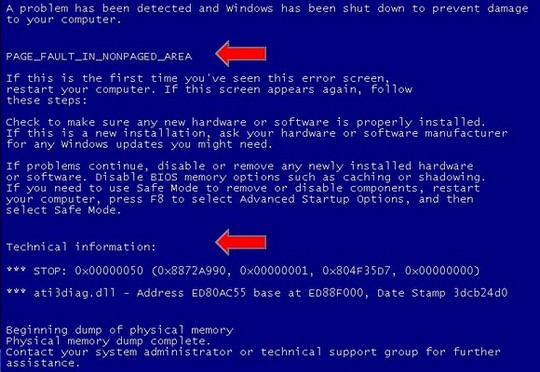
It's pretty easy to decode. you should see:
1) the offending file. (2nd line, or below the stop code)
2) the message about it (3rd line)
3) the stop code (near the bottom)

Once we have that, we can probably have a good go at pinpointing it.


andrewNZ
2487 posts

Uber Geek
+1 received by user: 1461
Inactive user


  #943598 1-Dec-2013 08:57
Send private message

A BSOD example


CyberN3rds

107 posts

Master Geek
+1 received by user: 2


  #943612 1-Dec-2013 09:43
Send private message

andrewNZ: A BSOD example


Thanks, my problem is software related... So I probably need to do a reinstall, never done one before and I'm nervous but I guess everyone needs to learn to do it at some point.


The Beast: Asus P9X79LE | Intel core i7 3820 | Seagate Barracuda 2TB | Toshiba Laptop Drive 450GB | Samsung 840 EVO SSD 120GB | Cooler Master CM Storm Enforcer Case | Cooler Master Hyper 212 EVO CPU cooler | Asus Direct CU GTX 650 (upgrading soon) | Silverstone Strider Plus 600w 80+ Silver Power Supply | 16GB Adata Premier Pro 1600mhz | Windows 7 Home Premium 64bit | Logitech MK520 Keyboard & Mouse Combo | ViewSonic VA2248M-LED Monitor |


freitasm
BDFL - Memuneh
80652 posts

Uber Geek
+1 received by user: 41045

Administrator
ID Verified
Trusted
Geekzone
Lifetime subscriber

  #943625 1-Dec-2013 09:49
Send private message

Have you really eliminated the hardware possibilities? RAM and PSU are the most common hardware problems, although overheating may cause it too. Are the fans working?

Also before you reinstall MAKE A BACKUP OF YOUR DATA.

MAKE A BACKUP OF YOUR DATA.

MAKE A BACKUP OF YOUR DATA.

MAKE A BACKUP OF YOUR DATA.

MAKE A BACKUP OF YOUR DATA.

MAKE A BACKUP OF YOUR DATA.

With this said you should also download DRIVERS for your PC before doing the reinstall. Some laptops for example use a network driver that is not available on Windows so you won't have network access to download any other drivers until that is installed. So you better have it handy BEFORE a fresh install.


Referral links: Quic Broadband (free setup code: R587125ERQ6VE) | Samsung | AliExpress | Wise | Sharesies 


Support Geekzone by subscribing (browse ads-free), or making a one-off or recurring donation through PressPatron.



andrewNZ
2487 posts

Uber Geek
+1 received by user: 1461
Inactive user


  #943634 1-Dec-2013 10:17
Send private message

What is the fault specifically? it may be trivial to fix.

If you are having trouble finding drivers, driverpacks.net is a good place to look.

MaxLV
656 posts

Ultimate Geek
+1 received by user: 161


  #943638 1-Dec-2013 10:42
Send private message

The Bluescreen is reporting the ATI3diag.dll is the cause of your problems. This is a Graphics card driver file.

Download the latest drivers from the net for the graphics card.

I would uninstall the ATI Graphics card drivers in Hardware Manager in Windows/Control Panel, remove the Graphics card completely, and reboot. Check the Bios and make sure it's using the onboard Graphics

See if you still get the Blue screens.

If not then try installing the Graphics card again but dont install the drivers yet. Check the bios, make sure it's using the Graphics card, not the onboard graphics.

See if you get the Blue screens when running the graphics card using windows (default) drivers.

If not then I would try installing the graphics card drivers downloaded from the net, rather than the ones on any CD or DVD install disk.

Hopefully that will solve the Blue screen problem.

BTW, all the websites I looked at for your graphics card say it's Nvidia based, not ATI. Not sure why an ATI driver would be required for an Nvidia based graphics card.


Stream your favourite shows now on Apple TV (affiliate link).
andrewNZ
2487 posts

Uber Geek
+1 received by user: 1461
Inactive user


  #943660 1-Dec-2013 11:46
Send private message

MaxLV: The Bluescreen is reporting the ATI3diag.dll is the cause of your problems. This is a Graphics card driver file.

Download the latest drivers from the net for the graphics card.

I would uninstall the ATI Graphics card drivers in Hardware Manager in Windows/Control Panel, remove the Graphics card completely, and reboot. Check the Bios and make sure it's using the onboard Graphics

See if you still get the Blue screens.

If not then try installing the Graphics card again but dont install the drivers yet. Check the bios, make sure it's using the Graphics card, not the onboard graphics.

See if you get the Blue screens when running the graphics card using windows (default) drivers.

If not then I would try installing the graphics card drivers downloaded from the net, rather than the ones on any CD or DVD install disk.

Hopefully that will solve the Blue screen problem.

BTW, all the websites I looked at for your graphics card say it's Nvidia based, not ATI. Not sure why an ATI driver would be required for an Nvidia based graphics card.


NO, that's an EXAMPLE picture...

MaxLV
656 posts

Ultimate Geek
+1 received by user: 161


#943668 1-Dec-2013 12:09
Send private message

andrewNZ:
MaxLV: The Bluescreen is reporting the ATI3diag.dll is the cause of your problems. This is a Graphics card driver file.

Download the latest drivers from the net for the graphics card.

I would uninstall the ATI Graphics card drivers in Hardware Manager in Windows/Control Panel, remove the Graphics card completely, and reboot. Check the Bios and make sure it's using the onboard Graphics

See if you still get the Blue screens.

If not then try installing the Graphics card again but dont install the drivers yet. Check the bios, make sure it's using the Graphics card, not the onboard graphics.

See if you get the Blue screens when running the graphics card using windows (default) drivers.

If not then I would try installing the graphics card drivers downloaded from the net, rather than the ones on any CD or DVD install disk.

Hopefully that will solve the Blue screen problem.

BTW, all the websites I looked at for your graphics card say it's Nvidia based, not ATI. Not sure why an ATI driver would be required for an Nvidia based graphics card.


NO, that's an EXAMPLE picture...


IOW check who the post is from before replying....

richms
29099 posts

Uber Geek
+1 received by user: 10210

Trusted
Lifetime subscriber

  #943683 1-Dec-2013 12:54
Send private message

I have had blue screens on idle before. Was the cpu fan throttling back and not cooling the other stuff enough.

Try winding all the fans to full speed always in the bios and see if it helps. I did touch the other mobo heat sinks and they were leave marks on finger hot when the cpu fan was just idling along.


Richard rich.ms

Jarno
270 posts

Ultimate Geek
+1 received by user: 50


  #943698 1-Dec-2013 14:32
Send private message

You can try looking at the dumps using BlueScreenView. It's not showing any program-related info in the dump you provided, so I think it is hardware related and not software.

CyberN3rds

107 posts

Master Geek
+1 received by user: 2


  #943856 1-Dec-2013 22:32
Send private message

richms: I have had blue screens on idle before. Was the cpu fan throttling back and not cooling the other stuff enough.

Try winding all the fans to full speed always in the bios and see if it helps. I did touch the other mobo heat sinks and they were leave marks on finger hot when the cpu fan was just idling along.


I use a Noctua CPU cooler, and by the quality of it I doubt it would let my temps down.  However I did in fact undervolt the fan using the low noise adapter which is now taken off.  


The Beast: Asus P9X79LE | Intel core i7 3820 | Seagate Barracuda 2TB | Toshiba Laptop Drive 450GB | Samsung 840 EVO SSD 120GB | Cooler Master CM Storm Enforcer Case | Cooler Master Hyper 212 EVO CPU cooler | Asus Direct CU GTX 650 (upgrading soon) | Silverstone Strider Plus 600w 80+ Silver Power Supply | 16GB Adata Premier Pro 1600mhz | Windows 7 Home Premium 64bit | Logitech MK520 Keyboard & Mouse Combo | ViewSonic VA2248M-LED Monitor |


Shop now for Dell laptops and other devices (affiliate link).
CyberN3rds

107 posts

Master Geek
+1 received by user: 2


  #943858 1-Dec-2013 22:35
Send private message

Jarno: You can try looking at the dumps using BlueScreenView. It's not showing any program-related info in the dump you provided, so I think it is hardware related and not software.

Are you sure? I thought it was corrupted windows files? Well, I've done a reinstall, I've also set my CPU fan to stock speeds.  Nothing is over clocked, so all thats left is the CPU, RAM, motherboard and other hardware things, so I've trimmed it down.  If its hardware related the components are on warranty, so not going to drain me of all my money. 


The Beast: Asus P9X79LE | Intel core i7 3820 | Seagate Barracuda 2TB | Toshiba Laptop Drive 450GB | Samsung 840 EVO SSD 120GB | Cooler Master CM Storm Enforcer Case | Cooler Master Hyper 212 EVO CPU cooler | Asus Direct CU GTX 650 (upgrading soon) | Silverstone Strider Plus 600w 80+ Silver Power Supply | 16GB Adata Premier Pro 1600mhz | Windows 7 Home Premium 64bit | Logitech MK520 Keyboard & Mouse Combo | ViewSonic VA2248M-LED Monitor |

1 | 2 
View this topic in a long page with up to 500 replies per page Create new topic


Geekzone Live »

Try automatic live updates from Geekzone directly in your browser, without refreshing the page, with Geekzone Live now.


Are you subscribed to our RSS feed? You can download the latest headlines and summaries from our stories directly to your computer or smartphone by using a feed reader.