|
|
|
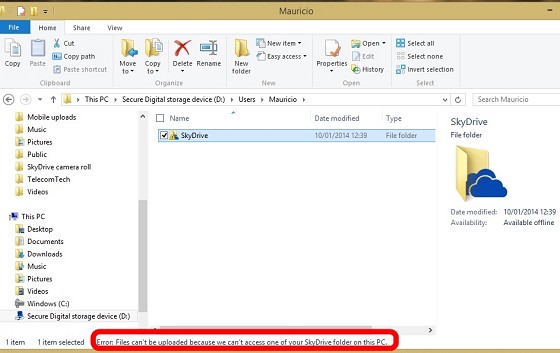
freitasm: Not if you're trying to use only Modern UI apps which will only use the Skydrive file picker - things such as Project Siena for example (which is exactly where I noticed this happening first time, then lead me to the screenshots above).
Can you send the SkyDrive logs by zip’ing up the contents of %localappdata%\microsoft\Windows\SkyDrive?
Referral links: Quic Broadband (free setup code: R587125ERQ6VE) | Samsung | AliExpress | Wise | Sharesies
Support Geekzone by subscribing (browse ads-free), or making a one-off or recurring donation through PressPatron.

nathan:freitasm: Not if you're trying to use only Modern UI apps which will only use the Skydrive file picker - things such as Project Siena for example (which is exactly where I noticed this happening first time, then lead me to the screenshots above).
you could try posting this in the SkyDrive support forums, since I'm only here in my personal spare time
nathan: or you could email me your SkyDrive logs
Can you send the SkyDrive logs by zip’ing up the contents of %localappdata%\microsoft\Windows\SkyDrive?
Referral links: Quic Broadband (free setup code: R587125ERQ6VE) | Samsung | AliExpress | Wise | Sharesies
Support Geekzone by subscribing (browse ads-free), or making a one-off or recurring donation through PressPatron.
freitasm:nathan:freitasm: Not if you're trying to use only Modern UI apps which will only use the Skydrive file picker - things such as Project Siena for example (which is exactly where I noticed this happening first time, then lead me to the screenshots above).
you could try posting this in the SkyDrive support forums, since I'm only here in my personal spare time
Nathan, thanks for the suggestion but my experience in many years with Microsoft support forums is that there's never a reply there that actually solves a problem. Completely opposite of my experience with more specific sites, such as IIS.net which is great.nathan: or you could email me your SkyDrive logs
Can you send the SkyDrive logs by zip’ing up the contents of %localappdata%\microsoft\Windows\SkyDrive?
Will package them - don't have a zip utility on this tablet so need to copy somewhere else first.
nathan: what is the exact error message in the Modern UI file picker?


Referral links: Quic Broadband (free setup code: R587125ERQ6VE) | Samsung | AliExpress | Wise | Sharesies
Support Geekzone by subscribing (browse ads-free), or making a one-off or recurring donation through PressPatron.
freitasm:nathan: what is the exact error message in the Modern UI file picker?
The file picker error:
The other messages:
universenz: On the subject of bugs with Skydrive I found an irreversible bug on my new installation of Windows 8.1 x64 for my Laptop.
Whatever you do, don't change the Skydrive storage "Location" (right click, Properties, Location) to your Desktop. Even if you try to move it away, it breaks something either in the registry or hidden ntfs links and your Desktop remains the Skydrive location symbolically forever.
I originally tested this because I wanted to synchronize my Skydrive folders and files to my Desktop view for my laptop and Surface as it is always the first place most accessible from both devices. Turns out, that was a really bad idea. I later changed location to "C:/SkyDrive" but even though the files moved and appeared there, any changes to files and folders continued to update the Desktop view. If I deleted a file from the desktop it deleted it from C:/SkyDrive.
I probably mistakenly created a symbolic link or junction loop or something.
It was really broken so I had to revert back to a back up I had made hours earlier (thankfully) and everything is fine now.
nathan:universenz: On the subject of bugs with Skydrive I found an irreversible bug on my new installation of Windows 8.1 x64 for my Laptop.
Whatever you do, don't change the Skydrive storage "Location" (right click, Properties, Location) to your Desktop. Even if you try to move it away, it breaks something either in the registry or hidden ntfs links and your Desktop remains the Skydrive location symbolically forever.
I originally tested this because I wanted to synchronize my Skydrive folders and files to my Desktop view for my laptop and Surface as it is always the first place most accessible from both devices. Turns out, that was a really bad idea. I later changed location to "C:/SkyDrive" but even though the files moved and appeared there, any changes to files and folders continued to update the Desktop view. If I deleted a file from the desktop it deleted it from C:/SkyDrive.
I probably mistakenly created a symbolic link or junction loop or something.
It was really broken so I had to revert back to a back up I had made hours earlier (thankfully) and everything is fine now.
thanks for the feedback, when you say backup, did you have to restore your OS image?
Referral links: Quic Broadband (free setup code: R587125ERQ6VE) | Samsung | AliExpress | Wise | Sharesies
Support Geekzone by subscribing (browse ads-free), or making a one-off or recurring donation through PressPatron.
Referral links: Quic Broadband (free setup code: R587125ERQ6VE) | Samsung | AliExpress | Wise | Sharesies
Support Geekzone by subscribing (browse ads-free), or making a one-off or recurring donation through PressPatron.
|
|
|