Geekzone: technology news, blogs, forums
Guest
Welcome Guest.
You haven't logged in yet. If you don't have an account you can register now.


View this topic in a long page with up to 500 replies per page Create new topic
1 | 2 | 3 | 4 | 5 | 6 | 7 | ... | 11
OmniouS
434 posts

Ultimate Geek
+1 received by user: 46

Trusted
Lifetime subscriber

  #588740 1-Mar-2012 10:52
Send private message

I'm quite keen to try this out and very impressed with the download speed!


Dratsab
3964 posts

Uber Geek
+1 received by user: 1728

Trusted
Lifetime subscriber

  #588775 1-Mar-2012 11:37
Send private message

Just installing it onto a laptop now in VMware Player but have to go out very soon so won't have time to play with it until much later :-( Looking forward to installing it (in VMware Player) on my 25" HP Touchsmart this evening!

Lurch
1061 posts

Uber Geek
+1 received by user: 71


  #588786 1-Mar-2012 12:07
Send private message

Downloaded it, Burnt it, printed a DVD cover for it, Installed it, Tried it. Formatted the drive and put Windows 7 back. :-)


maverick
3594 posts

Uber Geek
+1 received by user: 80

Trusted
WorldxChange

  #588788 1-Mar-2012 12:10
Send private message

Lurch: Downloaded it, Burnt it, printed a DVD cover for it, Installed it, Tried it. Formatted the drive and put Windows 7 back. :-)


Lol ... now that's funny


Yes I am a employee of WxC (My Profile) ... but I do have my own opinions as well Wink


https://www.facebook.com/wxccommunications

freitasm
BDFL - Memuneh
80646 posts

Uber Geek
+1 received by user: 41030

Administrator
ID Verified
Trusted
Geekzone
Lifetime subscriber

  #588797 1-Mar-2012 12:25
Send private message

XBox Live Sign-In not supported in New Zealand.

Me tile allows you to read Tweets and Facebook posts in your timeline, but you can't post anything.


Referral links: Quic Broadband (free setup code: R587125ERQ6VE) | Samsung | AliExpress | Wise | Sharesies 


Support Geekzone by subscribing (browse ads-free), or making a one-off or recurring donation through PressPatron.



StevieT
706 posts

Ultimate Geek
+1 received by user: 34


  #588805 1-Mar-2012 12:40
Send private message

What does everything look like in Windows 8 without the tablet view being enabled?


Shop now for Lenovo laptops and other devices (affiliate link).
freitasm
BDFL - Memuneh
80646 posts

Uber Geek
+1 received by user: 41030

Administrator
ID Verified
Trusted
Geekzone
Lifetime subscriber

  #588806 1-Mar-2012 12:45
Send private message

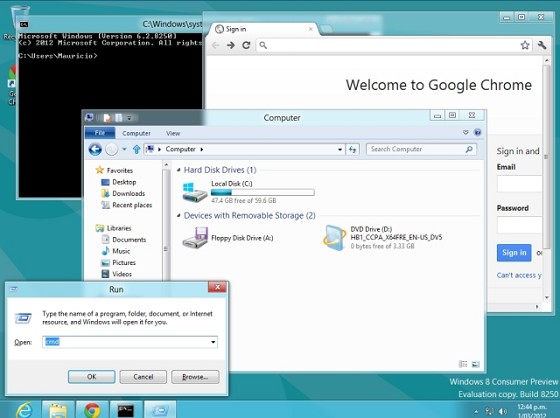
If you start a non-Metro app it will just show the old Windows Explorer UI - without the Orb at the bottom. The Windows key on your keyboard swaps between Metro and old-style desktops.


Referral links: Quic Broadband (free setup code: R587125ERQ6VE) | Samsung | AliExpress | Wise | Sharesies 


Support Geekzone by subscribing (browse ads-free), or making a one-off or recurring donation through PressPatron.


Lias
5655 posts

Uber Geek
+1 received by user: 3978

ID Verified
Trusted
Lifetime subscriber

  #588817 1-Mar-2012 13:12
Send private message

No windows classic, or ability to disable metro and force traditional start menu is a dealbreaker for me, and I'd imagine virtually every Enterprise IT department in existence. 5 minutes of using Metro left me wanting to ask Al Qaeda to target Redmond.

Waste of a download and resource to create that VM.


I'm a geek, a gamer, a dad, a Quic user, and an IT Professional. I have a full rack home lab, size 15 feet, an epic beard and Asperger's. I'm a bit of a Cypherpunk, who believes information wants to be free and the Net interprets censorship as damage and routes around it. If you use my Quic signup you can also use the code R570394EKGIZ8 for free setup. Opinions are my own and not the views of my employer.


freitasm
BDFL - Memuneh
80646 posts

Uber Geek
+1 received by user: 41030

Administrator
ID Verified
Trusted
Geekzone
Lifetime subscriber

  #588820 1-Mar-2012 13:19
Send private message

You can disable Metro using a registry change or policy.


Referral links: Quic Broadband (free setup code: R587125ERQ6VE) | Samsung | AliExpress | Wise | Sharesies 


Support Geekzone by subscribing (browse ads-free), or making a one-off or recurring donation through PressPatron.


th3r3turn
258 posts

Ultimate Geek
Inactive user


  #588871 1-Mar-2012 14:16
Send private message

downloaded and installed onto my SSD. somewhat ok, im still getting use to it.

Lias
5655 posts

Uber Geek
+1 received by user: 3978

ID Verified
Trusted
Lifetime subscriber

  #588882 1-Mar-2012 14:31
Send private message

freitasm: You can disable Metro using a registry change or policy.


Disabling it via the registry change breaks all sorts of other things like task manager, file ribbon in explorer etc, however. You need to use a 3rd party utility to get start menu with the rest of the new ui working. Every core windows component should work in a "Windows Classic" theme out of the box, without the need for third party utilities..


I'm a geek, a gamer, a dad, a Quic user, and an IT Professional. I have a full rack home lab, size 15 feet, an epic beard and Asperger's. I'm a bit of a Cypherpunk, who believes information wants to be free and the Net interprets censorship as damage and routes around it. If you use my Quic signup you can also use the code R570394EKGIZ8 for free setup. Opinions are my own and not the views of my employer.


Move to New Zealand's best fibre broadband service (affiliate link). Free setup code: R587125ERQ6VE. Note that to use Quic Broadband you must be comfortable with configuring your own router.
AndrewMac
83 posts

Master Geek
+1 received by user: 3


  #589017 1-Mar-2012 18:39
Send private message

my installation failed, but it kindly restored my windows 7

Dratsab
3964 posts

Uber Geek
+1 received by user: 1728

Trusted
Lifetime subscriber

  #589026 1-Mar-2012 18:57
Send private message

Have had to crash my laptop twice now because its system resources get completely used up - 100% memory and CPU. Not sure if it's VMware or Windows 8, either way I've given up on my laptop.

More success on my touchsmart but don't like the way a "fullscreen" implementation of VMware is actually only half a screen of the O/S with a MASSIVE black border around it. I notice VMware is also hogging a massive chunk of both memory and CPU resource, which leads me to think trying to run one than one virtual machine with software would be a waste of time. Any suggestions for usable virtual machine software?

Back on topic...not sure if I'm keen on the metro interface for a desktop. This is probably down to many years of using a mouse so I'm game to give it some time.

nathan
5695 posts

Uber Geek
+1 received by user: 1630
Inactive user


  #589029 1-Mar-2012 18:59
Send private message

geekiegeek: The set-up tool method failed for me as it reported my CPU as under 1Ghz - on a Core i7 2600K running at 4.5Ghz!

Grabbing it now from my technet sub.

Anyone know if this version includes desktop virtualization?


yes indeed, Hyper-V is in the client, you just need SLAT enabled CPU/hardware

Hyper-V in Win8 supports massive numbers, 1TB RAM per guest VM, 32 vCPUs per guest, 64 TB VHDX vDisks etc 

nathan
5695 posts

Uber Geek
+1 received by user: 1630
Inactive user


  #589031 1-Mar-2012 19:02
Send private message

Dratsab: Have had to crash my laptop twice now because its system resources get completely used up - 100% memory and CPU. Not sure if it's VMware or Windows 8, either way I've given up on my laptop.

More success on my touchsmart but don't like the way a "fullscreen" implementation of VMware is actually only half a screen of the O/S with a MASSIVE black border around it. I notice VMware is also hogging a massive chunk of both memory and CPU resource, which leads me to think trying to run one than one virtual machine with software would be a waste of time. Any suggestions for usable virtual machine software?

Back on topic...not sure if I'm keen on the metro interface for a desktop. This is probably down to many years of using a mouse so I'm game to give it some time.


everyone installing with Oracle Virtualbox and VMWare player:

I'd recommend you install with BootVHD instead of installing into a virtualisation layer

you'll get much better performance, direct access to the hardware, still won't affect your current OS install, if you want delete Win8, you can just delete the VHD file off your file system and boom its gone

if you need BootVHD guidance I can whip up a quick blog post 

1 | 2 | 3 | 4 | 5 | 6 | 7 | ... | 11
View this topic in a long page with up to 500 replies per page Create new topic


Geekzone Live »

Try automatic live updates from Geekzone directly in your browser, without refreshing the page, with Geekzone Live now.


Are you subscribed to our RSS feed? You can download the latest headlines and summaries from our stories directly to your computer or smartphone by using a feed reader.