Geekzone: technology news, blogs, forums
Guest
Welcome Guest.
You haven't logged in yet. If you don't have an account you can register now.


View this topic in a long page with up to 500 replies per page Create new topic
1 | 2 | 3 | 4 | 5 | 6 | 7 | 8 | ... | 23
linw
2893 posts

Uber Geek
+1 received by user: 1205


  #1757565 6-Apr-2017 14:10
Send private message

semigeek:


Why oh why did they remove Control Panel as an option when you right click the start menu? 
And Paint 3D? That's very useful. Not. 


Control Panel is being phased out.


If you don't want Paint 3D the old Paint is still there.


semigeek
1606 posts

Uber Geek
+1 received by user: 124


  #1757568 6-Apr-2017 14:12
Send private message

linw:


semigeek:


Why oh why did they remove Control Panel as an option when you right click the start menu? 
And Paint 3D? That's very useful. Not. 


Control Panel is being phased out.


If you don't want Paint 3D the old Paint is still there.


I use Paint.net anyway for most things. 


Talkiet
4819 posts

Uber Geek
+1 received by user: 3934

Trusted

  #1757572 6-Apr-2017 14:20
Send private message

Failed to install and rolled back twice now...... I can't find a log (haven't looked hard) to figure out why it failed


N


Please note all comments are from my own brain and don't necessarily represent the position or opinions of my employer, previous employers, colleagues, friends or pets.


networkn

Networkn
32862 posts

Uber Geek
+1 received by user: 15453

ID Verified
Trusted
Lifetime subscriber

  #1757573 6-Apr-2017 14:22
Send private message

semigeek:


Why oh why did they remove Control Panel as an option when you right click the start menu? 
And Paint 3D? That's very useful. Not. 


 I did not even notice that until this morning. My God they make some freaking braindead decisions. It's mind boggling.


freitasm
BDFL - Memuneh
80646 posts

Uber Geek
+1 received by user: 41030

Administrator
ID Verified
Trusted
Geekzone
Lifetime subscriber

  #1757590 6-Apr-2017 14:34
Send private message

Running the new Windows now. Control Panel not being there is easy: tap the Windows key and type "Control".


VPN connection from the systray icon!


Referral links: Quic Broadband (free setup code: R587125ERQ6VE) | Samsung | AliExpress | Wise | Sharesies 


Support Geekzone by subscribing (browse ads-free), or making a one-off or recurring donation through PressPatron.


networkn

Networkn
32862 posts

Uber Geek
+1 received by user: 15453

ID Verified
Trusted
Lifetime subscriber

  #1757593 6-Apr-2017 14:44
Send private message

freitasm:


Running the new Windows now. Control Panel not being there is easy: tap the Windows key and type "Control".


By easy you mean.. 1 Click + 7 characters typed on a keyboard, + 1 more click. 


As opposed to : 


1 Click, + 1 Click?


Makes a big difference when you access this multiple times a day for clients.


Not to mention the start menu is SLOW to open and search is sometimes SLOW to work or is erratic. 


Want to support Geekzone and browse the site without the ads? Subscribe to Geekzone now (monthly, annual and lifetime options).
darylblake
1172 posts

Uber Geek
+1 received by user: 410

Trusted

  #1757602 6-Apr-2017 14:57
Send private message

networkn:


timmmay:


I bet this update resets a bunch of stuff to defaults, like networking, it loses static IPs. Every time there's a significant update it takes a while to get the computer to work properly again.


Hence my start menu and shortcuts in OP. Bunch of stuff there I never wanted and have no need for. 


Yeh you think they could export some of these settings to your one drive or a folder or something, and then re-apply them after the update completes. 


I can understand them throwing in some new icons/features, that people may not want. But removing user preferences sounds a bit rookie.


freitasm
BDFL - Memuneh
80646 posts

Uber Geek
+1 received by user: 41030

Administrator
ID Verified
Trusted
Geekzone
Lifetime subscriber

  #1757674 6-Apr-2017 16:06
Send private message

Tried loading Edge again today. It loads ok, a bit slow to start with - I guess updating the Extensions.


Since I found out that there was a problem with Edge and AdBlock Plus I kept it there to test.


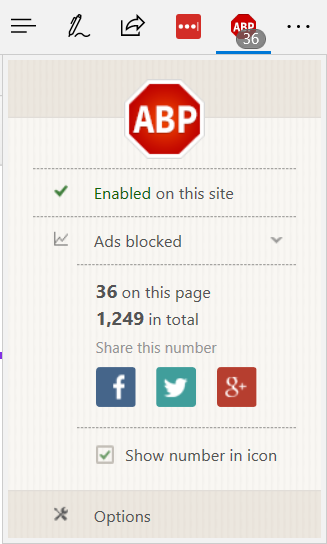
What I found is that AdBlock Plus shows the number of ads blocked... But all ads are still showing anyway. This for stuff.co.nz (which I use to test this because it's loaded with ads):


Also noticed LastPass won't fill passwords.


It's almost as extensions can no longer access the page to modify it...


Also Tweetdeck is extremely slow. No way to use it.


/cc @nathan


Referral links: Quic Broadband (free setup code: R587125ERQ6VE) | Samsung | AliExpress | Wise | Sharesies 


Support Geekzone by subscribing (browse ads-free), or making a one-off or recurring donation through PressPatron.



UHD

UHD
655 posts

Ultimate Geek
+1 received by user: 298
Inactive user


  #1757717 6-Apr-2017 17:33
Send private message

linw:


semigeek:


Why oh why did they remove Control Panel as an option when you right click the start menu? 
And Paint 3D? That's very useful. Not. 


Control Panel is being phased out.


If you don't want Paint 3D the old Paint is still there.


It'd be nice if they phased in a replacement with the same functionality ('Settings' is garbage and missing most of the functionality needed from a Control Panel replacement) before phasing out something that customers are familiar with.


freitasm
BDFL - Memuneh
80646 posts

Uber Geek
+1 received by user: 41030

Administrator
ID Verified
Trusted
Geekzone
Lifetime subscriber

  #1757718 6-Apr-2017 17:34
Send private message

Just search for Control Panel and pin to Start Menu.


Referral links: Quic Broadband (free setup code: R587125ERQ6VE) | Samsung | AliExpress | Wise | Sharesies 


Support Geekzone by subscribing (browse ads-free), or making a one-off or recurring donation through PressPatron.


Ruphus
469 posts

Ultimate Geek
+1 received by user: 181


  #1757784 6-Apr-2017 19:55
Send private message

nzkiwiman:


Hoping when the Enterprise version is released to the VL system, I can create an VM of my current laptop and apply the update and see if it gives me a crap ton of unwanted apps that I have removed and resets my preferences (laptop is currently running 1511 build - with all the issues around WSUS and Cumulative Updates that were introduced in 1607, I gave up on all testing)


If I was you, I'd be installing the creative update as soon as possible to release date instead of waiting for it to go to Current Branch for Business. At least then you'll have more time to fix any application related issues if there are any. The CBB release is exactly the same as the Current Branch (CB) release except for the cumulative update which is included with CBB. Functionality and features are exactly the same.


Shop now on Samsung phones, tablets, TVs and more (affiliate link).
nathan
5695 posts

Uber Geek
+1 received by user: 1630
Inactive user


  #1757885 7-Apr-2017 05:08
Send private message

UHD:


linw:


semigeek:


Why oh why did they remove Control Panel as an option when you right click the start menu? 
And Paint 3D? That's very useful. Not. 


Control Panel is being phased out.


If you don't want Paint 3D the old Paint is still there.


It'd be nice if they phased in a replacement with the same functionality ('Settings' is garbage and missing most of the functionality needed from a Control Panel replacement) before phasing out something that customers are familiar with.


it would be good to know why you think Settings is garbage, this would be good feedback to put into the Feedback Hub tool


and what things you find you need to go to the control panel for.  I hardly ever go there now myself.


Goto %localappdata%\Microsoft\Windows\WinX\Group2 and you should see the shortcut to control panel there.  If you look at the properties you can see that it now points to the new immersivecontrolpanel app.
I think you can add a new shortcut pointing to control.exe and this should add an entry into that menu.


nathan
5695 posts

Uber Geek
+1 received by user: 1630
Inactive user


  #1757886 7-Apr-2017 05:20
Send private message

nzkiwiman:


Hoping when the Enterprise version is released to the VL system, I can create an VM of my current laptop and apply the update and see if it gives me a crap ton of unwanted apps that I have removed and resets my preferences (laptop is currently running 1511 build - with all the issues around WSUS and Cumulative Updates that were introduced in 1607, I gave up on all testing)


 · When Windows 10, v1703 (Also known as Creators Update or RS2) is installed, apps that the user had previously uninstalled will not be put back.  (Windows already tracks the list of removed apps.)


 · When the next Windows 10 Feature Update (RS3) is installed, apps that the IT admin has de-provisioned will not be put back.  (RS2 give Windows the ability to keep track of what apps were de-provisioned, so that RS3 and beyond will not put them back.)
 
See https://blogs.technet.microsoft.com/mniehaus/2016/08/23/windows-10-1607-keeping-apps-from-coming-back-when-deploying-the-feature-update/ for shorter-term workarounds


freitasm
BDFL - Memuneh
80646 posts

Uber Geek
+1 received by user: 41030

Administrator
ID Verified
Trusted
Geekzone
Lifetime subscriber

  #1759228 7-Apr-2017 18:17
Send private message

Uninstalled AdBlock Plus and LastPass extensions from Edge, restarted laptop and installed again. These are now working.


Everything else is working - it seems no application was removed in my case.


Referral links: Quic Broadband (free setup code: R587125ERQ6VE) | Samsung | AliExpress | Wise | Sharesies 


Support Geekzone by subscribing (browse ads-free), or making a one-off or recurring donation through PressPatron.


freitasm
BDFL - Memuneh
80646 posts

Uber Geek
+1 received by user: 41030

Administrator
ID Verified
Trusted
Geekzone
Lifetime subscriber

  #1759258 7-Apr-2017 20:47
Send private message

Just noticed Edge extensions don't work in Private Browsing.


Referral links: Quic Broadband (free setup code: R587125ERQ6VE) | Samsung | AliExpress | Wise | Sharesies 


Support Geekzone by subscribing (browse ads-free), or making a one-off or recurring donation through PressPatron.


1 | 2 | 3 | 4 | 5 | 6 | 7 | 8 | ... | 23
View this topic in a long page with up to 500 replies per page Create new topic


Geekzone Live »

Try automatic live updates from Geekzone directly in your browser, without refreshing the page, with Geekzone Live now.


Are you subscribed to our RSS feed? You can download the latest headlines and summaries from our stories directly to your computer or smartphone by using a feed reader.