Geekzone: technology news, blogs, forums
Guest
Welcome Guest.
You haven't logged in yet. If you don't have an account you can register now.


eraser2

11 posts

Geek
+1 received by user: 1


#318644 6-Feb-2025 18:43
Send private message

The link: https://premier.ticketek.co.nz/shows/show.aspx?sh=ballot25
I tried several time, with several browser, with pop-up enabled, etc ... nothing: click on "Enter ballot" and nothing. 
Some people on Facebook claim that they managed to ... somehow ... 
Is it a lottery system to enter the ballot and then another lottery to get the ticket ???


Filter this topic showing only the reply marked as answer Create new topic
farcus
1628 posts

Uber Geek
+1 received by user: 437


  #3339985 6-Feb-2025 18:53
Send private message

clicking "enter ballot" takes me directly to a login screen.
No waiting. It is almost instant. And repeatable.
Something wrong at your end?


eraser2

11 posts

Geek
+1 received by user: 1


  #3339987 6-Feb-2025 18:57
Send private message

You are suppose to create an account first then while logged in, click on the Enter ballot in order to register. At least it's how I understood the instructions on that page:


Sign in to Ticketek to enter the competition - make sure your email/mobile is up to date!


Select the event date and Enter.


If successful, you will receive an email from the 26th of February with an exclusive code to redeem up to 6 free tickets.


MrMatt
27 posts

Geek
+1 received by user: 4


  #3339990 6-Feb-2025 19:10
Send private message

I've also just tried - after signing in and clicking enter ballot nothing happens. Even checking that popups are enabled doesn't seem to do the trick. If anyone has figured it out it would be much appreciated!


djtOtago
1181 posts

Uber Geek
+1 received by user: 605


  #3340000 6-Feb-2025 19:48
Send private message

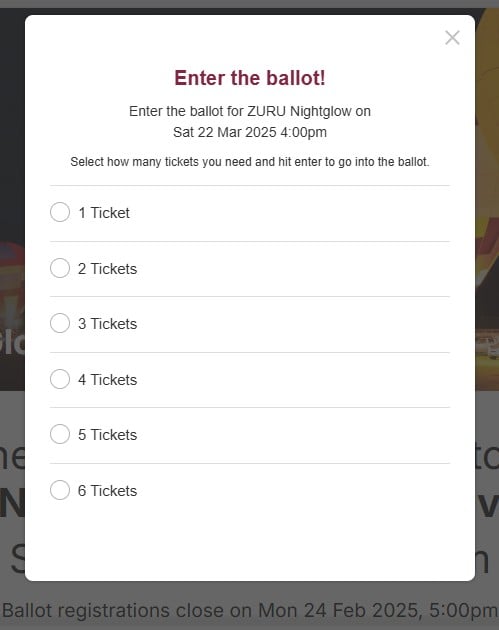
I opened a new tab went to ticketek https://premier.ticketek.co.nz/ and signed in. Went back to the tab with Geekzone thread, clicked on the link in OPs first post, after the page loaded, I clicked the Enter Balot button and was present with the below "Enter the Ballot" Dialogue popup. 


Jase2985
13735 posts

Uber Geek
+1 received by user: 6217

ID Verified
Lifetime subscriber

  #3340010 6-Feb-2025 20:38
Send private message

It didnt work for me but I had to disable my PiHoles (Ad Blockers) and it worked fine


eraser2

11 posts

Geek
+1 received by user: 1


  #3340014 6-Feb-2025 21:05
Send private message

Yes !! Thanks !! PiHole was blocking something !!!


Disabling PiHole worked for me now ! I tried without adblocker on browser but completely forgot about pihole :p


Filter this topic showing only the reply marked as answer Create new topic


Geekzone Live »

Try automatic live updates from Geekzone directly in your browser, without refreshing the page, with Geekzone Live now.


Are you subscribed to our RSS feed? You can download the latest headlines and summaries from our stories directly to your computer or smartphone by using a feed reader.