Geekzone: technology news, blogs, forums
Guest
Welcome Guest.
You haven't logged in yet. If you don't have an account you can register now.


majun

11 posts

Geek


#97614 17-Feb-2012 23:10
Send private message

Dear all,

My download works perfectly fine, but for some strange reason, my uploading doesn't work at all (I think).
Now I don't exactly understand what constitute as 'uploading', maybe the fact that I can post on these forums already means I'm uploading.

But the main troubles I'm running into are things such as: attaching things on gmail, uploading files to websites such as 2shared.com, uploading pictures to sites such as imageshack, etc.

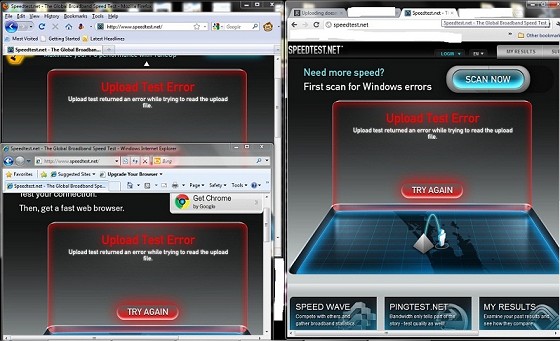
When I go to https://www.speedtest.net/, the downloading part works, but when it gets to upload, I just get an error.

I've tried restarting the router (several times too); there are other computers on our network, and their uploads DO work, so it's something on my computer. I've tried going to Network and Sharing Centre and disabling and re-enabling the driver. But nothing works.

Also, I'm with Telecom, I'm living in Flat Bush where the only internets available are either a trial fibre optics (free to use until further notice) or dialup, so I don't really have choices there.

Would anyone know anything about this? Or know how to fix it?
Hopefully I don't have to buy another network driver/card thing |:

Thanks in advance 

View this topic in a long page with up to 500 replies per page Create new topic
 1 | 2
cws82us
788 posts

Ultimate Geek
+1 received by user: 23


  #583051 18-Feb-2012 04:03
Send private message

how big is the file? Plus without upload u cannot go on websites. And do nothing.


join Quic and get free sign up when you click my link https://account.quic.nz/refer/250676


gzt

gzt
18679 posts

Uber Geek
+1 received by user: 7809

Lifetime subscriber

  #583057 18-Feb-2012 07:19
Send private message

Which browser are you using? does the same thing happen with a different browser? try chrome.

It should not make a difference but do you have any internet security type things installed?

Free fibre connection??? really? I'm miles away from Flat Bush but tell me more about that!

sbiddle
30853 posts

Uber Geek
+1 received by user: 9996

Retired Mod
Trusted
Biddle Corp
Lifetime subscriber

  #583068 18-Feb-2012 08:35
Send private message

It your modem wasn't able to send any data you wouldn't receive any as TCP is a two way protocol.

First step would be to try a different browser.


xpd

xpd
Geek of Coastguard
14115 posts

Uber Geek
+1 received by user: 4574

Retired Mod
ID Verified
Trusted
Lifetime subscriber

  #583074 18-Feb-2012 08:45
Send private message

And check any firewall programs you have installed, might have something being limited.


XPD / Gavin


LinkTree


majun

11 posts

Geek


  #583666 20-Feb-2012 03:58
Send private message

Thanks to all the replies,


I managed to upload this image onto geekzone, right after I did speedtest.net tests on different browsers.

I'm a chrome user, but I've tried the different browsers and nothing's changed, as for firewall, I've always had my windows firewall turned off because I found it annoying, I've been very careful though. And recently I've turned it back on since I thought it might be related to the uploading problem. But besides that, I don't have any other firewalls (that I know of)

cws82us: how big is the file?

The files I try to upload to 2shared.com are about 3-4mb in size, about the size of a song in mp3 format.
I guess I don't even really know what my problem is? Since I've just uploaded a picture, but ironically it's a picture that depicts how there's an error with my uploading ><

gzt: Free fibre connection??? really? I'm miles away from Flat Bush but tell me more about that!

I moved to Flat Bush about a year ago, our house had just been built, so this area is still really new. Like before houses were built, it was just farmland. I think the government or something/one wants fibre optics in this new area, but their technology wasn't quite stable yet? Or so I was told. So they're telling us it's still in trial, and everything is free. We just paid a one-time fee to have it set up (though not sure about the future), and I've had free internet for a year now, it's not as fast as what fibre optics sound to be though, but I've had no problems with it. 

Anyway, any other ideas?

Thanks again, and thanks in advance

majun

11 posts

Geek


  #584158 20-Feb-2012 20:34
Send private message

Sorry for double posting, but I found something else today,

Once I've clicked upload,

For pictures (44kb was the one I used) the loading bar went to 100%, but then it stopped there, and after a while it failed to upload,

For music files (2.5mb was the one I used) the loading bar went to 3%, stopped, and failed. Another time, it went to 14%, stopped and failed.

With the picture I tried several times but every time it failed after 100%. 

Thanks in advance 


Shop now for Lenovo laptops and other devices (affiliate link).
hamish225
1430 posts

Uber Geek
+1 received by user: 215

ID Verified

  #584265 20-Feb-2012 23:26
Send private message

try on a different computer/cellphone/whatever other device you have connected that has internet access.


*Insert big spe*dtest result here*


majun

11 posts

Geek


  #584506 21-Feb-2012 13:13
Send private message

Thanks for the reply,

I've mentioned in my original post that I have tried uploading on other computers on our network, and that there is no problems with their uploads.

Thanks 

gzt

gzt
18679 posts

Uber Geek
+1 received by user: 7809

Lifetime subscriber

  #584607 21-Feb-2012 15:22
Send private message

How about an upload/attach to gmail?

Also try some of the other speedtest services.

Not a solution, but it gives more knowledge about the problem..


majun

11 posts

Geek


  #584696 21-Feb-2012 17:39
Send private message

Uploading an attachment to Gmail works, but it isn't hassle free. Most of the time it ends up failing to attach ( files are under 50kb) and the one time when it works, I get 20 minutes of "Still working...." because I click send again, check back maybe 10 minutes later and I'm still not sure if it's been sent right, until I go to "Sent Mail" to confirm that it's actually been sent.

I've just tested my internet speed with other sites,

Vodafone - I get the same thing, download is fine at 15Mbps, but upload takes a long time to prepare, until finally I get an 'upload error' and provides a choice to see the "documentation" which shows this:

Upload test returned an error while trying to read the upload file.This is one of the most commonly seen errors with a newly setup server. It means that there was an issue trying to send data to the chosen upload script on the server. If you receive the error right at the start of the upload test the issue is likely one of the following:
  • The scripting language (PHP, ASP.NET, ASP or JSP) is not properly setup or the wrong one was chosen (learn more here).
  • The upload testing script is on a different host than the Speedtest® - try copying crossdomain.xml to the web root of the testing server to resolve this
If the upload test starts but then fails with this error then the problem is usually related to a maximum HTTP POST size getting hit. Here are tips to resolving it on some platforms:
Apache with PHP (DO NOT use mod_security)Open apache2.conf or httpd.confSearch for LimitRequestBody and remove that line if it existsOpen php.conf or php.iniSearch for post_max_size and increase it to 10MRestart Apache (usually /etc/init.d/httpd restart)IIS6 using ASPOpen IIS ManagerRight-click on the server name at the top of the tree and choose PropertiesCheck the first box for Enable Direct Metabase Edit and click the OK buttonOpen C:\Windows\System32\Inetsrv\metabase.xml with Notepad (NOT Wordpad)Find AspMaxRequestEntityAllowed and change it to 1073741824Find AspEnableChunkedEncoding and set it to False"

 
Telecom speed test isn't even showing up, http://www.telecom.co.nz/internet/broadband/yourbroadband/testyourspeed not sure if it's my problem or theirs. I wanted to use a few different sites but they end up using ones I've already tested.

Thanks again, please continue to help T_T 

Behodar
11094 posts

Uber Geek
+1 received by user: 6071

Trusted
Lifetime subscriber

  #584706 21-Feb-2012 17:54
Send private message

majun: Telecom speed test isn't even showing up, http://www.telecom.co.nz/internet/broadband/yourbroadband/testyourspeed not sure if it's my problem or theirs. I wanted to use a few different sites but they end up using ones I've already tested.

That's just returning a blue page with a Telecom logo for me. You could try TelstraClear: http://auckland.speedtest.telstraclear.co.nz


Move to New Zealand's best fibre broadband service (affiliate link). Free setup code: R587125ERQ6VE. Note that to use Quic Broadband you must be comfortable with configuring your own router.

gzt

gzt
18679 posts

Uber Geek
+1 received by user: 7809

Lifetime subscriber

  #584857 21-Feb-2012 22:21
Send private message

Could be some kind of DNS related problem, maybe.

If you have rights on your machine:

1) restart it
2) run admin cmd, then ipconfig /flushdns
3) start the browser with just one tab and try the google upload

Is it a corporate network? One option is to ask your IT dept to give it the standard image restore to eliminate anything local. If it is not local, then time to look at the network.

hamish225
1430 posts

Uber Geek
+1 received by user: 215

ID Verified

  #584907 22-Feb-2012 01:18
Send private message

majun: Thanks for the reply,

I've mentioned in my original post that I have tried uploading on other computers on our network, and that there is no problems with their uploads.

Thanks 


If you're using windows 7 you could go into Internet connection diagnostics and it will do things like resetting your network connection etc, that usually works for me if something's wrong with my computer.

But otherwise if you're using windows XP go into network connections and right click on the connection you're using and click repair and it does the same thing I think. 


*Insert big spe*dtest result here*


freitasm
BDFL - Memuneh
80646 posts

Uber Geek
+1 received by user: 41030

Administrator
ID Verified
Trusted
Geekzone
Lifetime subscriber

  #584933 22-Feb-2012 07:57
Send private message

You say this happen on one PC only. What antivirus are you running on that computer? Is is the same you are running in others? Have you tried disabling the AV during the speedtest? When was the last full scan?


Referral links: Quic Broadband (free setup code: R587125ERQ6VE) | Samsung | AliExpress | Wise | Sharesies 


Support Geekzone by subscribing (browse ads-free), or making a one-off or recurring donation through PressPatron.


majun

11 posts

Geek


  #585103 22-Feb-2012 12:03
Send private message

Thanks for all the replies,

Behodar: You could try TelstraClear: http://auckland.speedtest.telstraclear.co.nz

I've just tried that, same problem, no upload. It looks quite similiar to the Vodafone one too haha. Thanks


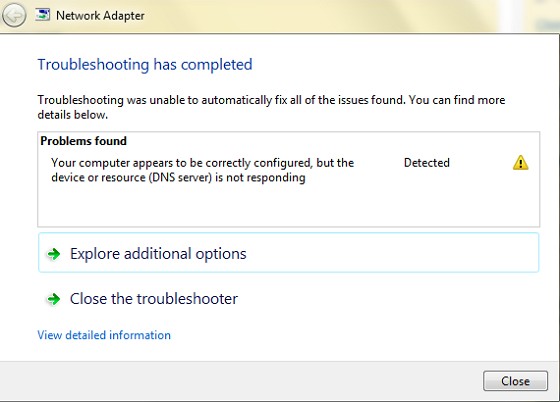
hamish225: If you're using windows 7 you could go into Internet connection diagnostics and it will do things like resetting your network connection etc, that usually works for me if something's wrong with my computer.  

I'm not entirely sure if I did it right, but it came up with this:

If this isn't what 'internet connection diagnotics' could you maybe give me a step-by-step? Thanks


gzt: Could be some kind of DNS related problem, maybe.

I think you're right. I've done the ipconfig /flushdns exactly as you've listed but upload still isn't working. I've always knew about this and use it sometimes when it seems that websites are slow to respond, although I never really knew what it did, or what DNS is haha. And I'm on a home network. Thanks


freitasm: You say this happen on one PC only. What antivirus are you running on that computer? Is is the same you are running in others? Have you tried disabling the AV during the speedtest? When was the last full scan? 
 
I'm running ESET  NOD32, and its the same with the other 3 computers on the network. I've just tried running the upload test after disabling it, but it didn't work. I'm currently running a full scan and I'll try again after that, but the last full scan would've been a very long time ago haha. Thanks


So I think it's mostly to do with "Your computer appears to be correctly configured, but the device or resource (DNS server) is not responding" seems to be most relevant? And cmd>ipconfig /flushdns doesn't seem to solve the upload problem... How else would one solve DNS issues??

Thanks for the responses

 1 | 2
View this topic in a long page with up to 500 replies per page Create new topic


Geekzone Live »

Try automatic live updates from Geekzone directly in your browser, without refreshing the page, with Geekzone Live now.


Are you subscribed to our RSS feed? You can download the latest headlines and summaries from our stories directly to your computer or smartphone by using a feed reader.