Geekzone: technology news, blogs, forums
Guest
Welcome Guest.
You haven't logged in yet. If you don't have an account you can register now.


View this topic in a long page with up to 500 replies per page Create new topic
1 | ... | 139 | 140 | 141 | 142 | 143 | 144 | 145 | 146 | 147 | 148 | 149 | ... | 285
smac
338 posts

Ultimate Geek
+1 received by user: 40


  #885729 28-Aug-2013 09:54
Send private message

smac:
smac: Interesting situation going on here. Yesterday just after 12pm VDSL got switched on here. Synced with 7dB attenuation and no added latency, so I take this to mean DLM1.

Because it's kinda mesmerizing I watched the stats off and on during the afternoon, and noted that the CRC rate climbed gradually throughout the afternoon, until by dinner time it was up to 10 per minute.

Around dinner time I did what I'd been meaning to do for a while: rewired the cable from the master filter from connecting to a socket in the wallplate, to an RJ45 plug and whacked it straight into the back of the modem.

From that point on it synced at more or less the same numbers but the errors started climbing even faster. Just got home now from a day away, and CRC count is at 42 per minute. No resync though.


So, questions: is it worth me doing a reset and bumping the SNRM across a notch to stable, or should I wait and see if I get bumped down to DLM2 first?

Second question: if I messed up the polarity of the cable when I crimped on the plug, could that contribute to the error situation? I tried looking online for info, and just found conflicting info and a bunch of flame wars.

For me latency and jitter is way more important than throughput, as the most 'connection dependant' thing I do is video conference. I'd take half the throughput if it meant retaining zero added latency.

Cheers


Looks to me like they have more control than just DLM.

After the post quoted above I got got a resync and bumped to DLM2. Errors were better, but still high enough that I think I would get bumped again (800+ an hour).

At 9am this morning there was a resync, but no DLM change, and errors have flat lined (single figures).

So they can shape the connection in other ways?

Any thoughts on what I could do to try and claw myself back to DLM1?


OK after a few days of weird stuff (errors suddenly increasing, maybe jumping 2 DLM levels) I decided I'd have a crack at tweaking the stability settings to see if I can get it to settle down before I get bumped further down.

The Line Settings screen lets me move the Intended SNR to the left, but this seems to have zero effect on sync speed, and SNR still reports at 12. Does that sound right? I tried all the way to the left, and just one step; no real change.

Also, the box will not save a change to INP. I change it, reboot, and it's back the right again. Anyone else seen this?

All this is done using the instructions on the first page - changes made while disconnected, reboot, then power off for a while (15 mins as per someone's comment that this will not be seen as a spontaneous resync by DLM)


6297a1679f9
371 posts

Ultimate Geek
+1 received by user: 29
Inactive user


  #885851 28-Aug-2013 13:26

Alrighty times to get some tweaking done, before that I would like to confirm what I'm doing is right.
I'm going to use the same method as noted on the first post.

Basicly im gonna replace

OEM=avme
Country=064
Language=en

with

Country=99
NoChecks=yes
Language=en


then making a change on line 735

DownstreamMarginOffset = 60;


does that all sound right? If it does then I'll go restore the settings and check my results.

stevehodge
393 posts

Ultimate Geek
+1 received by user: 52


  #885878 28-Aug-2013 14:04
Send private message

mikenzb: Alrighty times to get some tweaking done, before that I would like to confirm what I'm doing is right.
I'm going to use the same method as noted on the first post.

Basicly im gonna replace

OEM=avme
Country=064
Language=en

with

Country=99
NoChecks=yes
Language=en


Just add the NoChecks line. You don't need to change the other settings (and you probably shouldn't). So ...

...
OEM=avme
Country=064
NoChecks=yes
Language=en
...


then making a change on line 735

DownstreamMarginOffset = 60;


does that all sound right? If it does then I'll go restore the settings and check my results.

Are you trying to increase the SNRM or decrease it? "DownstreamMarginOffset = 60" will give you a target SNRM of 18db and cost you about 5 Mbps of downstream speed. If you are trying to get higher syncs you should use a negative number:
DownstreamMarginOffset = -60;


6297a1679f9
371 posts

Ultimate Geek
+1 received by user: 29
Inactive user


  #885898 28-Aug-2013 14:30

Alright thanks for that, looks like i'm set I'll give it a go and see how it turns out.

6297a1679f9
371 posts

Ultimate Geek
+1 received by user: 29
Inactive user


  #885915 28-Aug-2013 14:55

and Im back, Im not sure what happened here but it looked like my SNR didn't change, I restored the settings I got a settings has been restored Fritz Box will be rebooted, It rebooted then I powered it off and plugged the line back in and rebooted after 5 mins and then I'm here.

basicly

OEM=avme
Country=064
NoChecks=yes
Language=en

and

DownstreamMarginOffset = -60;

btw: Firmware version: 99.05.51

Lorenceo
904 posts

Ultimate Geek
+1 received by user: 336

Trusted

  #885918 28-Aug-2013 15:00
Send private message

Does anyone have suggestions on how to improve these stats?

Bearers generic info DS US
Payload rate [Kbps]: 20421 3908
Attenuation [dB]: 23.6 50.1
Margins [dB]: 12.1 10.8
Output power [dBm]: 13.5 7.3

Number of bearers: 1
Bearer 0 DS US
INP [DMT symbols]: 0.00 0.00
Delay [ms]: 0.00 0.00
Depth []: 1 0.00
R: 8 0

I've previously had 21.5 down and 5.2 up sync. Snap have told me Chorus say the line is "within spec", which I interpret as they don't want to do anything to try improve it.
I'm about 850m from the exchange. Getting about 0.6CRC/min at the moment.
The cable from the road enters the demarc, is connected to about 5m of cat 5 and then goes straight to a dedicated RJ45 jack installed by a Chorus tech. I've removed the splitter as this is a naked connection. Doing this made no difference to the stats.
I've been told there is a bridge tap somewhere on my line, but haven't been successful in getting that removed.


Support Geekzone with one-off or recurring donations Donate via PressPatron.
seatil
40 posts

Geek
+1 received by user: 6


  #885920 28-Aug-2013 15:04
Send private message

mikenzb: and Im back, Im not sure what happened here but it looked like my SNR didn't change, I restored the settings I got a settings has been restored Fritz Box will be rebooted, It rebooted then I powered it off and plugged the line back in and rebooted after 5 mins and then I'm here.

basicly

OEM=avme
Country=064
NoChecks=yes
Language=en

and

DownstreamMarginOffset = -60;

btw: Firmware version: 99.05.51


That looks like newer firmware, though mine is 84.05.51.  The method described in the first post probably doesn't work with it.

Is your Fritz a 7390 or 7340?

This post describes how to achieve results with a Fritz 7390 on 84.05.51: http://www.geekzone.co.nz/forums.asp?forumid=90&topicid=105744&page_no=132#869388  If you have a 7340 and it works for that, let me know and I'll update the post.


Software Engineer: Java, C++, SS7 and IP networking


6297a1679f9
371 posts

Ultimate Geek
+1 received by user: 29
Inactive user


  #885921 28-Aug-2013 15:07

seatil:
mikenzb: and Im back, Im not sure what happened here but it looked like my SNR didn't change, I restored the settings I got a settings has been restored Fritz Box will be rebooted, It rebooted then I powered it off and plugged the line back in and rebooted after 5 mins and then I'm here.

basicly

OEM=avme
Country=064
NoChecks=yes
Language=en

and

DownstreamMarginOffset = -60;

btw: Firmware version: 99.05.51


That's the newer firmware.  The method described in the first post doesn't work with it.

You probably want this one: http://www.geekzone.co.nz/forums.asp?forumid=90&topicid=105744&page_no=132#869388


That post lost me at step 4 "Telnet to the Fritz box and log in."

Also did not see a warning saying the newer firmware didn't work with that tweak.

Oh sorry forgot to add yes its a 7340

seatil
40 posts

Geek
+1 received by user: 6


  #885923 28-Aug-2013 15:11
Send private message

mikenzb:
That post lost me at step 4 "Telnet to the Fritz box and log in."


You need to run a telnet application and tell it to connect to host "fritz.box".  Exact instructions will depend on the OS you are running.

Mac:

  * Open the Terminal application (/Applications/Utilities/Terminal.app)
  * Type "telnet fritz.box" into it and hit enter.
  * Log in using your Fritz box username/password if it asks you to.

Linux/Ubuntu:

  * Open a Terminal or xterm window
  * Type "telnet fritz.box" into it and hit enter.
  * Log in using your Fritz box username/password if asked to.

Windows:

  * Maybe someone that has a Windows box can fill in the instructions for that.  It used to be open a command prompt and type telnet fritz.box, but I think MS may have done away with installing telnet by default.


Software Engineer: Java, C++, SS7 and IP networking


Inphinity
2780 posts

Uber Geek
+1 received by user: 1184


  #885927 28-Aug-2013 15:14
Send private message

seatil:
Windows:

  * Maybe someone that has a Windows box can fill in the instructions for that.  It used to be open a command prompt and type telnet fritz.box, but I think MS may have done away with installing telnet by default.


Correct, Telnet is not installed by default. if you have not installed Telnet, on Win7/8 you can use windows package manager to do so.
From an Administrative command prompt -
1) pkgmgr /iu:"TelnetClient"
2) telnet fritz.box
3) profit


6297a1679f9
371 posts

Ultimate Geek
+1 received by user: 29
Inactive user


  #885934 28-Aug-2013 15:28

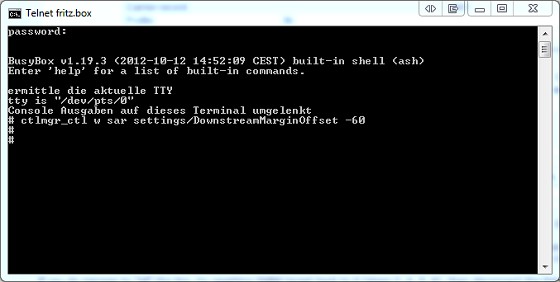
@Inphinity Thanks for that I figured that out using Google.

@seatil Looks like it doesn't want to work, Or maybe I'm doing it wrong....


Want to support Geekzone and browse the site without the ads? Subscribe to Geekzone now (monthly, annual and lifetime options).
seatil
40 posts

Geek
+1 received by user: 6


  #885936 28-Aug-2013 15:31
Send private message


@seatil Looks like it doesn't want to work, Or maybe I'm doing it wrong....


That's step 5 completed.  Success is indicated by nothing more than the little "#" symbol.  Failure would result in an error message being printed.

Now to do steps 6 and 7.


Software Engineer: Java, C++, SS7 and IP networking


6297a1679f9
371 posts

Ultimate Geek
+1 received by user: 29
Inactive user


  #885939 28-Aug-2013 15:40

I did do steps 6 & 7 how do you think I'm posting this reply.... When I got the # symbol I hit enter again just to make sure thats why there's 2 # symbols.


seatil
40 posts

Geek
+1 received by user: 6


  #885943 28-Aug-2013 15:50
Send private message

mikenzb: I did do steps 6 & 7 how do you think I'm posting this reply.... When I got the # symbol I hit enter again just to make sure thats why there's 2 # symbols.


OK, but you didn't say that.  You could have quite easily been posting from your phone or an alternate Internet connection.

I assume, then, that the downstream SNR margin is still being reported as 12dB on the modem stats page?  If that's the case, then it may be that this method doesn't work on the 7340.

Before you give up though, you could try rebooting the Fritz box to see if it requires a reboot to pick up the configuration change.  That's grasping at straws though -- a reboot wasn't needed for my 7390.


Software Engineer: Java, C++, SS7 and IP networking


seatil
40 posts

Geek
+1 received by user: 6


  #885946 28-Aug-2013 15:52
Send private message

One other thing that I remember -- I applied my changes to a clean Fritz box - i.e. one that had had all the front page stuff reverted. I have no idea if that would make any difference.


Software Engineer: Java, C++, SS7 and IP networking


1 | ... | 139 | 140 | 141 | 142 | 143 | 144 | 145 | 146 | 147 | 148 | 149 | ... | 285
View this topic in a long page with up to 500 replies per page Create new topic


Geekzone Live »

Try automatic live updates from Geekzone directly in your browser, without refreshing the page, with Geekzone Live now.


Are you subscribed to our RSS feed? You can download the latest headlines and summaries from our stories directly to your computer or smartphone by using a feed reader.