Geekzone: technology news, blogs, forums
Guest
Welcome Guest.
You haven't logged in yet. If you don't have an account you can register now.


View this topic in a long page with up to 500 replies per page Create new topic
1 | 2 
jennascott
3 posts

Wannabe Geek


  #3068545 27-Apr-2023 21:36
Send private message

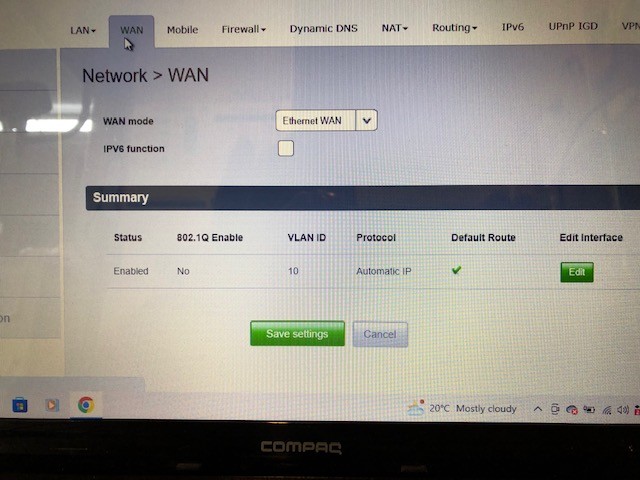
Hi there, I would love a screenshot of your smart modem settings if possible! We just received starlink and have a smart modem 2 with mesh setup and I would rather use this than spend more on another set up. I tried plugging it in via the Ethernet adaptor with the starlink router bypasses but had no luck.


Niscoupe

107 posts

Master Geek
+1 received by user: 5


  #3068555 27-Apr-2023 22:19
Send private message

jennascott: Hi there, I would love a screenshot of your smart modem settings if possible! We just received starlink and have a smart modem 2 with mesh setup and I would rather use this than spend more on another set up. I tried plugging it in via the Ethernet adaptor with the starlink router bypasses but had no luck.


I will do that tomorrow for you when I get back to work...


jennascott
3 posts

Wannabe Geek


  #3068556 27-Apr-2023 22:24
Send private message

Niscoupe:

jennascott: Hi there, I would love a screenshot of your smart modem settings if possible! We just received starlink and have a smart modem 2 with mesh setup and I would rather use this than spend more on another set up. I tried plugging it in via the Ethernet adaptor with the starlink router bypasses but had no luck.


I will do that tomorrow for you when I get back to work...


That would be awesome thanks so much!


Niscoupe

107 posts

Master Geek
+1 received by user: 5


  #3068749 28-Apr-2023 10:52
Send private message

img]https://cdn.geekzone.co.nz/imagessubs/97e87d4ae536f13dfb686e373e432640.jpg[/img]

Hope this helps. If you need anything else let me know..

https://cdn.geekzone.co.nz/imagessubs/97e87d4ae536f13dfb686e373e432640.jpg

Niscoupe

107 posts

Master Geek
+1 received by user: 5


  #3069067 28-Apr-2023 23:30
Send private message


michaelmurfy
meow
13580 posts

Uber Geek
+1 received by user: 10911

Moderator
ID Verified
Trusted
Lifetime subscriber

  #3069068 28-Apr-2023 23:32
Send private message

Give IPv6 a tick once you've popped your Starlink router into passthrough / bridge mode. Starlink supports IPv6 and can make some things a bit better.


Michael Murphy | https://murfy.nz
Referral Links: Quic Broadband (use R122101E7CV7Q for free setup)

Are you happy with what you get from Geekzone? Please consider supporting us by subscribing.
Opinions are my own and not the views of my employer.


Shop now for Lenovo laptops and other devices (affiliate link).
jennascott
3 posts

Wannabe Geek


  #3069224 29-Apr-2023 15:53
Send private message

Niscoupe:


Perfect thank you so much it seems to be working well! My laptop wouldn't connect after changing these settings but when I ticked the IPV6 function box it connected fine. 


Thanks again! 


1 | 2 
View this topic in a long page with up to 500 replies per page Create new topic


Geekzone Live »

Try automatic live updates from Geekzone directly in your browser, without refreshing the page, with Geekzone Live now.


Are you subscribed to our RSS feed? You can download the latest headlines and summaries from our stories directly to your computer or smartphone by using a feed reader.