Geekzone: technology news, blogs, forums
Guest
Welcome Guest.
You haven't logged in yet. If you don't have an account you can register now.


View this topic in a long page with up to 500 replies per page Create new topic
1 | 2 | 3
sidefx
3775 posts

Uber Geek
+1 received by user: 1295

Trusted

  #1022913 10-Apr-2014 14:52
Send private message

timmmay: I've used duct tape...


I prefer double sided foam tape (no really)  ;-)


"I was born not knowing and have had only a little time to change that here and there."         | Octopus Energy | Sharesies
              - Richard Feynman


freitasm

BDFL - Memuneh
80657 posts

Uber Geek
+1 received by user: 41065

Administrator
ID Verified
Trusted
Geekzone
Lifetime subscriber

  #1022915 10-Apr-2014 14:55
Send private message

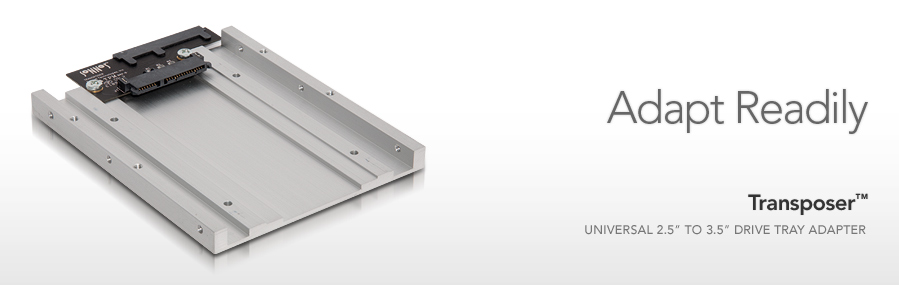
I need it to fit in a cradle to use with a NAS or my HP Microserver. Looking at those now it seems they position the drive in the center/middle so the connectors are not really in the same position as a native 3.5 drive. It's fine for desktop where using a flexible cable, but I suspect not really for a backplane...

Tape wouldn't work well in these cases either... I used it before on my desktop but not for this use.


Referral links: Quic Broadband (free setup code: R587125ERQ6VE) | Samsung | AliExpress | Wise | Sharesies 


Support Geekzone by subscribing (browse ads-free), or making a one-off or recurring donation through PressPatron.



Dynamic
4016 posts

Uber Geek
+1 received by user: 1852

ID Verified
Trusted
Lifetime subscriber

  #1022948 10-Apr-2014 15:25
Send private message

I assumed that the 2.5" to 3.5" mounting plate that my first Intel SSD came with would put the SSD in the right place to fit into a 3.5 hotplug drive bay.  I was a bit brassed off that it didn't.  It struck me as ridiculously logical and easy.

I ended up modifying the plate adapter (drilled new holes, hit it with a hammer a couple of times to iron out a wave in the plate).  It didn't look pretty, but once slotted into the server you couldn't see the panelbeating.  You could get just as creative with a bit of plywood or a dead 3.5" hard drive and some tools including a hacksaw.


“Don't believe anything you read on the net. Except this. Well, including this, I suppose.” Douglas Adams


andrewNZ
2487 posts

Uber Geek
+1 received by user: 1461
Inactive user


  #1022961 10-Apr-2014 16:05
Send private message

freitasm: I need it to fit in a cradle to use with a NAS or my HP Microserver. Looking at those now it seems they position the drive in the center/middle so the connectors are not really in the same position as a native 3.5 drive. It's fine for desktop where using a flexible cable, but I suspect not really for a backplane...

Tape wouldn't work well in these cases either... I used it before on my desktop but not for this use.


Get one of the offset tray ones. The one my Transcend SSD came with looks to offset it to the correct spot.

freitasm

BDFL - Memuneh
80657 posts

Uber Geek
+1 received by user: 41065

Administrator
ID Verified
Trusted
Geekzone
Lifetime subscriber

  #1022965 10-Apr-2014 16:11
Send private message

Yeah, well, they didn't have any offset there. The three different ones they had were all centre/middle...


Referral links: Quic Broadband (free setup code: R587125ERQ6VE) | Samsung | AliExpress | Wise | Sharesies 


Support Geekzone by subscribing (browse ads-free), or making a one-off or recurring donation through PressPatron.


andrewk
48 posts

Geek


Shop now at Mighty Ape (affiliate link).
Coil
6614 posts

Uber Geek
+1 received by user: 2153
Inactive user


  #1023750 12-Apr-2014 01:27
Send private message

Cooler Master make them. I got a few in my PC running SSD's and Laptop HDD's
Tadar: http://www.mightyape.co.nz/product/Cooler-Master-35-to-25-SSD-Bracket/21351322 


freitasm

BDFL - Memuneh
80657 posts

Uber Geek
+1 received by user: 41065

Administrator
ID Verified
Trusted
Geekzone
Lifetime subscriber

  #1023814 12-Apr-2014 08:56
Send private message

Again, that puts it in the center/middle. Need something to use in a drive bay, with connectors in the correct position.


Referral links: Quic Broadband (free setup code: R587125ERQ6VE) | Samsung | AliExpress | Wise | Sharesies 


Support Geekzone by subscribing (browse ads-free), or making a one-off or recurring donation through PressPatron.


chevrolux
4962 posts

Uber Geek
+1 received by user: 2638
Inactive user


  #1024026 12-Apr-2014 16:12
Send private message


C'mon mate, do it yourself!


Vice, thin sheet metal (ie old PC case) and a drill and you will be sweet!

Dynamic
4016 posts

Uber Geek
+1 received by user: 1852

ID Verified
Trusted
Lifetime subscriber

  #1024203 12-Apr-2014 22:24
Send private message

Thank you VERY much TimA for that tip.

I've just ordered 5 of these (2 for a job, 3 for stock) at $10 each (including the slow boat from China) and will post a note about how I get on.


“Don't believe anything you read on the net. Except this. Well, including this, I suppose.” Douglas Adams


Shop now for Dell laptops and other devices (affiliate link).
freitasm

BDFL - Memuneh
80657 posts

Uber Geek
+1 received by user: 41065

Administrator
ID Verified
Trusted
Geekzone
Lifetime subscriber

  #1030672 24-Apr-2014 15:38
Send private message

Got one today and couldn't remember well if the HP slide brackets had four or six screws - it's only got four, which means the adapter is kind of useless:


This is the brackets that came with my Synology NAS, it makes much more sense (except I am not using the NAS):


Now waiting for Dynamic to get his units so I can try one...


Referral links: Quic Broadband (free setup code: R587125ERQ6VE) | Samsung | AliExpress | Wise | Sharesies 


Support Geekzone by subscribing (browse ads-free), or making a one-off or recurring donation through PressPatron.


insane
3324 posts

Uber Geek
+1 received by user: 1006

ID Verified
Trusted
2degrees
Subscriber

  #1030679 24-Apr-2014 15:51
Send private message

You're after this, http://www.amazon.co.uk/Sparepart-Dell-Bracket-2-5-3-5-9W8C4/sim/B00A0YTFVG/2

c
ost me $7.18 each through Dell NZ. I use them to put SSDs into Dell R510's 3.5" drive caddys.

If your SSD has tiny little screw holes like the Sansung 840 Pro's do, then you'll be steeling screws from old laptops etc.

Dynamic
4016 posts

Uber Geek
+1 received by user: 1852

ID Verified
Trusted
Lifetime subscriber

  #1037853 6-May-2014 17:28
Send private message

Dynamic: Thank you VERY much TimA for that tip.

I've just ordered 5 of these (2 for a job, 3 for stock) at $10 each (including the slow boat from China) and will post a note about how I get on.


These are brilliant.  Used one, and some on the shelf for future use.


“Don't believe anything you read on the net. Except this. Well, including this, I suppose.” Douglas Adams


freitasm

BDFL - Memuneh
80657 posts

Uber Geek
+1 received by user: 41065

Administrator
ID Verified
Trusted
Geekzone
Lifetime subscriber

  #1037854 6-May-2014 17:29
Send private message

Thank you... Mine is working just fine on my HP Microserver.


Referral links: Quic Broadband (free setup code: R587125ERQ6VE) | Samsung | AliExpress | Wise | Sharesies 


Support Geekzone by subscribing (browse ads-free), or making a one-off or recurring donation through PressPatron.


1 | 2 | 3
View this topic in a long page with up to 500 replies per page Create new topic


Geekzone Live »

Try automatic live updates from Geekzone directly in your browser, without refreshing the page, with Geekzone Live now.


Are you subscribed to our RSS feed? You can download the latest headlines and summaries from our stories directly to your computer or smartphone by using a feed reader.