|
|
|
I had been looking at this one as I think it would A; work with my mother board and B; fit easily in the case. Opinions.... ?
Tomahawk66:
Thank you Lias :-)
I clicked on the link for the GTX 1050 It looks quite long. How do I ascertain if it will actually go in the case? And do you know if that card will be compatible with my motherboard ?
Kind of need to know the make/model of the case to be 100% sure of that, most good quality cases will have the specs listed on their website, including the max supported GPU length. That being said, unless it's a particularly small case you are unlikely to have issues fitting any of those cards in. Because the 1050's are made by a variety of manufacturers for a variety of uses, they will vary in size/shape/design, for example the Asus PH-GTX1050-2G is quite compact at 192x111x37 mm in dimension, whilst the Galax/KFA2 is a bit heftier at 245x126x39mm. You should be able to find all the info on the respective manufacturers websites.
I'm a geek, a gamer, a dad, a Quic user, and an IT Professional. I have a full rack home lab, size 15 feet, an epic beard and Asperger's. I'm a bit of a Cypherpunk, who believes information wants to be free and the Net interprets censorship as damage and routes around it. If you use my Quic signup you can also use the code R570394EKGIZ8 for free setup. Opinions are my own and not the views of my employer.
toejam316:
Tomahawk66:
toejam316:
A GTX 1050 will work fine, I wouldn't worry about that website. Just make sure you get one that physically fits in the space within the case.
That's what I am unsure of..... it's only a mid tower case and I've never done this before.....
Find out the type of case, do some googlin' to find the max GPU dimensions.
Find a GTX 1050 model you like the look of, rinse and repeat.
Failing that, pop in to a PC shop and tell them what you need, they'll charge you a bit for labour and cost the card higher, but they'll make it work without a problem.
I've already looked on line at the computer shops here in Dn and none of them even stock any suitable for me graphics cards...... as I was going to do that.
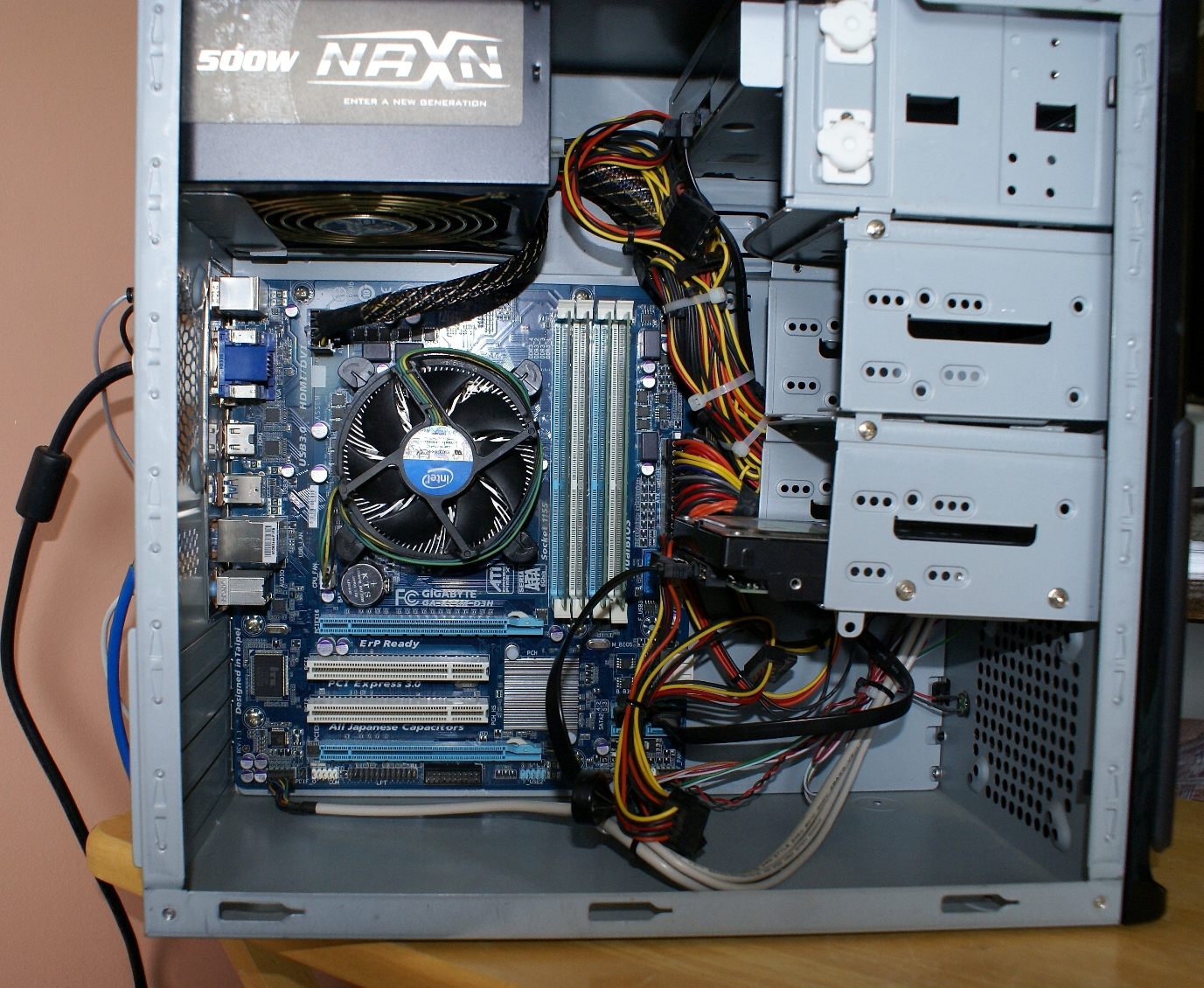
This is what I brought and the case it is in if it helps: If I had realised the graphics were no good I would have waited for something better to come up. But I totally panicked when my Win 7 SFF died.
https://www.trademe.co.nz/Browse/Listing.aspx?id=1844168778
PM me your budget and I'll look through the stack of graphics cards I have that don't need external power.
Break out the tape measure, and measure from the back of the case to the front of the case where you want the GPU to sit.
Find out how big the GPUs are, and there's your options. The Gigabyte does a Low Profile 1050 that's 167mm long.
Join Quic Broadband with my referral - no sign up fee and gives me account credit
Anything I say is the ramblings of an ill informed, opinionated so-and-so, and not representative of any of my past, present or future employers, and is also probably best disregarded.
I use this entry level gtx1050 in my media-center (it does X265 4k 60p in hardware). Its short and does not need an external power connection. Fantastic little card, the kids sometimes do LAN parties and one of their friends will use the media-center machine for gaming and it works nicely.
Tomahawk66:I've been on a site that helps you find compatible components for your machine and can't find the GTX 1050 on it for the motherboard I have?? http://www.pc-specs.com/mobo/GigaByte/Gigabyte_GA-B75M-D3H/1013/Compatible_GPUs
I don't think you're strictly limited to a pci-e powered card. Have you had a look inside that machine you bought? Unless its a bleh PSU, a 500w should have at least a single pci-e power cable. You'll also be able to measure the length available for a graphics card if you get a ruler to it. Just pop the side cover off, quite easy on most cases as its only two screws on the back.
Thank you everyone. The case is 36 cm long. I don't quite get "using one or two slots in terms of width".
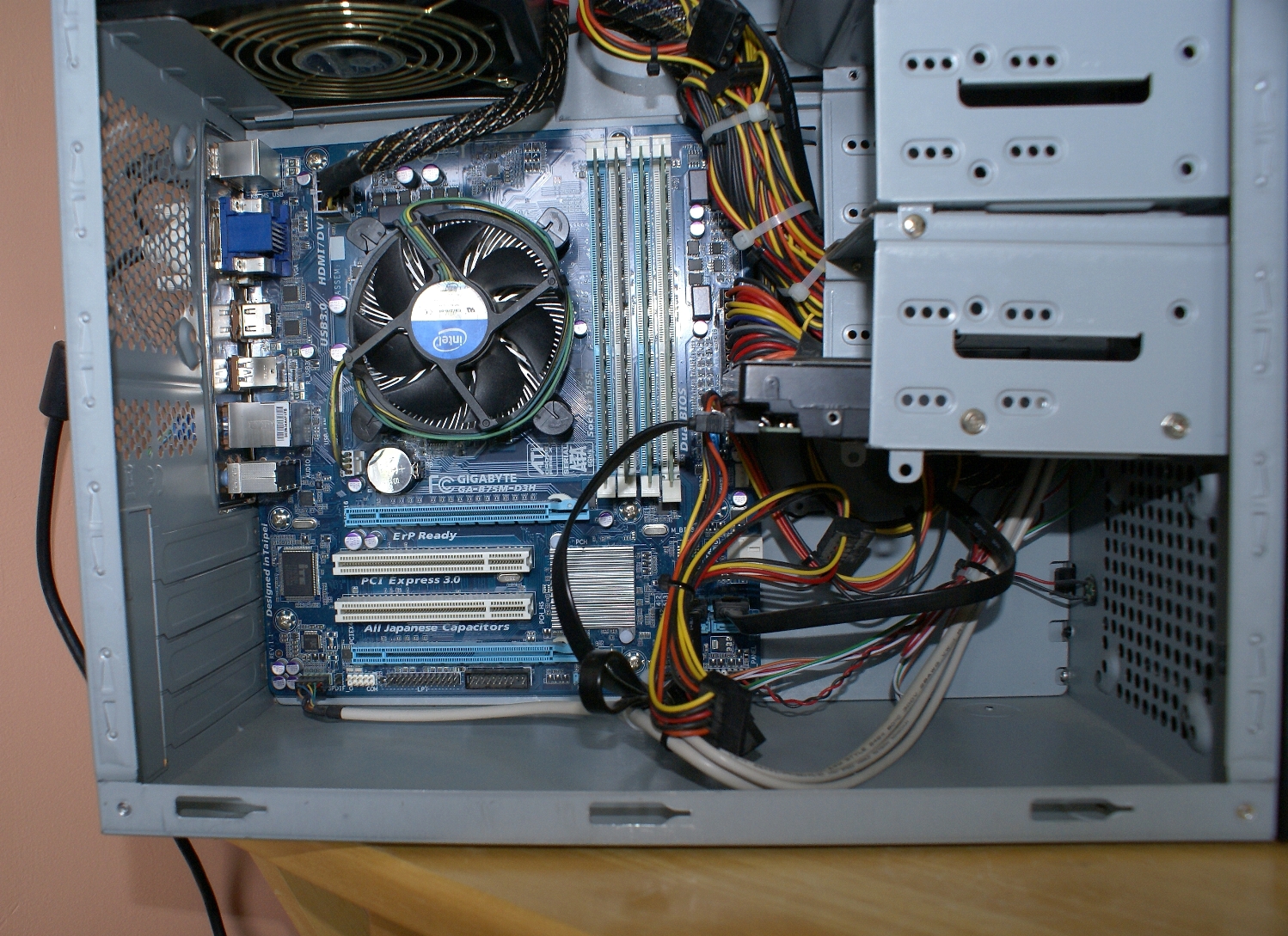
This is my machine. Am I meant to put it in the PCI EX 16 slot?


SpartanVXL: You'd want a nVidia 1050 or a AMD RX 560 equivalent. I don't think you're strictly limited to a pci-e powered card. Have you had a look inside that machine you bought? Unless its a bleh PSU, a 500w should have at least a single pci-e power cable. You'll also be able to measure the length available for a graphics card if you get a ruler to it. Just pop the side cover off, quite easy on most cases as its only two screws on the back.
Would the Radeon RX 550 Aero ITX OC be ok? I've found one of those at a reasonable price brand new.
Thanks Spartan :-)
plenty of space!
Tomahawk66:SpartanVXL: You'd want a nVidia 1050 or a AMD RX 560 equivalent. I don't think you're strictly limited to a pci-e powered card. Have you had a look inside that machine you bought? Unless its a bleh PSU, a 500w should have at least a single pci-e power cable. You'll also be able to measure the length available for a graphics card if you get a ruler to it. Just pop the side cover off, quite easy on most cases as its only two screws on the back.
Would the Radeon RX 550 Aero ITX OC be ok? I've found one of those at a reasonable price brand new.
Thanks Spartan :-)
Depends on the price. The RX 550 specwise is literally half a RX560, so if it's not too much more go with the RX560. Sad to say, but budget cards have never really been very good value for performance. Often better to step up just a bit to the low-end category. Even the RX460 is better than the 550 simply because it's in the right category (and predecessor to the RX560).
The slots people are talking about are the pci-e slots on the back of the case. From the picture your have four, if you look at the motherboard directly they are on the left of the motherboards pci-e slots. You generally only need two for the primary pci-e, plug the card into the top one (light blue, under the intel cpu cooler) and you'll be good to go.
Also your PSU should have a single (red,6+2) pci-e power cable. It looks just like the black 4+4 pin cpu cable you see plugged in near the CPU cooler, top left corner of the motherboard. It might be cable tied to the rest of the cables in the case, if you can find it and free it then you'll be able to power some better cards eg. RX570 or 580.
for some reason if somethign is going to have bugs with GPU it tends to be AMD .... so I only get Nvidia. but YMMV
Batman:for some reason if somethign is going to have bugs with GPU it tends to be AMD .... so I only get Nvidia. but YMMV
Since Adrenaline drivers for AMD cards came out, for normal operation they are quite fine. You may have a application that doesn't support using non-cuda(nvidia) but thats on the application and making sure you're getting something for your requirements.
If drivers are buggy it's usually something up with the combination of hardware in a rig. So many things could be the culprit.
noroad:
After looking at your MB, I actually have one of the kids machines with that exact MB with the above card on it. I would suggest the "ti" version might be even better though.
|
|
|