
Geekzone: technology news, blogs, forums
Guest
Welcome Guest.
You haven't logged in yet. If you don't have an account you can register now.


View this topic in a long page with up to 500 replies per page Create new topic
1 | 2 
SpartanVXL
1614 posts

Uber Geek
+1 received by user: 750


  #3477643 3-Apr-2026 15:01
Send private message

The asus manual should tell the spec of PD available, while the gan charger can provide up to 120W if doesn’t negotiate up to there than you cna be charging at a lower wattage.


You also have battery charging+laptop usage at same time if the battery is not full. You can try limit the laptop usage by disabling the dGPU and setting the cpu to low performance mode.


LurkingKiwi
48 posts

Geek
+1 received by user: 31


  #3494718 22-May-2026 14:49
Send private message

I know I'm a bit late to the party here, but anyway.


I have a Lenovo Legion Pro (16" 2560*1600, AMD 8-core CPU, RTX5060 mobile) with USB-C PD. The official rated power for PD was 100W (5A at 20V) although later specs boosted the voltage allowed up to 48V (a legal limitation) allowing 240W.


I know Lenovo offered a 140W USB charger using a proprietary extension and a captive cable; the native charger is 230W.


The system has 3 power modes: blue (cool/quiet), white and red (go-fast). It will not engage red mode unless the 230W power brick is attached.


I have a 100W GAN PD charger and it keeps ahead of the laptop doing s/w development, browsing etc in white mode. I think I've run an external monitor in white mode, but I have the system set to prefer the internal GPU (I don't game). The manual says you can charge at 20-45W with the system off (IIRC), run but not charge at 65W and run plus charge at 100W.


I have a 1M USB-C charging cable with the ID chip enabling 100W use; like most of these cables it only supports USB 2 so no use trying to connect an external HDD with it. Like another poster I also would be really leery of a 3M 100W cable, unless you really trust it. A 240W one SHOULD have fatter wires.


My work laptop is an HP Z-Book Fury, and that runs s/w development and a 4K screen off a 100W Thunderbolt dock. That does seem to have a different negotiation strategy, I don't think it likes the 100W PD charger.


For another factoid, I have an HP tablet PC which only comes with a USB-C charger. The dated implementation only uses a voltage which is not offered by the 100W GAN charger (9/12/15, don't remember which).


anandnz
9 posts

Wannabe Geek
+1 received by user: 3


  #3494721 22-May-2026 15:03
Send private message

We got a UGREEN USB-C charger from the helpful folk at PB Tech and it works great for both our laptops and was cheaper than the replacement part of the Acer.


wellygary
9189 posts

Uber Geek
+1 received by user: 5808


  #3494733 22-May-2026 15:22
Send private message

kiwifidget:


Update. With USB-C charging on while using laptop. No external visuals connected.


Quite frequently, about every 10 minutes or so, the laptop screen will go black and display a message saying "on battery" then the screen returns only to black out again seconds later and the message changes to "PD" and then the screen returns, and is ok again for 10 minutes or so.


Presumably the USB-C charging level is dropping out forcing the battery to kick in, by which time (ie within seconds) the USB-C charge level has restored.


The Gan charger is plugged into a multiboard, so will test again plugged straight into the wall.


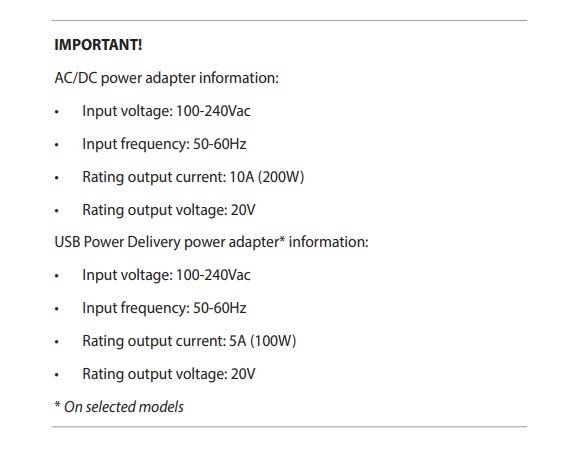
The Manual says this thing has a pretty beefy power load (its charger can deliver up to 200W)


So its likely  the USB-C charger that you have is underpowered, and this is causing the "tripping" that you are seeing, 


PD "power delivery" is about power FROM the laptop.. it should not be active when you are powering the laptop via USB-C, but given what happening it might be getting confused....


https://dlcdnta.asus.com/pub/ASUS/GamingNB/FA401UU/0409_E25280_FA401W_U_V2_A.pdf?model=FA401WU&Signature=Gv73CwODArUngowdHuVA7XjeQbsktzLWMo0-XqIjcrhzJm7O3lA2qJGSwN5WbYAzjICRHM3RIT9twR-RrMIMl2JmjKaw0kMsP0VkOf2QKohynbcPlw4ApkrI-JMPd25zXHO7YKxZEw~jha3qT80Aqldjb6HNk3BOqv8Ka7roPJKWIOejVVe~K4N28kOz4a7pWsVOUDf-flsRghnejo2UJhBYZajyEPPX0x767HnrK3gjor9C5ijnNYV8uRqJ26GTpoHgAApOsdq2rHzNcJSqWbstnQLUCCrw6XkIIErfCXjUwJdytfi4Sy86jH36WXGhRWw22TdlRQwRiq7WBuLWlw__&Expires=1779420288&Key-Pair-Id=K2ITB7O97XKKCX


LurkingKiwi
48 posts

Geek
+1 received by user: 31


  #3494912 24-May-2026 02:33
Send private message

wellygary:


PD "power delivery" is about power FROM the laptop.. it should not be active when you are powering the laptop via USB-C, but given what happening it might be getting confused....


USB-C PD works in both directions as required (if done properly, ha ha). It's probably used more often for powering laptops than for the laptop powering other things.


An external GPU, drive bay, or a smartphone with a USB-C connection could negotiate drawing power from a USB-C laptop or desktop.


1 | 2 
View this topic in a long page with up to 500 replies per page Create new topic


Geekzone Live »

Try automatic live updates from Geekzone directly in your browser, without refreshing the page, with Geekzone Live now.


Are you subscribed to our RSS feed? You can download the latest headlines and summaries from our stories directly to your computer or smartphone by using a feed reader.