Geekzone: technology news, blogs, forums
Guest
Welcome Guest.
You haven't logged in yet. If you don't have an account you can register now.


View this topic in a long page with up to 500 replies per page Create new topic
1 | 2 | 3 | 4
tomgeeknz
923 posts

Ultimate Geek
+1 received by user: 11


  #405284 16-Nov-2010 13:13
Send private message

Computer management
Start > Search for computer management

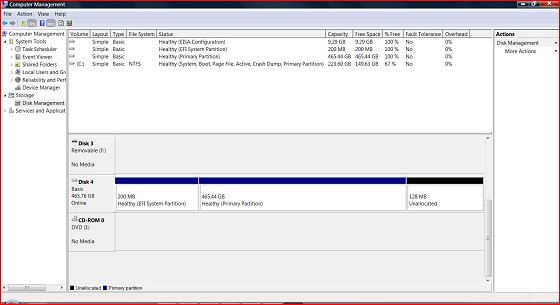
Screenshot
Start search for snipping tool
Then select new window snip and save that snip of the disk management window to your computer
then upload to geekzone using the "upload an image file " link below.


tigger

50 posts

Geek


  #405305 16-Nov-2010 13:47
Send private message

Here we go. Never heard of snipping tool till now....

Thought I was uploading it to here - has it done?

tigger

50 posts

Geek


  #405307 16-Nov-2010 13:50
Send private message

I have uploaded screen shot to my image gallery on geekzone but cannot see it on this stream? How can I get it here or is there somewhere you can see it here?


tigger

50 posts

Geek


  #405359 16-Nov-2010 15:18
Send private message

Well have looked and cannot see how to load screen shot from My Gallery on Geekzone to this thread even though done the whole upload image and ticked the box to show as slide show or similar. Tips would be appreciated thanks.

tomgeeknz
923 posts

Ultimate Geek
+1 received by user: 11


  #405364 16-Nov-2010 15:28
Send private message

Copy the URL (link) from next to the image in your galery and then in the thread click the button "compose reply"

Find the insert image button (Te little tree with a white border, then paste the link into the image URL box. Click insert then post reply.


tigger

50 posts

Geek


  #405367 16-Nov-2010 15:32
Send private message


Stream your favourite shows now on Apple TV (affiliate link).
tigger

50 posts

Geek


  #408692 24-Nov-2010 08:21
Send private message

Hi there.  I am still at square one on this and would really appreciate any help to the initial question if anyone has the time.  Working away today but will plug in the hard driive and work on any directions suggested. Cheers.

ScottStevensNZ
245 posts

Master Geek


  #408707 24-Nov-2010 08:50
Send private message

All looks normal, can you right click on it and assign a drive letter?


Load & Performance Tester/PHP/JSP/C/PERL/MYSQL/LoadRunner8->11/HTML/CSS/XML/XSLT/2B|!2B/Cervelo Soloist/EMC Equip4/ Samsung Galaxy S /Darkys 10.2 Extreme

Do androids dream of electric sheep?
use strict;
my $sheepCount;

Yes, they can.

tigger

50 posts

Geek


  #408718 24-Nov-2010 09:10
Send private message

How do I get to disk management - cannot remember?

ScottStevensNZ
245 posts

Master Geek


  #408724 24-Nov-2010 09:18
Send private message

Quick question, when you formatted the drive on the mac, did you format it to the Mac file system or Fat32?

I am doing this on XP, so if someone with win7 can chip in that would be helpful...

Right Click on "My Computer"
Select "Manage"

Manage Computer window pops up

Click "Disk Management"
Right click the dive and select "Change Drive Letter and Path"
Assign a drive letter to the disk

You might need to format it once the disk letter has been assigned


Load & Performance Tester/PHP/JSP/C/PERL/MYSQL/LoadRunner8->11/HTML/CSS/XML/XSLT/2B|!2B/Cervelo Soloist/EMC Equip4/ Samsung Galaxy S /Darkys 10.2 Extreme

Do androids dream of electric sheep?
use strict;
my $sheepCount;

Yes, they can.

freitasm
BDFL - Memuneh
80652 posts

Uber Geek
+1 received by user: 41038

Administrator
ID Verified
Trusted
Geekzone
Lifetime subscriber

  #408730 24-Nov-2010 09:26
Send private message

tigger: How do I get to disk management - cannot remember?


Control Panel | Administrative Tools | Computer Management.


Referral links: Quic Broadband (free setup code: R587125ERQ6VE) | Samsung | AliExpress | Wise | Sharesies 


Support Geekzone by subscribing (browse ads-free), or making a one-off or recurring donation through PressPatron.



Shop now for Lego sets and other gifts (affiliate link).
tigger

50 posts

Geek


  #408736 24-Nov-2010 09:34
Send private message

Thanks for that and found my way. It appears I cannot assign a disk letter as the drive only appears as Disk 4 with partitions - in the boxes section below the lines of info section at top of the screen. Left or right click on any of the boxes does not give me an option to assign a letter.


When I formatted for Mac I just followed the instructions to format and do not know what configuration.

ScottStevensNZ
245 posts

Master Geek


  #408744 24-Nov-2010 09:41
Send private message

tigger: Thanks for that and found my way. It appears I cannot assign a disk letter as the drive only appears as Disk 4 with partitions - in the boxes section below the lines of info section at top of the screen. Left or right click on any of the boxes does not give me an option to assign a letter.


When I formatted for Mac I just followed the instructions to format and do not know what configuration.


This is where I will hand over to someone like Mauricio who probably has the right version of windows infront of them because from here I would say that you would need to run fdisk on the drive - which while not complicated requires a great deal of care...


Load & Performance Tester/PHP/JSP/C/PERL/MYSQL/LoadRunner8->11/HTML/CSS/XML/XSLT/2B|!2B/Cervelo Soloist/EMC Equip4/ Samsung Galaxy S /Darkys 10.2 Extreme

Do androids dream of electric sheep?
use strict;
my $sheepCount;

Yes, they can.

tigger

50 posts

Geek


  #408747 24-Nov-2010 09:46
Send private message

Cheers, thanks for your help.

bazzer
3438 posts

Uber Geek
+1 received by user: 267

Trusted

  #408754 24-Nov-2010 09:53
Send private message

What options come up when you right-click the big partition? Are you happy to lose any data that might be on this drive at the moment?

1 | 2 | 3 | 4
View this topic in a long page with up to 500 replies per page Create new topic


Geekzone Live »

Try automatic live updates from Geekzone directly in your browser, without refreshing the page, with Geekzone Live now.


Are you subscribed to our RSS feed? You can download the latest headlines and summaries from our stories directly to your computer or smartphone by using a feed reader.