Geekzone: technology news, blogs, forums
Guest
Welcome Guest.
You haven't logged in yet. If you don't have an account you can register now.


Filter this topic showing only the reply marked as answer View this topic in a long page with up to 500 replies per page Create new topic
1 | 2 | 3 
Rikkitic

Awrrr
19065 posts

Uber Geek
+1 received by user: 16305

Lifetime subscriber

  #2407375 27-Jan-2020 10:57
Send private message

I am just going in circles on this. When I open the Graphics control panel, I see exactly what @Freitasm has posted above. But there is no way to change overscan settings. If I go to the Intel site, it tells me I have a 'custom' Acer graphics driver and installing an Intel one might cause 'technical issues' which is another rabbit hole I absolutely don't want to go down. If I got to the Acer site and look for drivers, it tells me that I have to use Windows 10 update, which I already have, and gives me no other options. I withdraw what I said earlier about my crap comment being facetious. This really is crap. 


Plesse igmore amd axxept applogies in adbance fir anu typos


freitasm
BDFL - Memuneh
80652 posts

Uber Geek
+1 received by user: 41045

Administrator
ID Verified
Trusted
Geekzone
Lifetime subscriber

  #2407378 27-Jan-2020 11:15
Send private message

If you click Advanced you don't have an option? Have you tried the scaling?


Referral links: Quic Broadband (free setup code: R587125ERQ6VE) | Samsung | AliExpress | Wise | Sharesies 


Support Geekzone by subscribing (browse ads-free), or making a one-off or recurring donation through PressPatron.


Rikkitic

Awrrr
19065 posts

Uber Geek
+1 received by user: 16305

Lifetime subscriber

  #2407428 27-Jan-2020 11:58
Send private message

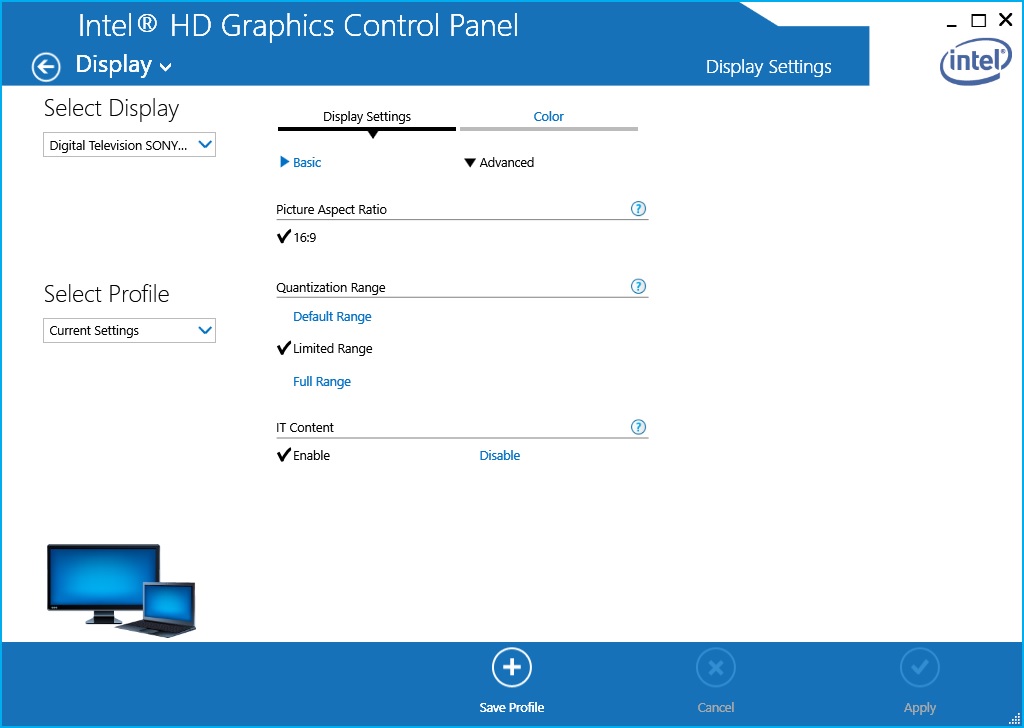
All I get is what you see below. On the Basic screen I can change the display to the TV, but I can't choose anything else with the scan. And as soon as I click on it, the display selection reverts back to the laptop.


Plesse igmore amd axxept applogies in adbance fir anu typos


freitasm
BDFL - Memuneh
80652 posts

Uber Geek
+1 received by user: 41045

Administrator
ID Verified
Trusted
Geekzone
Lifetime subscriber

  #2407432 27-Jan-2020 12:01
Send private message

That's the advanced option. What about Basic?


Referral links: Quic Broadband (free setup code: R587125ERQ6VE) | Samsung | AliExpress | Wise | Sharesies 


Support Geekzone by subscribing (browse ads-free), or making a one-off or recurring donation through PressPatron.


sqishy
530 posts

Ultimate Geek
+1 received by user: 193


  #2407433 27-Jan-2020 12:04
Send private message

Read this in an old Bravia Manual:


The 1080p timing, when applied to the HDMI input, will be treated as a video timing and not a


PC timing. This will affect the [Preferences] and [Picture & Display] settings. To view PC


content, set [Scene Select] to [Graphics], [Wide Mode] to [Full], and [Display Area] to [Full


Pixel]. ([Display Area] is configurable only when [Auto Display Area] is set to [Off].

Rikkitic

Awrrr
19065 posts

Uber Geek
+1 received by user: 16305

Lifetime subscriber

  #2407478 27-Jan-2020 12:24
Send private message

Thanks but have done all of the above and it still makes no difference. This should be a simple thing, as it has always been with every other PC/TV combination. It gets really frustrating. @Freitasm: When the control panel is set to basic, I get the Scaling choice but if the display is set to the laptop I only have the choice to maintain the current setting and I can't change anything. If I set the display to Sony TV, I can only choose the current setting which is to centre the image. No other option is available. And even then as soon as I click on anything the display setting reverts to the laptop. I am not presented with any other choices. This is the circle I keep going around in. It is really annoying.


Plesse igmore amd axxept applogies in adbance fir anu typos


Support Geekzone with one-off or recurring donations Donate via PressPatron.
richms
29099 posts

Uber Geek
+1 received by user: 10210

Trusted
Lifetime subscriber

  #2407510 27-Jan-2020 13:32
Send private message

Try pressing windows P and external screen only before opening the intel control panel and see if that lets you get more options.


Richard rich.ms

Rikkitic

Awrrr
19065 posts

Uber Geek
+1 received by user: 16305

Lifetime subscriber

  #2407523 27-Jan-2020 13:54
Send private message

richms:


Try pressing windows P and external screen only before opening the intel control panel and see if that lets you get more options.


Hallelujah! You are a genius! If you were here I would kiss you. It finally works.


When I did as you suggest, I saw more available resolutions for the first time, including 1080. I selected that and then clicked on scan setting again. Suddenly the display magically went to all the screen area. I am very glad to finally have this sorted, but why in godsname do they make it so damned difficult? Anyway, thank you again and thanks to everyone else who has contributed here.


Plesse igmore amd axxept applogies in adbance fir anu typos


Oblivian
7345 posts

Uber Geek
+1 received by user: 2117

ID Verified

  #2407532 27-Jan-2020 14:01
Send private message

It's as if I never suggested that in my first reply or something.. :(


Windows-P. show external Only = rule out any of that rubbish. And let the TV decide/tell the laptop what it is capable of.

Rikkitic

Awrrr
19065 posts

Uber Geek
+1 received by user: 16305

Lifetime subscriber

  #2407538 27-Jan-2020 14:19
Send private message

Oblivian: It's as if I never suggested it in my first reply or something..


Windows-P. show external Only = rule out any of that rubbish. And let the TV decide/tell the laptop what it is capable of.


You are right. My apologies. I saw your suggestion but did not properly consider it. I was too focused on the Intel software and the TV settings at that time. 


The Intel software seems to be seriously flawed, and that is part of what was confusing me. It lets you change the external device, which in this case is the Sony, but it doesn't change from the the default laptop settings.  


Plesse igmore amd axxept applogies in adbance fir anu typos


freitasm
BDFL - Memuneh
80652 posts

Uber Geek
+1 received by user: 41045

Administrator
ID Verified
Trusted
Geekzone
Lifetime subscriber

  #2407539 27-Jan-2020 14:26
Send private message

Serious question... When using the external device did you select Extend or Duplicate?

Duplicate will limit the second monitor to the specs of the primary monitor (or the lowest of the monitors)...


Referral links: Quic Broadband (free setup code: R587125ERQ6VE) | Samsung | AliExpress | Wise | Sharesies 


Support Geekzone by subscribing (browse ads-free), or making a one-off or recurring donation through PressPatron.


Shop now for Dell laptops and other devices (affiliate link).
Rikkitic

Awrrr
19065 posts

Uber Geek
+1 received by user: 16305

Lifetime subscriber

  #2407543 27-Jan-2020 14:38
Send private message

When I was trying to figure this out, I tried everything, including duplicate, though I did realise that was just copying the laptop screen. But I tried every possibility with every setting there was. But even though the Intel software lets you choose the device and change the settings for that, you can only choose from the settings for the default device, which is the laptop. So even though it says Sony TV, the settings are still the laptop ones unless the device is set to external only before running the Intel control panel, as @oblivian and @richms pointed out. This is very confusing and I am easily confused. I think it is a fault of Intel. 


Plesse igmore amd axxept applogies in adbance fir anu typos


Rikkitic

Awrrr
19065 posts

Uber Geek
+1 received by user: 16305

Lifetime subscriber

  #2407550 27-Jan-2020 14:47
Send private message

I feel a need to add a further note of appreciation, because I really do appreciate all the help I get here from other Geekzoners. This is what Geekzone is all about and I also try to pass it on wherever I can. Unfortunately, as I grow older and the technology develops, I find myself less and less able to contribute on technical matters but I still try to help out where I feel I can. In any case, there are a lot of very knowledgeable people here.


Plesse igmore amd axxept applogies in adbance fir anu typos


1 | 2 | 3 
Filter this topic showing only the reply marked as answer View this topic in a long page with up to 500 replies per page Create new topic


Geekzone Live »

Try automatic live updates from Geekzone directly in your browser, without refreshing the page, with Geekzone Live now.


Are you subscribed to our RSS feed? You can download the latest headlines and summaries from our stories directly to your computer or smartphone by using a feed reader.